

Aigentik
Aigentik is made and published by Think Code Release Ltd. AppBrain is an independent app data site and isn't affiliated with Think Code Release Ltd. The app name, icon, screenshots and description belong to Think Code Release Ltd and are shown as published on the App Store.
AppBrain's verdict
- Last updated
- July 27, 2026
- Size
- 49.9 MB
User feedback
Ratings and reviews on the App StoreComments on Aigentik for iOS
We don't have enough comments to show example comments. Please check back later.
Store listing
By Think Code Release Ltd, from the App Store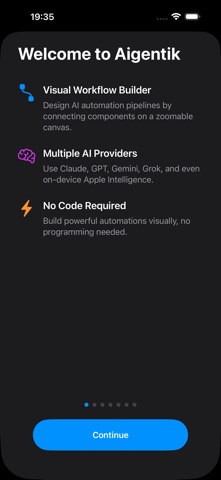
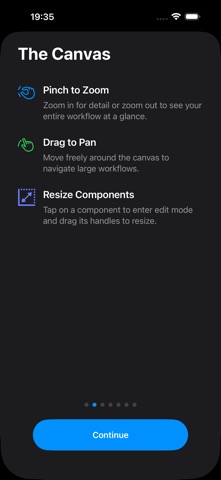
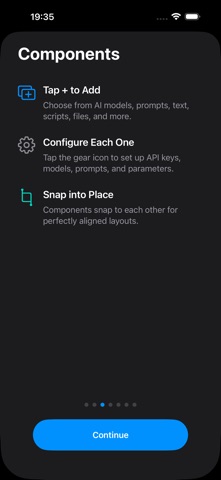


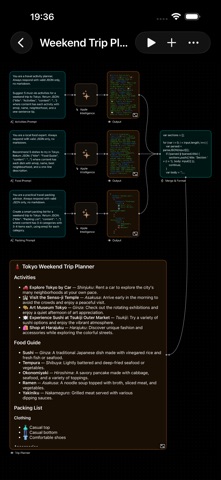
Description by Think Code Release Ltd Written by the developer, not by AppBrain. Click to read.
DISCOVER READY-MADE WORKFLOWS
Not sure where to start? Browse the built-in Discover gallery of curated workflows, search by name or description, and install any of them in one tap. Every installed workflow lands on your canvas fully editable — run it as-is, or rearrange and extend it to make it your own.
RUN FROM SHORTCUTS & SIRI (iPhone & iPad)
Every canvas becomes an action in the Shortcuts app. Pass in text, photos, and files; get text and images back to chain into other actions. Trigger workflows with automations — time of day, arriving somewhere, an NFC tag, the Action Button — and run any workflow by name with Siri.
YOUR WORKFLOW LIBRARY
The gallery shows all your canvases with live thumbnails. Name, duplicate, and organize workflows; import and export them as portable files; open canvases side by side in multiple windows on iPad and Mac.
START FREE, NO SETUP
Run workflows entirely on-device with Apple Intelligence and Liquid AI on supported devices — private, offline-capable, and at no cost. When you want more power, plug in your own API keys for Claude, GPT, Gemini, Grok, Kimi, Venice, or 100+ models via OpenRouter. Keys are stored securely on your device and never touch our servers.
BUILT FOR TRADERS
Stream live market data over WebSocket, let AI analyze the signal, and execute on MEXC or HyperLiquid — with leverage, stop-loss, take-profit, and trailing stops configurable per position. Your strategy, your keys, your device.
AUTOMATE ANYTHING
Process documents and images, generate content, transform data with JavaScript, call any API with REST components, connect external tools via MCP, post to X, and save results to iCloud. Chain it all together and execute with a single tap — components run in parallel with automatic dependency resolution.
KEY FEATURES
- Discover gallery — curated ready-made workflows, installed in one tap.
- Infinite zoomable canvas with grid alignment and smart snapping.
- Run workflows from Shortcuts and Siri on iPhone and iPad — with text, photo, and file inputs.
- Canvas gallery with live thumbnails — rename, duplicate, import, and export.
- 16 components — AI, scripting, REST, WebSocket, MCP, trading, and more.
- 9 AI providers, 100+ models — including free on-device AI.
- Custom JavaScript scripting for data transformation.
- Scheduled triggers with second-level precision.
- Real-time data streaming via WebSocket.
- Model Context Protocol (MCP) integration for external tools.
- Crypto trading on MEXC and HyperLiquid with per-position risk controls.
- Parallel execution with automatic dependency resolution.
- Preview component for text, images, audio, and video.
- Auto-save, iCloud output archiving, and JSON export/import.
Questions or ideas? Write to feedback@thinkcoderelease.com — every message gets read.
Terms of Use: https://www.aigentik.app/terms.html
Privacy Policy: https://www.aigentik.app/privacy-policy.html
Safety and technology
Found in the app by AppBrain- Price
- Free
- App size
- 49.9 MB
- Content rating
- Everyone
Technologies used by Aigentik
Releases
Updates seen on the App Store- Version
- 1.4
- Launched
- March 2026
No changelog data
Alternatives
Similar apps and more from Think Code Release LtdAlternatives to Aigentik




More from Think Code Release Ltd



Rankings
App Store top chartsApp Store Rankings for Aigentik
About the app and developer
About Aigentik
Aigentik is a productivity app developed by Think Code Release Ltd.
User Ratings
The app has no ratings yet.
App Information
Aigentik is freely available from the App Store. The app size is 49.89 MB. The latest version available is 1.4. The last update was on July 27, 2026.
Technical Requirements
The app has a content rating of Everyone. The app has been available on the App Store since March 2026.
Developer information for Think Code Release Ltd
Address: