




AppBrain's verdict
- Last updated
- April 16, 2026
- Size
- 972.0 KB
User feedback
Ratings and reviews on the App StoreComments on AILinkPad One for iOS
We don't have enough comments to show example comments. Please check back later.
Store listing
By MASATO SATO, from the App StoreDescription by MASATO SATO Written by the developer, not by AppBrain. Click to read.
When you want to summarize a YouTube video with AI, do you copy the URL and type the same instructions every time?
AILinkPad One is an iOS share pad. From YouTube, Safari, or other apps, use Share to send a URL or text into the app, choose a saved prompt, edit if you need to, then hand everything to an AI app through the standard iOS share sheet.
It doesn’t just forward a link—you can pick prompts for summarizing, fact-checking, related coverage, and more, refine the text on the spot, and then send.
How it works
Share → choose AILinkPad One → pick a prompt → (optional) edit → choose an AI app in the share sheet
1. From YouTube, a news site, or any webpage, tap Share and choose AILinkPad One.
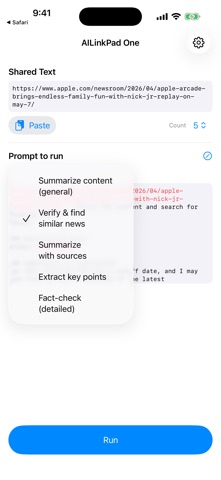
2. Select a prompt for summarizing, fact-checking, finding similar news, and more.
3. Edit on the spot if you need to.
4. Open the share sheet and pick an installed AI app (Gemini and others appear when installed).
Your URL or selected text and a clear instruction are passed to the AI app in one flow. On iOS, the destination is always chosen in the system share sheet—there are no separate in-app buttons for each AI provider.
What you can do
• Summarize YouTube and videos
Share a video page and ask AI to summarize or analyze it.
• Analyze news and web pages
Share an article URL for summaries, explanations, or comparisons.
• Fact-check a selection
Select part of an article, share it, and verify that passage or look for related sources.
• Tune length and detail (Pro)
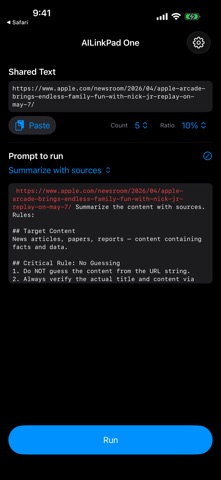
Adjust summary ratio and the number of key points. Switch between quick summaries and deeper analysis.
• Manage prompts
Edit built-in prompts by use case and keep instructions consistent. The free tier can edit presets; Pro also lets you add custom prompts.
• Direct Share (Pro)
Skip the main app entirely—just two taps from Share to your AI app. Your default prompt is applied automatically, so a workflow that normally takes four steps finishes in two. Perfect when you repeat the same task every day.
Free vs Pro
The free version includes the full flow: Share → choose a prompt → send via the share sheet.
Free limits:
• Only the top two prompts in your list are usable (reorder to pick which two)
• You cannot add new prompts (editing built-in prompts is allowed)
• Summary ratio and key-point count are fixed
• Direct Share is not available
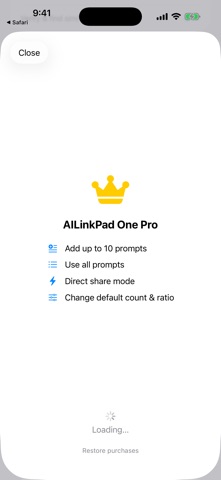
Pro unlocks:
• All built-in prompts
• Add custom prompts (up to 10 total)
• Change default ratio and key-point count
• Direct Share
Pro is a one-time in-app purchase.
Recommended for
• People who summarize YouTube or articles with AI often
• Readers who fact-check or compare news
• Anyone who uses several AI apps
• Anyone who wants control over summary length and structure
• Anyone tired of typing the same prompt every time
• Anyone who compares multiple articles from the same angle
Important
• AILinkPad One is not YouTube, Gemini, or any AI app’s official product. It assists the Share workflow only.
• A destination AI app must be installed and available from the share sheet.
• This app does not fetch or display full video or article content; it forwards URLs and text you share.
• AI answer quality depends on the app you use.
Privacy (summary)
• Prompt and app settings are stored on your device.
• URLs and text are sent to an AI app only when you choose to share.
Details: use the Privacy Policy link on the App Store or in Settings → Support & legal.
Support
Questions? Use the support link on the App Store or in the app’s Settings.
Safety and technology
Found in the app by AppBrain- Price
- Free
- App size
- 972.0 KB
- Content rating
- Everyone
Technologies used by AILinkPad One
Releases
Updates seen on the App Store- Version
- 1.0
- Launched
- April 2026
No changelog data
Alternatives
Similar apps and more from MASATO SATOAlso available on Google Play

Rankings
App Store top chartsApp Store Rankings for AILinkPad One
About the app and developer
About AILinkPad One
AILinkPad One is a productivity app developed by MASATO SATO.
User Ratings
The app has no ratings yet.
App Information
AILinkPad One is freely available from the App Store. The app size is 972.00 kB. The latest version available is 1.0. The last update was on April 16, 2026.
Technical Requirements
The app has a content rating of Everyone. The app has been available on the App Store since April 2026.
AILinkPad One is made and published by MASATO SATO. AppBrain is an independent app data site and isn't affiliated with MASATO SATO. The app name, icon, screenshots and description belong to MASATO SATO and are shown as published on the App Store.
Developer information for MASATO SATO
Address:
Frequently asked questions about AILinkPad One
Is AILinkPad One free?
Yes. AILinkPad One is free on the App Store.
Is AILinkPad One still available?
Yes. AILinkPad One is on the App Store, and the last update we saw was on April 16, 2026.
How large is AILinkPad One?
AILinkPad One is 972.00 kB.
Is AILinkPad One suitable for children?
App Store rates the content of AILinkPad One as suitable for everyone.
Who made AILinkPad One?
AILinkPad One was developed by MASATO SATO. It is listed in the productivity category on the App Store.