AppBrain
AppBrain
  • Apps
  • Apps being viewed right now Trending apps today Most popular apps All-time most installed apps Top rated apps iPhone and iPad apps
  • Intelligence ▾
    Intelligence overview → Track any Android app or your whole market
    Track & analyze
    Keyword Tracker & OptimizerTrack & improve Play rankings App Performance ReportOne-off PDF for any app StatisticsFree Android & Play market stats
    Promote your app
    Featured Apps App Links
  • Intelligence
  • Pricing
  • Dashboard
  • Sign up
  • Log in
App Store Apps > Utilities > AirBoard: Bluetooth Keyboard
AirBoard: Bluetooth Keyboard icon

AirBoard: Bluetooth Keyboard

1.2.2
Shenzhen Wenlicai Technology Co., Ltd.
4.00
3 reviews
Free

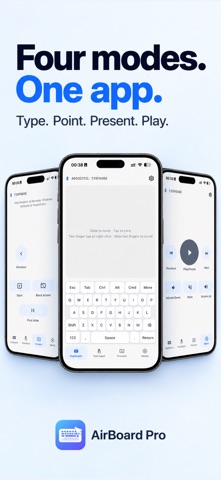
AirBoard: Bluetooth Keyboard Screenshot 1 of 6
AirBoard: Bluetooth Keyboard Screenshot 2 of 6
AirBoard: Bluetooth Keyboard Screenshot 3 of 6
AirBoard: Bluetooth Keyboard Screenshot 4 of 6
AirBoard: Bluetooth Keyboard Screenshot 5 of 6
AirBoard: Bluetooth Keyboard Screenshot 6 of 6
Screenshots by Shenzhen Wenlicai Technology Co., Ltd., from the the App Store listing
View on the App Store

About AirBoard: Bluetooth Keyboard

AirBoard: Bluetooth Keyboard is an utilities app developed by Shenzhen Wenlicai Technology Co., Ltd.

User Ratings

AirBoard: Bluetooth Keyboard is rated 4.00 out of 5 stars. The rating is based on 3 ratings.

App Information

AirBoard: Bluetooth Keyboard is freely available from the App Store. The app size is 27.73 MB. The latest version available is 1.2.2. The last update was on November 18, 2026.

Technical Requirements

The app has a content rating of Everyone. The app has been available on the App Store since June 2026.

AirBoard: Bluetooth Keyboard is made and published by Shenzhen Wenlicai Technology Co., Ltd. AppBrain is an independent app data site and isn't affiliated with Shenzhen Wenlicai Technology Co., Ltd. The app name, icon, screenshots and description belong to Shenzhen Wenlicai Technology Co., Ltd. and are shown as published on the App Store.

Description by Shenzhen Wenlicai Technology Co., Ltd. (from the App Store)
Turn your iPhone or iPad into a wireless keyboard, touchpad, presentation remote, and media controller for your computer with AirBoard Pro.
CHOOSE BLUETOOTH OR WI-FI
AirBoard Pro provides two independent connection methods for Mac and Windows. Choose the one that fits your setup:
• Bluetooth mode — connect directly to a compatible Mac or Windows PC. No AirBoard Receiver or shared Wi-Fi network is required.
• Wi-Fi mode — install AirBoard Receiver on a Mac or Windows PC, keep both devices on the same local network, select the computer in AirBoard Pro, and enter the six-digit code shown by the receiver.
On Mac, Wi-Fi mode requires macOS 13 or later and Accessibility permission. On Windows, AirBoard Receiver supports Windows 11 and requires a Private network connection and local network access through Windows Firewall.
The two connection methods work independently. Bluetooth connects directly without AirBoard Receiver, while Wi-Fi mode uses AirBoard Receiver on Mac or Windows.
After a successful Wi-Fi pairing, AirBoard Pro remembers the receiver for faster reconnection. Saved computers can be reviewed or removed from Wi-Fi settings at any time.
FOUR CONTROL MODES
Keyboard
• Type with letters, numbers, function keys, arrow keys, modifiers, Backspace, Enter, and Space
• Switch between Mac-style and Windows-style keyboard layouts
• Use common actions such as Copy, Paste, Select All, and Undo
• Turn your device sideways for a larger keyboard layout
Touchpad
• Move the pointer with natural touch gestures
• Tap to click and use secondary click
• Scroll with two fingers
• Adjust pointer speed, scroll speed, natural scrolling, and gesture preferences
Presentation
• Move between previous and next slides
• Start or end a presentation
• Show a black screen
• Return to the first slide
• Designed for Keynote on Mac and PowerPoint on Windows
Media
• Play or pause media
• Move to the previous or next track
• Adjust volume
• Mute or restore sound
CUSTOM SHORTCUTS AND TEXT SNIPPETS
Create reusable keyboard shortcuts for frequently used actions. Save text snippets, preview them before sending, and cancel when needed. Available text input depends on the supported keyboard layout and characters.
CLEAR CONNECTION CONTROL
See whether AirBoard Pro is ready for input, switch between Bluetooth and Wi-Fi, select a discovered receiver, and manage saved computers from settings.
AirBoard Pro sends keyboard, pointer, presentation, and media-control input. It is not a remote desktop, screen-sharing, cloud-sync, or file-transfer app.
TRY BEFORE YOU UNLOCK
The 3-day trial begins with your first unpaid input-ready connection. Lifetime access is available through a one-time in-app purchase. If you have already purchased, use Restore Purchase in the app settings.
Compatibility depends on the computer, operating system, Bluetooth implementation, firewall configuration, and local network environment. Keep AirBoard Pro open and active for the most reliable input experience.
Support: https://airboardpro.com/support
Privacy Policy: https://airboardpro.com/privacy
Show more Show less

More data about AirBoard: Bluetooth Keyboard

Price Free
Rating 4.00 based on 3 ratings
Ranking Not ranked
Version 1.2.2
App size 27.7 MB
Suitable for Everyone

More from Shenzhen Wenlicai Technology Co., Ltd.

Afterlog: Action Journal icon Afterlog: Action Journal
Shenzhen Wenlicai Technology Co., Ltd.
0.0
Free

Changelog of AirBoard: Bluetooth Keyboard

No changelog data

Developer information for Shenzhen Wenlicai Technology Co., Ltd.

Shenzhen Wenlicai Technology Co., Ltd.

Address:

Share AirBoard: Bluetooth Keyboard

Comments on AirBoard: Bluetooth Keyboard for iOS

We don't have enough comments to show example comments. Please check back later.

App Store Rankings for AirBoard: Bluetooth Keyboard

This app is not ranked

Technologies used by AirBoard: Bluetooth Keyboard

Frequently asked questions about AirBoard: Bluetooth Keyboard

Is AirBoard: Bluetooth Keyboard free?

Yes. AirBoard: Bluetooth Keyboard is free on the App Store.

Is AirBoard: Bluetooth Keyboard still available?

Yes. AirBoard: Bluetooth Keyboard is on the App Store, and the last update we saw was on November 18, 2026.

How large is AirBoard: Bluetooth Keyboard?

AirBoard: Bluetooth Keyboard is 27.73 MB.

Is AirBoard: Bluetooth Keyboard suitable for children?

App Store rates the content of AirBoard: Bluetooth Keyboard as suitable for everyone.

How do people rate AirBoard: Bluetooth Keyboard?

AirBoard: Bluetooth Keyboard scores 4.00 out of 5 stars, from 3 ratings on the App Store.

Who made AirBoard: Bluetooth Keyboard?

AirBoard: Bluetooth Keyboard was developed by Shenzhen Wenlicai Technology Co., Ltd. It is listed in the utilities category on the App Store.

Top new apps Apps other people are watching Today's trending apps Popular Utilities Apps Price drops on Google Play
More hot apps 🔥
AppBrain Intelligence premium content

Subscribe now to get full and unlimited access to AppBrain Intelligence. You'll have access to:

  • App Intelligence dashboard (performance timeline, competitor comparison, country rankings, insight cards)
  • Detailed ranking data per app
  • Full timeline per developer
  • Device market shares data per country
  • Unlimited keyword tracking
  • AI assistant access via MCP (Claude, Cursor or any MCP client)
1 Month

$75/mo
(billed every month)

SAVE 0%
Subscribe
3 Months

$65/mo
($195 billed every 3 months)

SAVE 13%
Subscribe
1 Year

$57.50/mo
($690 billed every year)

SAVE 23%
Subscribe
Each subscription will automatically renew 3 days before the expiration date for the same time period. Subscriptions can be cancelled at any time before the renewal.

AppBrain is an app data site, we track rankings, ratings, installs for all apps and games on Google Play and the App Store. AppBrain doesn't host app files or APKs, all install links go directly to the official store. All trademarks are owned by their respective owners.

More apps

  • Top Android apps being viewed
  • Chicken Attack: Galaxy Shooter
  • Snipers Duel stats
  • Nara Baby & Pregnancy Tracker

App statistics

  • Android statistics
  • Google Play Developer stats
  • Trending Android Apps
  • Trending iOS apps
  • Top popular Apps
  • Buy the best Android phone
  • Buy & sell app businesses

About AppBrain

  • Contact
  • Privacy
  • Documentation
  • DMCA takedowns
  • Blog
  • Android Interstitial Ads: Best practices to optimize your app's earnings
© 2010-2026 - AppBrain