

AirBoard: Bluetooth Mouse
AirBoard: Bluetooth Mouse is made and published by Shenzhen Wenlicai Technology Co., Ltd. AppBrain is an independent app data site and isn't affiliated with Shenzhen Wenlicai Technology Co., Ltd. The app name, icon, screenshots and description belong to Shenzhen Wenlicai Technology Co., Ltd. and are shown as published on the App Store.
AppBrain's verdict
- Rating on App Store
- 4.00
- 3 ratings
- Last updated
- October 6, 2026
It doesn't have enough ratings yet to judge what users think.
Rankings
App Store top chartsApp Store Rankings for AirBoard: Bluetooth Mouse
Competitors
Similar apps and more from Shenzhen Wenlicai Technology Co., Ltd.More from Shenzhen Wenlicai Technology Co., Ltd.

Releases
Updates seen on the App Store- Version
- 1.2.0
- Launched
- June 2026
No changelog data
User feedback
Ratings and reviews on the App StoreComments on AirBoard: Bluetooth Mouse for iOS
We don't have enough comments to show example comments. Please check back later.
Technology
Found in the app by AppBrain- Price
- Free
- App size
- 26.8 MB
- Content rating
- Everyone
Technologies used by AirBoard: Bluetooth Mouse
About the app and developer
About AirBoard: Bluetooth Mouse
AirBoard: Bluetooth Mouse is an utilities app developed by Shenzhen Wenlicai Technology Co., Ltd.
User Ratings
AirBoard: Bluetooth Mouse is rated 4.00 out of 5 stars. The rating is based on 3 ratings.
App Information
AirBoard: Bluetooth Mouse is freely available from the App Store. The app size is 26.76 MB. The latest version available is 1.2.0. The last update was on October 6, 2026.
Technical Requirements
The app has a content rating of Everyone. The app has been available on the App Store since June 2026.
Developer information for Shenzhen Wenlicai Technology Co., Ltd.
Frequently asked questions about AirBoard: Bluetooth Mouse
Is AirBoard: Bluetooth Mouse free?
Yes. AirBoard: Bluetooth Mouse is free on the App Store.
Is AirBoard: Bluetooth Mouse still available?
Yes. AirBoard: Bluetooth Mouse is on the App Store, and the last update we saw was on October 6, 2026.
How large is AirBoard: Bluetooth Mouse?
AirBoard: Bluetooth Mouse is 26.76 MB.
Is AirBoard: Bluetooth Mouse suitable for children?
App Store rates the content of AirBoard: Bluetooth Mouse as suitable for everyone.
How do people rate AirBoard: Bluetooth Mouse?
AirBoard: Bluetooth Mouse scores 4.00 out of 5 stars, from 3 ratings on the App Store.
Who made AirBoard: Bluetooth Mouse?
AirBoard: Bluetooth Mouse was developed by Shenzhen Wenlicai Technology Co., Ltd. It is listed in the utilities category on the App Store.
Store listing
By Shenzhen Wenlicai Technology Co., Ltd., from the App Store


Description by Shenzhen Wenlicai Technology Co., Ltd. Written by the developer, not by AppBrain. Click to read.
CHOOSE BLUETOOTH OR WI-FI
AirBoard Pro provides two independent connection methods for Mac and Windows. Choose the one that fits your setup:
• Bluetooth mode — connect directly to a compatible Mac or Windows PC. No AirBoard Receiver or shared Wi-Fi network is required.
• Wi-Fi mode — install AirBoard Receiver on a Mac or Windows PC, keep both devices on the same local network, select the computer in AirBoard Pro, and enter the six-digit code shown by the receiver.
On Mac, Wi-Fi mode requires macOS 13 or later and Accessibility permission. On Windows, AirBoard Receiver supports Windows 11 and requires a Private network connection and local network access through Windows Firewall.
The two connection methods work independently. Bluetooth connects directly without AirBoard Receiver, while Wi-Fi mode uses AirBoard Receiver on Mac or Windows.
After a successful Wi-Fi pairing, AirBoard Pro remembers the receiver for faster reconnection. Saved computers can be reviewed or removed from Wi-Fi settings at any time.
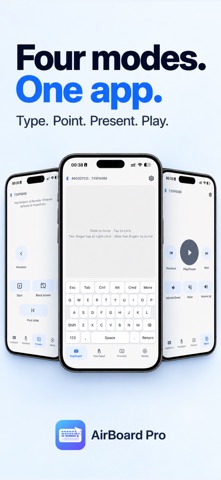
FOUR CONTROL MODES
Keyboard
• Type with letters, numbers, function keys, arrow keys, modifiers, Backspace, Enter, and Space
• Switch between Mac-style and Windows-style keyboard layouts
• Use common actions such as Copy, Paste, Select All, and Undo
• Turn your device sideways for a larger keyboard layout
Touchpad
• Move the pointer with natural touch gestures
• Tap to click and use secondary click
• Scroll with two fingers
• Adjust pointer speed, scroll speed, natural scrolling, and gesture preferences
Presentation
• Move between previous and next slides
• Start or end a presentation
• Show a black screen
• Return to the first slide
• Designed for Keynote on Mac and PowerPoint on Windows
Media
• Play or pause media
• Move to the previous or next track
• Adjust volume
• Mute or restore sound
CUSTOM SHORTCUTS AND TEXT SNIPPETS
Create reusable keyboard shortcuts for frequently used actions. Save text snippets, preview them before sending, and cancel when needed. Available text input depends on the supported keyboard layout and characters.
CLEAR CONNECTION CONTROL
See whether AirBoard Pro is ready for input, switch between Bluetooth and Wi-Fi, select a discovered receiver, and manage saved computers from settings.
AirBoard Pro sends keyboard, pointer, presentation, and media-control input. It is not a remote desktop, screen-sharing, cloud-sync, or file-transfer app.
TRY BEFORE YOU UNLOCK
The 3-day trial begins with your first unpaid input-ready connection. Lifetime access is available through a one-time in-app purchase. If you have already purchased, use Restore Purchase in the app settings.
Compatibility depends on the computer, operating system, Bluetooth implementation, firewall configuration, and local network environment. Keep AirBoard Pro open and active for the most reliable input experience.
Support: https://airboardpro.com/support
Privacy Policy: https://airboardpro.com/privacy