

Aircall is made and published by Aircall.io Inc. AppBrain is an independent app data site and isn't affiliated with Aircall.io Inc. The app name, icon, screenshots and description belong to Aircall.io Inc. and are shown as published on the App Store.
AppBrain's verdict
EstablishedWell rated- Rating on App Store
- 4.43
- 349 ratings
- Last updated
- October 8, 2026
Users rate it well: 4.4 stars from 349 ratings.
Rankings
App Store top chartsApp Store Rankings for Aircall
Competitors
Similar apps and more from Aircall.io Inc.Alternatives to Aircall





Releases
Updates seen on the App Store- Version
- 9.23.1
- Launched
- December 2015
No changelog data
User feedback
Ratings and reviews on the App StoreComments on Aircall for iOS
We don't have enough comments to show example comments. Please check back later.
Technology
Found in the app by AppBrain- Price
- Free
- App size
- 88.2 MB
- Content rating
- Everyone
Technologies used by Aircall
About the app and developer
About Aircall
Aircall is a business app developed by Aircall.io Inc.
User Ratings
Aircall is rated 4.43 out of 5 stars. The rating is based on 350 ratings.
App Information
Aircall is freely available from the App Store. The app size is 88.18 MB. The latest version available is 9.23.1. The last update was on October 8, 2026.
Technical Requirements
The app has a content rating of Everyone. The app has been available on the App Store since December 2015.
Developer information for Aircall.io Inc.
Address:
Store listing
By Aircall.io Inc., from the App Store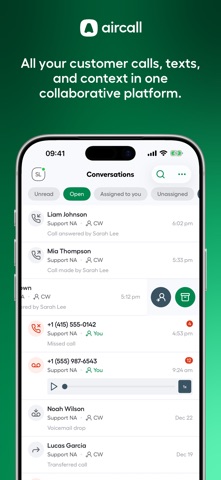

Description by Aircall.io Inc. Written by the developer, not by AppBrain. Click to read.
Trusted by 20K+ businesses, Aircall is more than a business phone; it’s an integrated customer communications and intelligence platform. Achieve more with virtual agents, AI-driven insights, and automation.
Extend your desktop experience to mobile
Stay connected with your team and customers, and keep your work flowing smoothly, no matter where you are, with the Aircall app for iOS.
Step away with confidence
Stay connected and respond to customers quickly, even when you're away from your computer. Receive instant alerts for voicemail, missed calls, text messages, and assignments with mobile notifications, so you'll never miss a thing.
Create work-life privacy and separation
Manage business calls conveniently from your mobile device, without exposing your personal phone number.
Keep productive on-the-go
Record calls, have notes automatically taken for you, and instantly track business conversations in 100+ CRM or Helpdesk integrations for attribution.
Faster response times
Are missed calls leading to missed opportunities? Instantly view and assign missed calls, texts, call back requests, and voicemails to teammates right from your mobile device.
Stay connected and in control
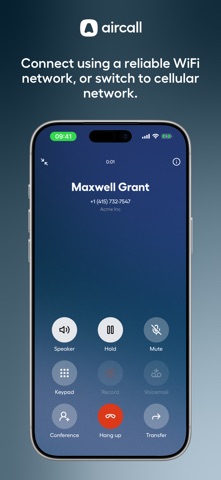
Get the best experience on mobile when you connect using a reliable WiFi network. In-app notifications will alert you to network, headset, or infrastructure problems, so you can adjust your setup or transfer your call to a GSM cellular network.
Aircall Features for iOS:
Business numbers
Select local, toll-free, mobile numbers or port existing numbers.
Phone controls
Mute, hold, transfer, and add to conference call.
Messaging
Send and receive SMS/MMS text messages.
Notifications
Respond faster and get alerted when a conversation comes in.
Availability settings
Manage when you're available for calls, especially on shared lines.
Unified view
Calls, texts, voicemails, and status logs are captured around the customer.
Call recordings
Capture and pause call recordings for quality assurance.
AI assist
Save time with automatic call summaries, transcriptions, and instant insights.
Integrations
Instantly record your conversation activity into your systems of record.
Contacts
Access your business contact information list on-the-go, from anywhere.
Assign to
Manage your inbox by assigning conversations to teammates.
Transfer to GSM network
Switch to cellular if your WiFi network connection is unstable.
Sign up for Aircall today
If you have any feedback or questions, please visit our Help Center or email our Support team for assistance.