

Aire Subtitle
Aire Subtitle is made and published by Chen Mun Kok. AppBrain is an independent app data site and isn't affiliated with Chen Mun Kok. The app name, icon, screenshots and description belong to Chen Mun Kok and are shown as published on the App Store.
AppBrain's verdict
- Last updated
- October 5, 2026
Rankings
App Store top chartsApp Store Rankings for Aire Subtitle
Competitors
Similar apps and more from Chen Mun KokAlternatives to Aire Subtitle


Releases
Updates seen on the App Store- Version
- 1.2
- Launched
- September 2026
No changelog data
User feedback
Ratings and reviews on the App StoreComments on Aire Subtitle for iOS
We don't have enough comments to show example comments. Please check back later.
Technology
Found in the app by AppBrain- Price
- Free
- App size
- 6.02 MB
- Content rating
- Everyone
Technologies used by Aire Subtitle
About the app and developer
About Aire Subtitle
Aire Subtitle is a photo & video app developed by Chen Mun Kok.
User Ratings
The app has no ratings yet.
App Information
Aire Subtitle is freely available from the App Store. The app size is 6.02 MB. The latest version available is 1.2. The last update was on October 5, 2026.
Technical Requirements
The app has a content rating of Everyone. The app has been available on the App Store since September 2026.
Developer information for Chen Mun Kok
Address:
Store listing
By Chen Mun Kok, from the App Store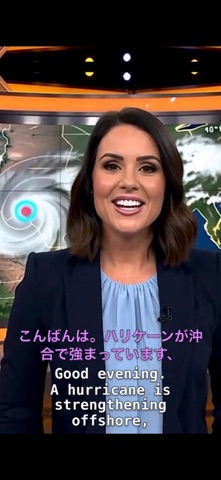


Description by Chen Mun Kok Written by the developer, not by AppBrain. Click to read.
There is no account to create, no credits to buy and nothing to upload. Your recording never leaves the device — transcription runs on Apple's own on-device speech models, and translation on Apple Intelligence.
TRANSCRIBE, TRANSLATE, OR BOTH
• Transcribe — subtitles in the language that was spoken.
• Translate — subtitles in the language you choose.
• Transcribe + translate — both languages stacked in one subtitle, for a bilingual cue.
Translation always runs after the transcription is finished, so the translator sees whole punctuated sentences rather than half-heard fragments. That is what gets tense, pronouns and word order right — and the original timings survive untouched.
SUBTITLES, NOT A WALL OF TEXT
The hard part of speech-to-text is not the speech. It is everything after: grouping words into lines that hold one thought, breaking them where a reader would pause, and timing each one so it stays up long enough to read and never overlaps the next. Aire SubTitle does all of that to the conventions broadcast subtitles follow, so what comes out is a subtitle someone can actually read.
CORRECT ANYTHING IT MISHEARD
Speech recognition gets names and jargon wrong, and no amount of processing fixes a word the model never heard. Every cue opens for editing — the text, the line breaks, and the in and out times, nudged a tenth of a second at a time or typed in full. Add a missing line into the silence where the speech was. Break a long line at the right clause with one tap. Edits are held as a draft until you save.
BURN THEM INTO THE PICTURE
A sidecar .srt is the better file in almost every way, but it only survives where something reads it. Aire SubTitle will write a new video with the cues drawn on the frames — and it styles the spoken language and the translation separately, in font, size, colour and weight, which is the whole point of a bilingual subtitle. The preview is a real frame from your own footage, and you choose how large the new video is: a small file that already looks excellent on a phone, or one indistinguishable from the source.
GET FILES IN, ANY WAY YOU LIKE
Pick from Files or your photo library, AirDrop a clip straight to the app, or use Share → Aire SubTitle from Photos, Files or Safari. Give it as many files as you like and each one comes back with its own subtitle; a file that fails no longer throws away the rest of the run.
Reads MP4, MOV, M4V, MP3, M4A, WAV, AAC, AIFF and CAF. Exports SubRip (.srt), WebVTT (.vtt) or plain text.
NOTHING HIDDEN ON DISK
Working files are large, and all of them are visible in the Files app under On My iPhone → Aire SubTitle, in folders named for what is in them. The Files row in the app shows the same folders and the total they take up, and empties them in one tap.
FREE FOR VIDEOS UP TO 30 MINUTES
Every feature works free on videos and recordings up to 30 minutes long. One in-app purchase, Unlimited Video Length, removes the limit for good — a single payment, not a subscription. If you bought the app while it was paid, nothing changes: longer videos are already unlocked for you.
REQUIREMENTS
iOS 26 or later on an iPhone 15 Pro or newer, or an iPad with an M1 chip or later, with Apple Intelligence switched on. Apple's speech and translation models download themselves once per language, over Wi-Fi, free of charge.