

Airlink | Screen Mirroring
Airlink | Screen Mirroring is made and published by Soroush Chehresa. AppBrain is an independent app data site and isn't affiliated with Soroush Chehresa. The app name, icon, screenshots and description belong to Soroush Chehresa and are shown as published on the App Store.
AppBrain's verdict
- Last updated
- June 10, 2026
- Size
- 13.8 MB
User feedback
Ratings and reviews on the App StoreComments on Airlink | Screen Mirroring for iOS
We don't have enough comments to show example comments. Please check back later.
Store listing
By Soroush Chehresa, from the App Store


Description by Soroush Chehresa Written by the developer, not by AppBrain. Click to read.
Your phone does all the work. Airlink runs entirely on your device and streams over your local Wi-Fi, so your screen never leaves your network. Just show the watch link or QR code, and anyone on the same Wi-Fi can open it in Safari, Chrome, Edge, or any modern browser and start watching in real time.
Perfect for demos, tutorials, presentations, gaming, classrooms, and pair-work — anywhere you want your screen on a bigger display without AirPlay receivers or a streaming service.
HOW IT WORKS
• Tap Start Broadcast
• A watch link and QR code appear on your device
• On a laptop, TV, or another phone, scan the QR or open the link in any browser
• Your live screen plays instantly
WHY AIRLINK
• Real-time, low-latency mirroring over local Wi-Fi
• Works in any modern web browser — nothing to install on the viewer
• No cloud, no accounts, no sign-up — your screen stays on your network
• Mirrors your entire screen, including app and system audio
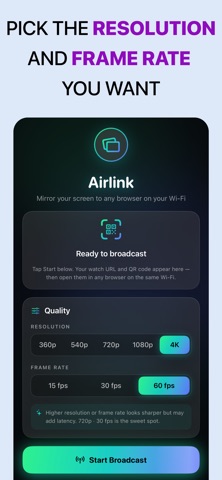
• Choose your quality — pick the resolution and frame rate that fit your network
• Clean, simple, one-tap experience
GREAT FOR
• Product demos and client presentations
• Recording tutorials and walkthroughs on a big screen
• Showing photos, videos, or slides to a room
• Mobile gaming on a larger display
• Teaching and classroom sharing
• Pair programming and design reviews
PRIVATE BY DESIGN
Airlink streams only over your local Wi-Fi network. Nothing is uploaded to the internet, there are no accounts, and there is no tracking. Viewers connect directly to your device.
Note: Airlink and the viewing device must be on the same Wi-Fi network. Some public or guest networks block device-to-device connections; a personal hotspot works as an alternative.
Download Airlink and put your screen on any browser — in seconds.
Privacy and policy: https://mydishview.com/mirror-privacy.html
Terms of use: https://mydishview.com/mirror-terms.html
Safety and technology
Found in the app by AppBrain- Price
- Free
- App size
- 13.8 MB
- Content rating
- Everyone
Technologies used by Airlink | Screen Mirroring
Releases
Updates seen on the App Store- Version
- 1.0.0
- Launched
- June 2026
No changelog data
Alternatives
Similar apps and more from Soroush ChehresaMore from Soroush Chehresa


Rankings
App Store top chartsApp Store Rankings for Airlink | Screen Mirroring
About the app and developer
About Airlink | Screen Mirroring
Airlink | Screen Mirroring is an utilities app developed by Soroush Chehresa.
User Ratings
The app has no ratings yet.
App Information
Airlink | Screen Mirroring is freely available from the App Store. The app size is 13.81 MB. The latest version available is 1.0.0. The last update was on June 10, 2026.
Technical Requirements
The app has a content rating of Everyone. The app has been available on the App Store since June 2026.
Developer information for Soroush Chehresa
Address: