AppBrain
AppBrain
  • Apps
  • Apps being viewed right now Trending apps today Most popular apps All-time most installed apps Top rated apps iPhone and iPad apps
  • Intelligence ▾
    Intelligence overview → Track any Android app or your whole market
    Track & analyze
    Keyword Tracker & OptimizerTrack & improve Play rankings App Performance ReportOne-off PDF for any app StatisticsFree Android & Play market stats
    Promote your app
    Featured Apps App Links
  • Intelligence
  • Pricing
  • Dashboard
  • Sign up
  • Log in
App Store Apps > Utilities > AirTape - AR Measure
AirTape - AR Measure icon

AirTape - AR Measure

by 丽佳 施 · Utilities · Free
On the App Store since July 2026 · Data updated 2026-11-02

AirTape - AR Measure is made and published by 丽佳 施. AppBrain is an independent app data site and isn't affiliated with 丽佳 施. The app name, icon, screenshots and description belong to 丽佳 施 and are shown as published on the App Store.

AppBrain's verdict

Last updated
October 22, 2026
Size
4.45 MB
Official page on the App Store

User feedback

Ratings and reviews on the App Store

Comments on AirTape - AR Measure for iOS

We don't have enough comments to show example comments. Please check back later.

Store listing

By 丽佳 施, from the App Store
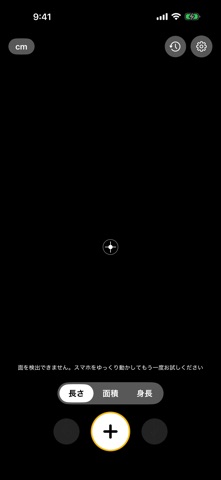
AirTape - AR Measure Screenshot 1 of 3
AirTape - AR Measure Screenshot 2 of 3
AirTape - AR Measure Screenshot 3 of 3
Screenshots by 丽佳 施, from the the App Store listing
Description by 丽佳 施 Written by the developer, not by AppBrain. Click to read.
Point your iPhone, tap twice, and get the measurement. AirTape turns your phone into a tape measure that floats in the air: measure furniture, rooms, and people — no tape, no helper needed.

Three everyday modes, all open with no limits:

- Length: tap two points for a distance, keep adding points for baseboards or around a table, with a live readout as you move
- Area: outline a polygon on any floor, table, or wall; it closes automatically and gives you area, perimeter, and every edge length
- Height: tap the ground, then the top. AirTape uses the vertical difference between the two points, so holding the phone at an angle does not change the reading and there is no need to stand flat against a wall

Save your rooms and generate a 2D floor plan with dimension labels, then export it as PNG or A4 PDF for your contractor, landlord, or records. There is no limit on how many measurements you keep or how many plans you export, and the footer credit can be turned off at any time.

READINGS ARE FOR REFERENCE
AR measurements depend on lighting, surface texture, your device, and how you move the phone, so treat every reading as a reference. For anything that matters — ordering materials, checking whether furniture fits — measure again with a real tape.

ADS AND PRIVACY
Measuring and floor plans run entirely on this device and work offline. The only thing that needs a connection is a single banner ad at the bottom of the screen. If you would rather not see it, there is a one-time Remove Ads purchase — it removes the banner and nothing else, because every feature is already open to you.
Your measurements, notes, and screenshots stay on this iPhone. There is no account and no server, and deleting the app deletes everything. AirTape does not track you and never asks for ad tracking permission.

HARDWARE
Requires an AR-capable iPhone (iPhone XS and later). LiDAR models (iPhone 12 Pro and later Pro models) automatically use finer scene reconstruction.
Official page on the App Store

Safety and technology

Found in the app by AppBrain
Price
Free
App size
4.45 MB
Content rating
Everyone

Technologies used by AirTape - AR Measure

Releases

Updates seen on the App Store
Version
1.0.1
Launched
July 2026

No changelog data

Alternatives

Similar apps and more from 丽佳 施

Alternatives to AirTape - AR Measure

Acota · Measure icon Acota · Measure
Ruben Martin Salvador
0.0
Free
Ruler: Tape Measure & Level icon Ruler: Tape Measure & Level
RANA RESIDOGLU
0.0
Free
Ruler ▸ icon Ruler ▸
Yaroslava Majstrovich
0.0
Free
AR Ruler: Distance & Area Tool icon AR Ruler: Distance & Area Tool
Sandeep Bhandari
0.0
Free
SurfacePro - Area Caculator icon SurfacePro - Area Caculator
EDUARD MARIUS ROBERT PANTAZI
5.0
Free
2 ratings
Measure by Moving - Phruler AR icon Measure by Moving - Phruler AR
Muyao Wu
5.0
Free
15 ratings
Plnar Pro icon Plnar Pro
Smart Picture Tech
4.3
Free
11 ratings
Measure Area icon Measure Area
William Coates
4.1
Free
14 ratings

More from 丽佳 施

DualCam – Front & Back Camera icon DualCam – Front & Back Camera
丽佳 施
5.0
Free
4 ratings
Study Time Memo: Subject Log icon Study Time Memo: Subject Log
丽佳 施
5.0
Free
1 ratings
CafeMemo - Cafe Visit Log icon CafeMemo - Cafe Visit Log
丽佳 施
0.0
Free
TintCraft - Widget Studio icon TintCraft - Widget Studio
丽佳 施
0.0
Free
Sleep Memo - Sleep Tracker icon Sleep Memo - Sleep Tracker
丽佳 施
0.0
Free
SleepTrace: Snore Recorder icon SleepTrace: Snore Recorder
丽佳 施
0.0
Free
GlowFace - Face Yoga Daily icon GlowFace - Face Yoga Daily
丽佳 施
0.0
Free
今日3つだけ:1日3つのシンプルToDo icon 今日3つだけ:1日3つのシンプルToDo
丽佳 施
0.0
Free

Rankings

App Store top charts

App Store Rankings for AirTape - AR Measure

This app is not ranked

About the app and developer

About AirTape - AR Measure

AirTape - AR Measure is an utilities app developed by 丽佳 施.

What is the rating of AirTape - AR Measure?

AirTape - AR Measure has no ratings yet.

Is AirTape - AR Measure free?

AirTape - AR Measure is free. The app size is 4.45 MB. The latest version available is 1.0.1. The last update was on October 22, 2026.

What are the requirements for AirTape - AR Measure?

The app has a content rating of Everyone. The app has been available on the App Store since July 2026.

Developer information for 丽佳 施

丽佳 施

Address:

Share AirTape - AR Measure

Top new apps Today's trending apps Price drops on Google Play Popular Utilities Apps Apps other people are watching
Acota · Measure icon Acota · Measure
Ruler: Tape Measure & Level icon Ruler: Tape Measure & Level
Ruler ▸ icon Ruler ▸
AR Ruler: Distance & Area Tool icon AR Ruler: Distance & Area Tool
SurfacePro - Area Caculator icon SurfacePro - Area Caculator
Measure by Moving - Phruler AR icon Measure by Moving - Phruler AR
Plnar Pro icon Plnar Pro
Measure Area icon Measure Area
Overview Alternatives Reviews Rankings Technology
AppBrain Intelligence premium content

Subscribe now to get full and unlimited access to AppBrain Intelligence. You'll have access to:

  • App Intelligence dashboard (performance timeline, competitor comparison, country rankings, insight cards)
  • Detailed ranking data per app
  • Full timeline per developer
  • Device market shares data per country
  • Unlimited keyword tracking
1 Month

$75/mo
(billed every month)

SAVE 0%
Subscribe
3 Months

$65/mo
($195 billed every 3 months)

SAVE 13%
Subscribe
1 Year

$57.50/mo
($690 billed every year)

SAVE 23%
Subscribe
Each subscription will automatically renew 3 days before the expiration date for the same time period. Subscriptions can be cancelled at any time before the renewal.

AppBrain is an app data site, we track rankings, ratings, installs for all apps and games on Google Play and the App Store. AppBrain doesn't host app files or APKs, all install links go directly to the official store. All trademarks are owned by their respective owners.

More apps

  • Top Android apps being viewed
  • Moto
  • Tank Smash: City Crash
  • Poppy:AI Roleplay Chat

App statistics

  • Android statistics
  • Google Play Developer stats
  • Trending Android Apps
  • Trending iOS apps
  • Top popular Apps
  • Buy the best Android phone
  • Buy & sell app businesses

About AppBrain

  • Contact
  • Privacy
  • Documentation
  • DMCA takedowns
  • Blog
  • Free App-Ads.Txt Validation
© 2010-2026 - AppBrain