

Alarm Clock: Smart Waking Up
Alarm Clock: Smart Waking Up is made and published by Blue Bike LLC. AppBrain is an independent app data site and isn't affiliated with Blue Bike LLC. The app name, icon, screenshots and description belong to Blue Bike LLC and are shown as published on the App Store.
AppBrain's verdict
EstablishedWell rated- Rating on App Store
- 4.15
- 1,936 ratings
- Last updated
- September 25, 2026
Users rate it well: 4.1 stars from 1,936 ratings.
Rankings
App Store top chartsApp Store Rankings for Alarm Clock: Smart Waking Up
Competitors
Similar apps and more from Blue Bike LLCAlternatives to Alarm Clock: Smart Waking Up




More from Blue Bike LLC


Releases
Updates seen on the App Store- Version
- 15.4
- Launched
- September 2019
No changelog data
User feedback
Ratings and reviews on the App StoreComments on Alarm Clock: Smart Waking Up for iOS
We don't have enough comments to show example comments. Please check back later.
Technology
Found in the app by AppBrain- Price
- Free
- App size
- 117.5 MB
- Content rating
- Everyone
Technologies used by Alarm Clock: Smart Waking Up
About the app and developer
About Alarm Clock: Smart Waking Up
Alarm Clock: Smart Waking Up is a health & fitness app developed by Blue Bike LLC.
What is the rating of Alarm Clock: Smart Waking Up?
Alarm Clock: Smart Waking Up is rated 4.15 out of 5 stars, based on 1.9 thousand ratings.
Is Alarm Clock: Smart Waking Up free?
Alarm Clock: Smart Waking Up is free. The app size is 117.54 MB. The latest version available is 15.4. The last update was on September 25, 2026.
What are the requirements for Alarm Clock: Smart Waking Up?
The app has a content rating of Everyone. The app has been available on the App Store since September 2019.
Developer information for Blue Bike LLC
Address:
Frequently asked questions about Alarm Clock: Smart Waking Up
Is Alarm Clock: Smart Waking Up free?
Yes. Alarm Clock: Smart Waking Up is free on the App Store.
Is Alarm Clock: Smart Waking Up still available?
Yes. Alarm Clock: Smart Waking Up is on the App Store, and the last update we saw was on September 25, 2026.
How large is Alarm Clock: Smart Waking Up?
Alarm Clock: Smart Waking Up is 117.54 MB.
Is Alarm Clock: Smart Waking Up suitable for children?
App Store rates the content of Alarm Clock: Smart Waking Up as suitable for everyone.
How do people rate Alarm Clock: Smart Waking Up?
Alarm Clock: Smart Waking Up scores 4.15 out of 5 stars, from 1,936 ratings on the App Store.
Who made Alarm Clock: Smart Waking Up?
Alarm Clock: Smart Waking Up was developed by Blue Bike LLC. It is listed in the health & fitness category on the App Store.
What are the best alternatives to Alarm Clock: Smart Waking Up?
People looking at Alarm Clock: Smart Waking Up also look at these health & fitness apps: Easy Rise Alarm Clock :, Sleepwave: Alarm & Tracker, Music Alarm Clock for Spotify, Sleep Science Alarm Clock, Sleep Music Alarm.
Store listing
By Blue Bike LLC, from the App Store


Description by Blue Bike LLC Written by the developer, not by AppBrain. Click to read.
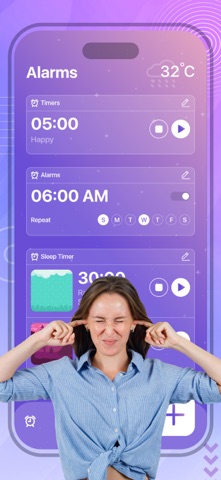
Customize your alarm; track your important events; set personal timers, and go to bed easily with the large list of functions you can have in the palm of your hand.
* Set as many alarms as you need, and use them along the day to any necessity.
* Customize the alarms in just a couple of steps, and select the exact hour, the days of the week, or any other feature you may need to make your alarm the most accurate possible.
* Personalize your alarm music and vibration mode, for you to wake up every morning with the correct attitude.
* Track the days, hours, minutes, and even seconds that are missing to your important events with our in-app countdown.
* Decide how many hours you want to sleep, and keep track of your sleep cycle by selecting your bedtime and wake time in an easy-to-use user interface.
* Get informed of your sleeping habits by looking at your daily and weekly statistics to learn more about how well are your sleeping hours.
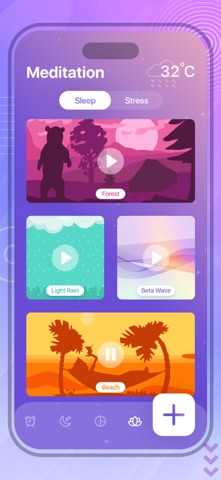
* Forget about problems when going to bed with our in-app meditation modality for you to eliminate stress, sleep correctly, and get as many hours of good sleep as your body needs.
* Don’t worry about accidentally dismissing your alarm and falling asleep again; with just a couple of taps, you can select the activity you want to do to turn your alarm off.
* Add notes and reminders to your alarms in case you have something you don’t want to forget.
The solution to never wake up late again, to improve your sleeping habits, to keep track of your health, so don’t forget all those important events, and to get the wake-up alarm you are looking for in just one single app.
Below is subscription detail:
• Monthly Subscription Price: 3 Day Free Trial then $6.99 USD/month
• Yearly Subscription Price: 3 Day Free Trial then $29.99 USD/Year
• Paid features: Unlock all the features of the app
• Payment will be charged to iTunes Account at confirmation of purchase
• Subscription automatically renews unless auto-renew is turned off at least 24-hours before the end of the current period. You can turn of the auto-renew subscription from iPhone setting
• Account will be charged for renewal within 24-hours prior to the end of the current period, and identify the cost of the renewal
• Subscriptions may be managed by the user and auto-renewal may be turned off by going to the user's Account Settings after purchase
• Any unused portion of a free trial period, if offered, will be forfeited when the user purchases a subscription to that publication, where applicable Background Eraser adds the great features above and are available through an auto-renewing subscription. Subscriptions will be charged to your credit card through your iTunes account. Your subscription will automatically renew unless cancelled at least 24 hours before the end of your current subscription, and you can cancel a subscription during the active period. You can manage your subscription at any time, either by viewing your account in iTunes from your Mac or PC, or Account Settings on your device after purchase.
Read our privacy policy at https://topappsandpopulargames.wordpress.com/privacy-policy/
Read our Terms of Service at
https://topappsandpopulargames.wordpress.com/terms-of-use/