
Alarm Clock – Wake Up Time
Alarm Clock – Wake Up Time is made and published by Abdulla Yasin. AppBrain is an independent app data site and isn't affiliated with Abdulla Yasin. The app name, icon, screenshots and description belong to Abdulla Yasin and are shown as published on the App Store.
AppBrain's verdict
- Last updated
- January 19, 2024
- Size
- 36.0 MB
User feedback
Ratings and reviews on the App StoreComments on Alarm Clock – Wake Up Time for iOS
We don't have enough comments to show example comments. Please check back later.
Store listing
By Abdulla Yasin, from the App Store


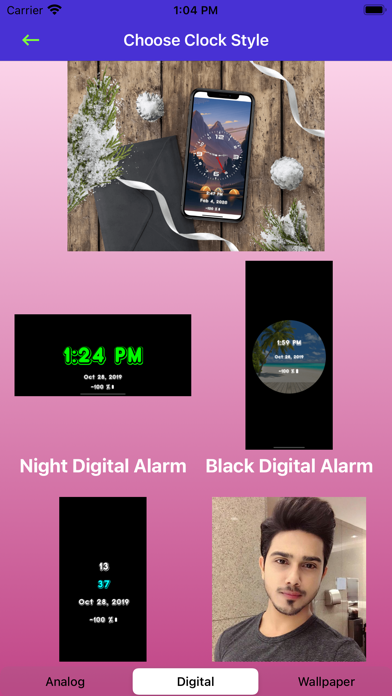


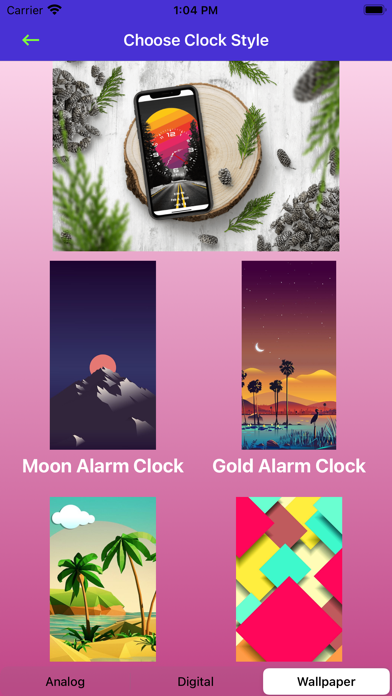

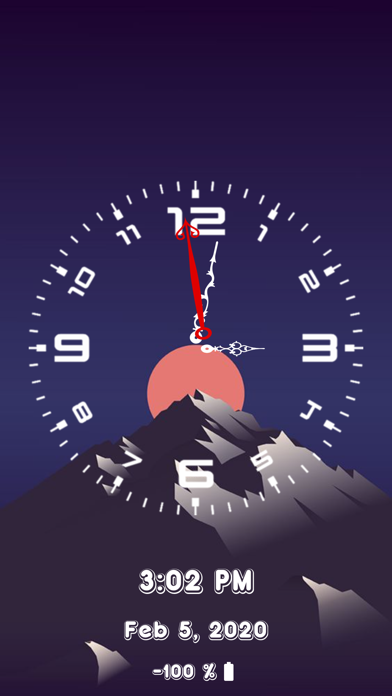

Description by Abdulla Yasin Written by the developer, not by AppBrain. Click to read.
This app is very useful for everyone and it’s also great to decorate your bedroom. Turn on our alarm clock and put your iPhone or iPad on a nightstand. Our app is FREE, so if you are currently looking for a great and loud Alarm Clock to help you wake up on time everyday, just download and try it!
== FEATURES OF ALARM CLOCK – WAKE UP TIME:
* A very loud alarm noise to make sure you wake up on time.
* Beautiful clock display in Analog or Digital Face.
* Stunning wallpapers as background for your clock.
* Show the Time, Date and remaining Battery Life.
* Put the clock on your nightstand to decorate your room.
* Super simple to use with very user-friendly interface.
* Customize the Alarm Display with your own picture from the Gallery.
* Change Date, Time, or Battery Information Color and photo.
If you don’t need the Alarm and you just want to use your iPhone to display beautiful Night Clock Display, you can simply choose the Night Clock Mode. If you need the Alarm feature, use this simple guide below to activate it.
How to Use Alarm Clock – Wake Up Time:
1. Tap on the Start Alarm Button.
2. Tap on the Set Alarm Time to choose the time for the alarm to go off.
3. Tap on Start Alarm.
4. Choose your preferred Clock Display and Wallpaper
5. Wait until the Alarm sets off.
It’s very important to get up on time every morning so you won’t be late for work or school. We know that ordinary alarm clocks and the standard alarm from iPhone just won’t cut it. It also looks bland, not decorative and stunning as ours. That’s why you should try and download our FREE Alarm Clock and Wake up Time app. If you like it, you can try our paid version that has no ads.
SUBSCRIPTION DETAILS
All customers are welcome to use free features. If you want to access pro features then we offer 3 auto-renewing subscription options on either a 1, 3 or 12 month basis.
Payment will be charged to your credit card through your iTunes account at confirmation of purchase. Subscription renews automatically unless cancelled at least 24 hours prior to the end of the subscription period.
Subscriptions can be managed and auto-renewal turned off in Account Settings in iTunes after purchase. Once purchased, refunds will not be provided for any unused portion of the term.
Your account will be charged for renewal within 24-hours prior to the end of the current period, for the price indicated above.
Read our terms of use for more information:
Terms of Use: https://www.privacypolicies.com/terms/view/68237bda8beeae140d2d63c47874716a
If you have any issue with using our app or with your subscription, please feel free to email us.We will get back to you and address the issue as soon as possible.
Rate and review our app, please! We are an indie app developer and we need all the support we can get from our users. If you like our app, please recommend Alarm Clock to your friends and family. They can enjoy alarm clock and you will help us grow!
Safety and technology
Found in the app by AppBrain- Price
- Free
- App size
- 36.0 MB
- Content rating
- Everyone
Technologies used by Alarm Clock – Wake Up Time
Releases
Updates seen on the App Store- Version
- 1.0.7
- Launched
- February 2020
No changelog data
Alternatives
Similar apps and more from Abdulla YasinAlternatives to Alarm Clock – Wake Up Time






More from Abdulla Yasin







Rankings
App Store top chartsApp Store Rankings for Alarm Clock – Wake Up Time
About the app and developer
About Alarm Clock – Wake Up Time
Alarm Clock – Wake Up Time is a lifestyle app developed by Abdulla Yasin.
User Ratings
The app has no ratings yet.
App Information
Alarm Clock – Wake Up Time is freely available from the App Store. The app size is 35.96 MB. The latest version available is 1.0.7. The last update was on January 19, 2024.
Technical Requirements
The app has a content rating of Everyone. The app has been available on the App Store since February 2020.
Developer information for Abdulla Yasin
Address:
Frequently asked questions about Alarm Clock – Wake Up Time
Is Alarm Clock – Wake Up Time free?
Yes. Alarm Clock – Wake Up Time is free on the App Store.
Is Alarm Clock – Wake Up Time still available?
Yes. Alarm Clock – Wake Up Time is on the App Store, and the last update we saw was on January 19, 2024.
How large is Alarm Clock – Wake Up Time?
Alarm Clock – Wake Up Time is 35.96 MB.
Is Alarm Clock – Wake Up Time suitable for children?
App Store rates the content of Alarm Clock – Wake Up Time as suitable for everyone.
Who made Alarm Clock – Wake Up Time?
Alarm Clock – Wake Up Time was developed by Abdulla Yasin. It is listed in the lifestyle category on the App Store.
What are the best alternatives to Alarm Clock – Wake Up Time?
People looking at Alarm Clock – Wake Up Time also look at these lifestyle apps: TicAlarm - Morning Alarm Clock, Motivation Charging Play, TapNow - simple Daily Diary, Quik Alarm, My Pendulum clock.