

Alarm Manager – Smart Wake Up
Alarm Manager – Smart Wake Up is made and published by Pawel Malyszczuk. AppBrain is an independent app data site and isn't affiliated with Pawel Malyszczuk. The app name, icon, screenshots and description belong to Pawel Malyszczuk and are shown as published on the App Store.
AppBrain's verdict
- Last updated
- September 10, 2026
Rankings
App Store top chartsApp Store Rankings for Alarm Manager – Smart Wake Up
Competitors
Similar apps and more from Pawel MalyszczukAlternatives to Alarm Manager – Smart Wake Up


More from Pawel Malyszczuk


Releases
Updates seen on the App Store- Version
- 2.9
- Launched
- June 2025
No changelog data
User feedback
Ratings and reviews on the App StoreComments on Alarm Manager – Smart Wake Up for iOS
We don't have enough comments to show example comments. Please check back later.
Technology
Found in the app by AppBrain- Price
- Free
- App size
- 41.9 MB
- Content rating
- Everyone
Technologies used by Alarm Manager – Smart Wake Up
About the app and developer
About Alarm Manager – Smart Wake Up
Alarm Manager – Smart Wake Up is a lifestyle app developed by Pawel Malyszczuk.
User Ratings
The app has no ratings yet.
App Information
Alarm Manager – Smart Wake Up is freely available from the App Store. The app size is 41.93 MB. The latest version available is 2.9. The last update was on September 10, 2026.
Technical Requirements
The app has a content rating of Everyone. The app has been available on the App Store since June 2025.
Developer information for Pawel Malyszczuk
Address:
Frequently asked questions about Alarm Manager – Smart Wake Up
Is Alarm Manager – Smart Wake Up free?
Yes. Alarm Manager – Smart Wake Up is free on the App Store.
Is Alarm Manager – Smart Wake Up still available?
Yes. Alarm Manager – Smart Wake Up is on the App Store, and the last update we saw was on September 10, 2026.
How large is Alarm Manager – Smart Wake Up?
Alarm Manager – Smart Wake Up is 41.93 MB.
Is Alarm Manager – Smart Wake Up suitable for children?
App Store rates the content of Alarm Manager – Smart Wake Up as suitable for everyone.
Who made Alarm Manager – Smart Wake Up?
Alarm Manager – Smart Wake Up was developed by Pawel Malyszczuk. It is listed in the lifestyle category on the App Store.
What are the best alternatives to Alarm Manager – Smart Wake Up?
People looking at Alarm Manager – Smart Wake Up also look at these lifestyle apps: Momo Alarm: Sleep Tracker, Wakey: No Snooze Loud Alarm, WakeyClips: Alarm Clock Games, Alarm Buddy: Morning Start, Talking Clock: Time Announcer.
Store listing
By Pawel Malyszczuk, from the App Store






Description by Pawel Malyszczuk Written by the developer, not by AppBrain. Click to read.
Alarm Manager is a smart alarm clock for iOS, designed to give you full control over your wake-up routine and help you start every day with ease.
Whether you need a simple one-time alarm or a flexible weekly schedule — Alarm Manager keeps it clean, intuitive, and distraction-free.
KEY FEATURES
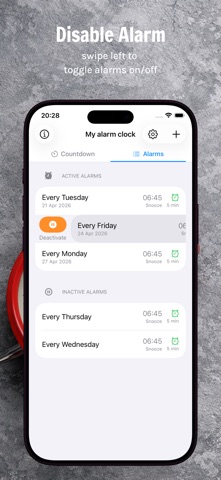
• Live countdown to your next wake-up
• Flexible snooze controls (1-30 minutes) with customizable alarm actions
• Weekly repeating alarm schedule
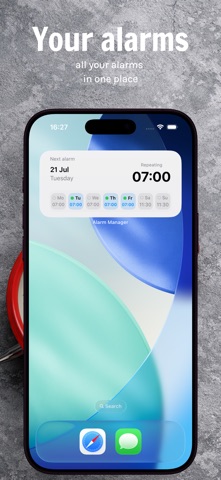
• Home screen widget with upcoming alarms
• Custom alarm sound library with built-in and imported sounds
• Manage your sounds in one place: add, preview, and remove anytime
• iOS Focus / Do Not Disturb friendly
• Privacy-first — all data stays on your device
• Clean, simple settings designed for quick daily use
FREE VERSION
• Full alarm functionality
• Supported by ads
PREMIUM VERSION
• Everything in Free
• Completely ad-free experience
• Clean, uninterrupted usage — no distractions, ever
Alarm Manager is built for anyone who wants better mornings and total control over their daily schedule.
Premium Version
The app offers an automatically renewing Premium subscription. Payment will be charged to your iTunes Account upon confirmation of purchase. Subscription automatically renews unless auto-renew is turned off at least 24-hours before the end of the current period.
Account will be charged for renewal within 24-hours before the end of the current period and specify the cost of renewal. Subscriptions may be managed by the user, and auto-renewal may be turned off by going to the user's Account Settings after purchase.
Any prices referenced are in US Dollars (USD). Pricing in other currencies and countries may vary and actual changes may be converted to your local currency depending on the country of residence.
LINKS
Stay connected and join our community:
• Website: https://alarm-manager.pamnet.pl/
Terms & Privacy:
• Private Policy: https://alarm-manager.pamnet.pl/privacy-policy
• Terms of Service: https://alarm-manager.pamnet.pl/terms-and-conditions