




AppBrain's verdict
EstablishedWell rated- Rating on App Store
- 4.31
- 2,248 ratings
- Last updated
- October 19, 2026
- Size
- 40.8 MB
Users rate it well: 4.3 stars from 2,248 ratings.
User feedback
Ratings and reviews on the App StoreComments on Alarm & Timer for iOS
We don't have enough comments to show example comments. Please check back later.
Store listing
By KAZUTERU YOKOI, from the App StoreDescription by KAZUTERU YOKOI Written by the developer, not by AppBrain. Click to read.
This all-in-one clock app combines Alarm, Timer, and Stopwatch functions into a clean, intuitive interface.
Privacy-friendly: When headphones are connected, the alarm sounds only through the headphones, not the device speakers.
By making advanced features optional, we maintain a minimalist design while meeting a wide range of user needs.
[General]
Customization: Color themes, "My Theme" creation, and adjustable font sizes.
Typography: Choose from system fonts, specialized clock fonts, or even add your own custom fonts.
Time Display: Toggle between 12/24-hour formats, customize 12:00 vs. 0:00 display, and enable/disable leading zeros (e.g., 09:00 vs. 9:00).
[Clock]
Dual analog and digital display with extensive layout options.
Design: Multiple dial designs and support for custom image/video backgrounds.
Visibility: Toggle seconds, choose second hand movement (Ticking vs. Smooth), and customize date formats/languages.
Dynamic Layout: Hide the status bar, tab bar, or settings button for a cleaner look. Digital-only mode available in landscape orientation.
Hourly Chime: Use simple presets or create a fully customized hourly schedule.
World Clock: View multiple cities and time zones simultaneously in a convenient list.
[Alarm]
Set unlimited alarms with full background notification support. Compatible with AlarmKit (iOS 26.1+), allowing alarms to sound even in Silent or Focus modes.
Scheduling: Powerful repeat options including daily, weekly, monthly, yearly, and custom intervals (e.g., every 2 days). Supports pause periods.
Sound: Use custom recordings or local music files (when the app is in the foreground).
Management: Organize alarms with folders, label search, and easy duplication. Sort by time or firing order.
Advanced Features: Checklist, Snooze, Auto-stop (by duration/repetition), Skip next, and one-tap global pause. New alarms can automatically inherit previous settings for faster setup.
[Timer]
Run multiple timers simultaneously ranging from 1 second to 10000 hours.
Quick Start: Access presets and history for instant activation.
Interface: Switch between list and full-screen views. Choose between 10-key or picker input with customizable units (1s/10s/1m/10m).
Foreground Features: Displays estimated completion time and supports auto-stop for sounds.
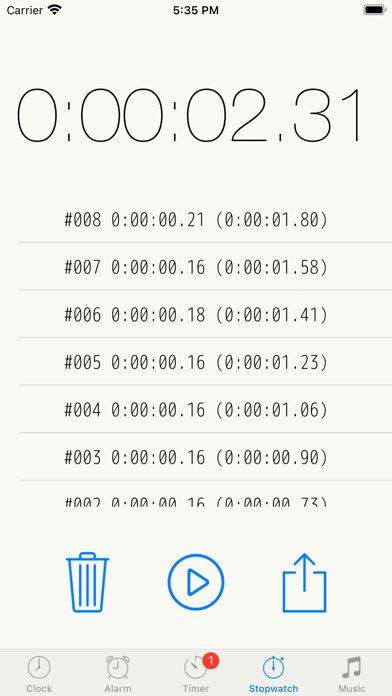
[Stopwatch]
Records: Capture lap times with precision.
Export: Send your recorded data as a text file via email.
[Other Settings]
System Integration: Audio mix mode (play alongside other music apps), and Auto-lock.
Display: Brightness adjustment with "Darkness Correction" and customizable UI elements (toggle between switches or checkboxes).
Note on Music:
Currently, this app does not support playback for Apple Music, iCloud-only songs, or purchased songs that have not been downloaded to the device storage.
URL Scheme:
net.hakoniwa.clock://
Safety and technology
Found in the app by AppBrain- Price
- Free
- App size
- 40.8 MB
- Content rating
- Everyone
Technologies used by Alarm & Timer
Releases
Updates seen on the App Store- Version
- 15.2.0
- Launched
- January 2016
No changelog data
Alternatives
Similar apps and more from KAZUTERU YOKOIAlternatives to Alarm & Timer


More from KAZUTERU YOKOI


Rankings
App Store top chartsApp Store Rankings for Alarm & Timer
About the app and developer
About Alarm & Timer
Alarm & Timer is a lifestyle app developed by KAZUTERU YOKOI.
User Ratings
Alarm & Timer is rated 4.31 out of 5 stars. The rating is based on 2.2 thousand ratings.
App Information
Alarm & Timer is freely available from the App Store. The app size is 40.85 MB. The latest version available is 15.2.0. The last update was on October 19, 2026.
Technical Requirements
The app has a content rating of Everyone. The app has been available on the App Store since January 2016.
Alarm & Timer is made and published by KAZUTERU YOKOI. AppBrain is an independent app data site and isn't affiliated with KAZUTERU YOKOI. The app name, icon, screenshots and description belong to KAZUTERU YOKOI and are shown as published on the App Store.
Developer information for KAZUTERU YOKOI
Address:
Frequently asked questions about Alarm & Timer
Is Alarm & Timer free?
Yes. Alarm & Timer is free on the App Store.
Is Alarm & Timer still available?
Yes. Alarm & Timer is on the App Store, and the last update we saw was on October 19, 2026.
How large is Alarm & Timer?
Alarm & Timer is 40.85 MB.
Is Alarm & Timer suitable for children?
App Store rates the content of Alarm & Timer as suitable for everyone.
How do people rate Alarm & Timer?
Alarm & Timer scores 4.31 out of 5 stars, from 2,248 ratings on the App Store.
Who made Alarm & Timer?
Alarm & Timer was developed by KAZUTERU YOKOI. It is listed in the lifestyle category on the App Store.
What are the best alternatives to Alarm & Timer?
People looking at Alarm & Timer also look at these lifestyle apps: Clock Face - desktop alarm, Alarmy - Loud alarm clock, Digital Clock - Bedside Alarm, Kiwake: smart alarm clock, AlarmMon ( alarm clock ).