




AppBrain's verdict
- Last updated
- November 9, 2026
- Size
- 29.3 MB
User feedback
Ratings and reviews on the App StoreComments on Alarmatic: Traffic Alarm Clock for iOS
We don't have enough comments to show example comments. Please check back later.
Store listing
By Aydin Can Polatkan, from the App StoreDescription by Aydin Can Polatkan Written by the developer, not by AppBrain. Click to read.
Other alarms ask when to wake you. Alarmatic asks when you need to arrive, then does the math.
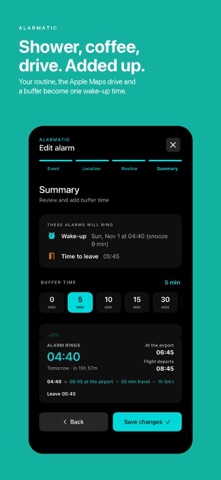
Tell it where you need to be and when. Add what you do before you leave: shower, breakfast, getting dressed. Pick how you're getting there. Alarmatic works out the latest moment you can wake up, then rings again when it's time to leave.
WHY ALARMATIC
• Set the arrival time, not the wake-up time. Alarmatic works backwards from when you need to be there.
• Real alarms. On iOS 26 and later Alarmatic uses Apple's alarm system, so it rings like the Clock app, even in Silent mode and Focus, with snooze on the Lock Screen and on Apple Watch.
• Traffic-aware travel time. Travel times come from Apple Maps for the moment you'll actually leave. Before you wake up, Alarmatic checks the route again in the background and moves your alarm earlier if the trip gets longer. Background checks run when iOS allows them.
• Your routine, added up. "Shower 10 min, coffee 5, get dressed 8": Alarmatic adds the steps and your safety buffer.
• Trips on autopilot. Turn on auto alarms and Alarmatic finds flights and trains in your calendar and sets the alarm for you, with time to get to the airport or station.
• Flights. Enter a flight number to fill in the departure time, using your own AeroDataBox key (a free plan is available).
• Apple Watch. See your next wake-up and leave time on your wrist and add it to your watch face.
• Widget and Live Activity. Your next alarm and your morning progress at a glance.
• Repeats and templates. Weekdays, weekends or the days you choose; save favorite setups as templates.
• Night mode. A dim red bedside clock with your next alarm and how much sleep you'll get. It keeps the screen on and shifts slightly so the display doesn't burn in.
• Light or dark. Alarmatic follows your iPhone's appearance, or pick Light or Dark in Settings.
FREE, OR PLUS
Alarmatic is free to download. The free version rings your next alarm and shows ads. Alarmatic Plus is a one-time purchase with no subscription: it rings every alarm, unlocks repeats, live traffic re-checks, flights and trip alarms, calendar sync, the Apple Watch app, widgets, Insights and templates, and removes the ads. Bought Alarmatic before it became free? Plus is already included.
PRIVACY
No account and no analytics. The free version shows ads from Google, personalized only if you allow it in Apple's tracking prompt; Plus has none. Your alarms stay on your device. Places you search and your location go to Apple Maps and Apple Weather to calculate routes and weather. Your calendar is read on your device to find trips; only the departure airport or station is looked up with Apple Maps. Flight numbers go only to the flight-data provider whose key you add.
A NOTE ON RELIABILITY
On iOS 26 and later, allow Alarmatic to schedule alarms when asked; that's what lets it ring in Silent mode. On iOS 17 to 25, alarms are time-sensitive notifications, which follow your Silent mode setting.
Safety and technology
Found in the app by AppBrain- Price
- Free
- App size
- 29.3 MB
- Content rating
- Everyone
Technologies used by Alarmatic: Traffic Alarm Clock
Releases
Updates seen on the App Store- Version
- 1.1
- Launched
- November 2026
No changelog data
Alternatives
Similar apps and more from Aydin Can PolatkanMore from Aydin Can Polatkan


Rankings
App Store top chartsApp Store Rankings for Alarmatic: Traffic Alarm Clock
About the app and developer
About Alarmatic: Traffic Alarm Clock
Alarmatic: Traffic Alarm Clock is a productivity app developed by Aydin Can Polatkan.
User Ratings
The app has no ratings yet.
App Information
Alarmatic: Traffic Alarm Clock is freely available from the App Store. The app size is 29.34 MB. The latest version available is 1.1. The last update was on November 9, 2026.
Technical Requirements
The app has a content rating of Everyone. The app has been available on the App Store since November 2026.
Alarmatic: Traffic Alarm Clock is made and published by Aydin Can Polatkan. AppBrain is an independent app data site and isn't affiliated with Aydin Can Polatkan. The app name, icon, screenshots and description belong to Aydin Can Polatkan and are shown as published on the App Store.
Developer information for Aydin Can Polatkan
Address:
Frequently asked questions about Alarmatic: Traffic Alarm Clock
Is Alarmatic: Traffic Alarm Clock free?
Yes. Alarmatic: Traffic Alarm Clock is free on the App Store.
Is Alarmatic: Traffic Alarm Clock still available?
Yes. Alarmatic: Traffic Alarm Clock is on the App Store, and the last update we saw was on November 9, 2026.
How large is Alarmatic: Traffic Alarm Clock?
Alarmatic: Traffic Alarm Clock is 29.34 MB.
Is Alarmatic: Traffic Alarm Clock suitable for children?
App Store rates the content of Alarmatic: Traffic Alarm Clock as suitable for everyone.
Who made Alarmatic: Traffic Alarm Clock?
Alarmatic: Traffic Alarm Clock was developed by Aydin Can Polatkan. It is listed in the productivity category on the App Store.