

Album Craft - Photo Notes
Album Craft - Photo Notes is made and published by byoungwook Lee. AppBrain is an independent app data site and isn't affiliated with byoungwook Lee. The app name, icon, screenshots and description belong to byoungwook Lee and are shown as published on the App Store.
AppBrain's verdict
- Last updated
- September 25, 2026
Rankings
App Store top chartsApp Store Rankings for Album Craft - Photo Notes
Competitors
Similar apps and more from byoungwook LeeAlternatives to Album Craft - Photo Notes






More from byoungwook Lee

Releases
Updates seen on the App Store- Version
- 1.0.1
- Launched
- June 2026
No changelog data
User feedback
Ratings and reviews on the App StoreComments on Album Craft - Photo Notes for iOS
We don't have enough comments to show example comments. Please check back later.
Technology
Found in the app by AppBrain- Price
- Free
- App size
- 50.3 MB
- Content rating
- Everyone
Technologies used by Album Craft - Photo Notes
About the app and developer
About Album Craft - Photo Notes
Album Craft - Photo Notes is a photo & video app developed by byoungwook Lee.
User Ratings
The app has no ratings yet.
App Information
Album Craft - Photo Notes is freely available from the App Store. The app size is 50.30 MB. The latest version available is 1.0.1. The last update was on September 25, 2026.
Technical Requirements
The app has a content rating of Everyone. The app has been available on the App Store since June 2026.
Developer information for byoungwook Lee
Address:
Store listing
By byoungwook Lee, from the App Store


Description by byoungwook Lee Written by the developer, not by AppBrain. Click to read.
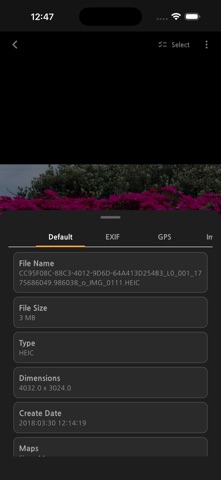
Album Craft is an on-device photo album organizer that helps you browse albums, add notes to photos, review photo information, and export selected photos as PDFs.
[Features]
You can view photos by album, organize photos into user albums, search photo notes, and check photo details such as capture date, EXIF information, and location links when available.
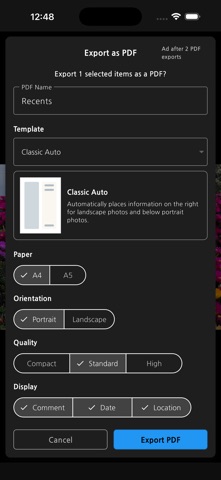
Album Craft also supports sharing selected photos, creating PDF albums with multiple layout options, adding comments to photos, and exporting or importing local note backup files using .acbackup files.
All core photo notes, album assignment data, PDF settings, and app settings are stored locally on the device.
[Key Features]
- Browse photos and albums on your device
- Organize photos into user albums
- Add and search photo comments
- View photo details, EXIF metadata, dates, and location links when available
- Share selected photos
- Create PDF albums with layout, paper, orientation, quality, date, and location options
- Export and import local photo note backups using .acbackup files
- Support English, Korean, and Japanese