

Align Vision Journal
Align Vision Journal is made and published by James Beasley. AppBrain is an independent app data site and isn't affiliated with James Beasley. The app name, icon, screenshots and description belong to James Beasley and are shown as published on the App Store.
AppBrain's verdict
- Best rank
- #109
- New Apps, Canada
- Last updated
- October 22, 2026
Rankings
App Store top charts- Highest rank
- #109
- Chart
- New Apps
- Books
- Country
- Canada
App Store Rankings for Align Vision Journal
Top rankings
| Rank | Country | Category | List |
|---|---|---|---|
| 109 | Canada | Books | New Apps |
| 109 | Canada | Business | New Apps |
| 109 | Canada | Education | New Apps |
| 109 | Canada | Finance | New Apps |
| 109 | Canada | Food & Drink | New Apps |
| 109 | Canada | Games | New Apps |
| 109 | Canada | Action Games | New Apps |
| 109 | Canada | Arcade Games | New Apps |
| 109 | Canada | Role Playing Games | New Apps |
| 109 | Canada | Simulation Games | New Apps |
Ranking history in Canada
Releases
Updates seen on the App Store- Version
- 1.0
- Launched
- October 2026
No changelog data
User feedback
Ratings and reviews on the App StoreComments on Align Vision Journal for iOS
We don't have enough comments to show example comments. Please check back later.
Technology
Found in the app by AppBrain- Price
- Free
- App size
- 3.05 MB
- Content rating
- Medium
Technologies used by Align Vision Journal
About the app and developer
About Align Vision Journal
Align Vision Journal is a medical app developed by James Beasley.
User Ratings
The app has no ratings yet.
App Information
Align Vision Journal is freely available from the App Store. The app size is 3.05 MB. The latest version available is 1.0. The last update was on October 22, 2026.
Technical Requirements
The app has a content rating of Medium Maturity. The app has been available on the App Store since October 2026.
Developer information for James Beasley
Address:
Store listing
By James Beasley, from the App Store


Description by James Beasley Written by the developer, not by AppBrain. Click to read.
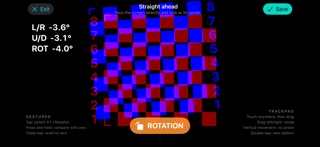
Using red-and-blue anaglyph glasses, adjust separate pattern layers until they appear aligned. Align records the horizontal, vertical, and rotational adjustments you select. Repeat the process while looking straight ahead and with your head turned left, right, up, or down.
Complete multiple test sets over days or weeks to create a journal of your observations. Review results by head position, compare observations across time, and share a printable report or spreadsheet with your eye-care professional.
Features include:
• Five viewing positions
• Grid, checkerboard, and text targets
• Horizontal, vertical, and rotational adjustments
• Adjustable red-and-blue display calibration
• Saved test sets and gallery views
• Results organized by head position and time
• Printable observation reports
• Spreadsheet export
• Screen mirroring for televisions, monitors, and projected displays
• Experimental automatic viewing-distance estimation on supported iPads
• Reversible left- and right-eye controls
Your observations are stored on your device. You decide whether and how to share exported reports.
Direct on-device observations are intended for supported iPads. On iPhone, use Align to become familiar with the app or as a controller while screen mirroring to a television, monitor, or projector. Do not make measurements from the iPhone screen.
Align records user-selected perceptual observations, not professional measurements of ocular deviation. Do not use its results to diagnose a condition, make treatment decisions, change prescribed care, or delay professional evaluation. Stop using the app if testing causes eye strain, headache, dizziness, nausea, or other discomfort.