





AppBrain's verdict
- Rating on App Store
- 5.00
- 3 ratings
- Last updated
- October 26, 2026
- Size
- 12.3 MB
It doesn't have enough ratings yet to judge what users think.
User feedback
Ratings and reviews on the App StoreComments on Aligned - Schedule Tracker for iOS
We don't have enough comments to show example comments. Please check back later.
Store listing
By prismtree, from the App StoreDescription by prismtree Written by the developer, not by AppBrain. Click to read.
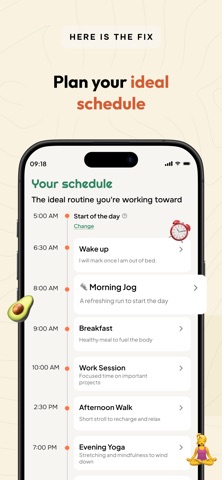
Aligned lets you set your ideal routine, log when activities actually happened, and shows drift patterns that help you to improve over time.
START IN MINUTES, NOT FROM A BLANK PAGE
Answer a few quick questions about your day, and Aligned builds a starter schedule for you: wake up, meals, work, wind-down, bedtime. Adjust any time with a tap, then make it yours.
HOW DOES ALIGNED WORK?
Plan your ideal routine:
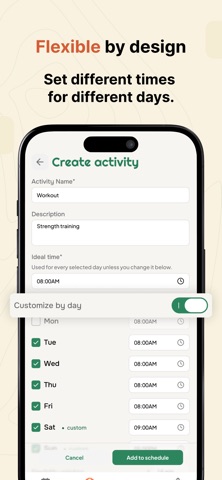
Set your daily activities with specific timings and reminders to follow. Customise activities by day of the week — choose different activities, or different timings for the same activity, on different days.
Track what actually happens:
Log the activities as they happen and capture your actual timings, including your meals, sleep and work time. Log directly from the home screen widget without even opening the app. This will help you to understand your real behaviour with ease.
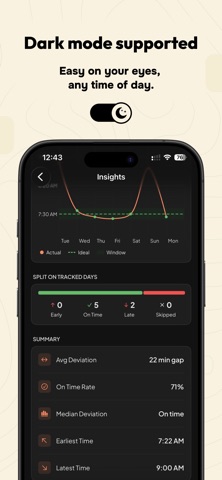
See your patterns clearly:
Understand how your routine evolves over time with:
- Weekly trends
- Monthly patterns
- Quarterly insights
See whether you are drifting away or getting closer to your ideal routine.
Designed for real-life use cases:
- Flexibility window: Add a small time buffer so an activity is considered on time if completed within 10–15 minutes of the planned time.
- Custom start of the day: Set your day start time based on your routine. The order of activities will be adjusted based on the start of the day. You don’t have to follow fixed times like 5 AM.
- Day-wise customisation: Weekdays don't look like weekends — set different activities and timings for different days of the week.
PRIVATE BY DESIGN
- Works completely offline, no account needed
- Automatic iCloud sync and manual backups
- Manage your backups with ease — restore or delete individual backups anytime
- Manual export anytime
PERFECT FOR:
- Remote workers and WFH professionals whose days blur without structure
- Anyone dealing with sleep issues or digestion problems caused by irregular meal timings
- Students and professionals who want to build consistent, trackable routines
- Anyone who wants to understand their drift and close the gap over time
FREE FEATURES:
- Track up to 5 activities in your daily routine.
- Export your data to CSV (up to 3 times)
- Detailed insights of the last 7 days of activity
ALIGNED PLUS+
- Track unlimited activities with no limits.
- Unlimited CSV exports for full data access
- Automatic iCloud sync for seamless backup
- Manual backup & restore across devices
- Detailed insights of 30 days and 90 days of activity
Aligned Plus is available quarterly, annually or as a lifetime access.
Unlike a typical planner, Aligned is a schedule tracker with insights, which is built to help you understand how you actually live, not just how you plan to.
Start planning, tracking, and improving your routine today with Aligned.
Privacy policy: https://prismtree.com/privacy-policy/
User license agreement: https://www.apple.com/legal/internet-services/itunes/dev/stdeula/
Safety and technology
Found in the app by AppBrain- Price
- Free
- App size
- 12.3 MB
- Content rating
- Everyone
Technologies used by Aligned - Schedule Tracker
Releases
Updates seen on the App Store- Version
- 1.3.1
- Launched
- May 2026
No changelog data
Alternatives
Similar apps and more from prismtreeMore from prismtree

Also available on Google Play

Rankings
App Store top chartsApp Store Rankings for Aligned - Schedule Tracker
About the app and developer
About Aligned - Schedule Tracker
Aligned - Schedule Tracker is a lifestyle app developed by prismtree.
What is the rating of Aligned - Schedule Tracker?
Aligned - Schedule Tracker is rated 5.00 out of 5 stars, based on 3 ratings.
Is Aligned - Schedule Tracker free?
Aligned - Schedule Tracker is free. The app size is 12.31 MB. The latest version available is 1.3.1. The last update was on October 26, 2026.
What are the requirements for Aligned - Schedule Tracker?
The app has a content rating of Everyone. The app has been available on the App Store since May 2026.
Aligned - Schedule Tracker is made and published by prismtree. AppBrain is an independent app data site and isn't affiliated with prismtree. The app name, icon, screenshots and description belong to prismtree and are shown as published on the App Store.
Developer information for prismtree
Address: