

All Around World Clock Weather
All Around World Clock Weather is made and published by Jack Garrett-Jones. AppBrain is an independent app data site and isn't affiliated with Jack Garrett-Jones. The app name, icon, screenshots and description belong to Jack Garrett-Jones and are shown as published on the App Store.
AppBrain's verdict
New- Rating on App Store
- 5.00
- 1 ratings
- Last updated
- August 22, 2026
All Around World Clock Weather came out 78 days ago. It doesn't have enough ratings yet to judge what users think.
Rankings
App Store top chartsApp Store Rankings for All Around World Clock Weather
Competitors
Similar apps and more from Jack Garrett-JonesAlternatives to All Around World Clock Weather


Releases
Updates seen on the App Store- Version
- 1.1
- Launched
- August 2026
No changelog data
User feedback
Ratings and reviews on the App StoreComments on All Around World Clock Weather for iOS
We don't have enough comments to show example comments. Please check back later.
Technology
Found in the app by AppBrain- Price
- Free
- App size
- 1.97 MB
- Content rating
- Everyone
Technologies used by All Around World Clock Weather
About the app and developer
About All Around World Clock Weather
All Around World Clock Weather is an utilities app developed by Jack Garrett-Jones.
What is the rating of All Around World Clock Weather?
All Around World Clock Weather is rated 5.00 out of 5 stars, based on one rating ratings.
Is All Around World Clock Weather free?
All Around World Clock Weather is free. The app size is 1.97 MB. The latest version available is 1.1. The last update was on August 22, 2026.
What are the requirements for All Around World Clock Weather?
The app has a content rating of Everyone. The app has been available on the App Store since August 2026.
Developer information for Jack Garrett-Jones
Address:
Store listing
By Jack Garrett-Jones, from the App Store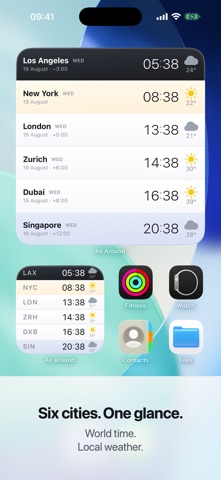


Description by Jack Garrett-Jones Written by the developer, not by AppBrain. Click to read.
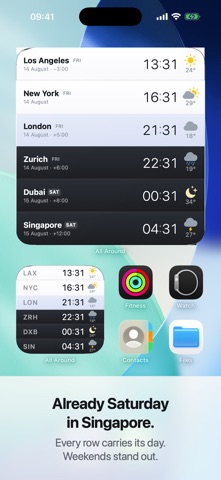
Set up the people you care about once. After that All Around lives on your Home Screen and your desktop: six cities, their local time, their weather, and a colour that tells you whether it is a decent hour to message them — read at a glance, without unlocking anything or opening anything.
WHAT THE COLOURS MEAN
• Plain — they are up and working
• Warm — early or late where they are, so tread carefully
• Blue — almost certainly asleep
You set what counts as awake and what counts as working hours. The bands follow.
WHAT EACH ROW OF THE WIDGET SHOWS
• Local time, ordered west to east
• Current conditions and temperature — °C, °F, or both
• The local day, so you notice it is already Saturday in Singapore
• Optionally a person’s name: “Priya · Bengaluru” reads as people, not places
TWO WIDGETS, TWO LISTS
Keep a work team and a family on separate widgets, side by side.
TWO SIZES
Small shows airport codes and times — six cities in the space of four app icons. Large gives every row its full name, date and offset from you.
THE APP IS JUST THE SETTINGS
Open it to pick cities, attach names and set your hours. Everything else happens on the widget.
PRIVATE BY CONSTRUCTION
No account, no sign-in, no analytics, no advertising, no tracking. Your roster is stored on your device and stays there. The only thing that ever leaves is a set of map coordinates, so a free weather service can say what the weather is doing there.
Free, and complete. Nothing is held back for a purchase.
Weather and place data from Open-Meteo.