

All in One Smart Calculator
All in One Smart Calculator is made and published by TrueNorthLabs Inc. AppBrain is an independent app data site and isn't affiliated with TrueNorthLabs Inc. The app name, icon, screenshots and description belong to TrueNorthLabs Inc. and are shown as published on the App Store.
AppBrain's verdict
- Last updated
- October 2, 2026
Rankings
App Store top chartsApp Store Rankings for All in One Smart Calculator
Competitors
Similar apps and more from TrueNorthLabs Inc.Alternatives to All in One Smart Calculator





More from TrueNorthLabs Inc.


Releases
Updates seen on the App Store- Version
- 1.15.6
- Launched
- April 2026
No changelog data
User feedback
Ratings and reviews on the App StoreComments on All in One Smart Calculator for iOS
We don't have enough comments to show example comments. Please check back later.
Technology
Found in the app by AppBrain- Price
- Free
- App size
- 18.2 MB
- Content rating
- Everyone
Technologies used by All in One Smart Calculator
About the app and developer
About All in One Smart Calculator
All in One Smart Calculator is an utilities app developed by TrueNorthLabs Inc.
User Ratings
The app has no ratings yet.
App Information
All in One Smart Calculator is freely available from the App Store. The app size is 18.18 MB. The latest version available is 1.15.6. The last update was on October 2, 2026.
Technical Requirements
The app has a content rating of Everyone. The app has been available on the App Store since April 2026.
Developer information for TrueNorthLabs Inc.
Address:
Store listing
By TrueNorthLabs Inc., from the App Store




Description by TrueNorthLabs Inc. Written by the developer, not by AppBrain. Click to read.
■ Calculator
• Arithmetic, percentage, sign toggle
• Scientific functions (sin, cos, tan, log, ln, √, powers, π, e, parentheses) in degrees or radians
• Memory keys (M+, M-, MR, MC)
• See the result before you press =
■ History and favorites
• Saves up to 100 calculations automatically
• Star favorites, add a memo and search by memo or amount (Pro)
• Export as text
■ Math workbook (new)
• 160 middle and high school problems in four topics: linear equations, quadratics, Pythagoras and trigonometry, probability and statistics
• 25 problems per round, multiple choice and written answers mixed, graded all at once at the end
• Tap a missed problem to see the steps
• On supported devices, Apple Intelligence explains the steps in plain words, on device
■ Formula book (interactive)
• 81 formulas across geometry, finance, trigonometry and algebra, physics, and astronomy
• Enter values and it calculates on the spot
• Each formula has a how-to sheet and its history
• Formula quiz with three difficulty levels
■ Handy tools
• Fuel economy and cost — km/L, L/100km and MPG (US/UK) side by side, plus cost per distance with a round trip switch. EVs too
• Discount, tip, and split the bill (share the result in a message)
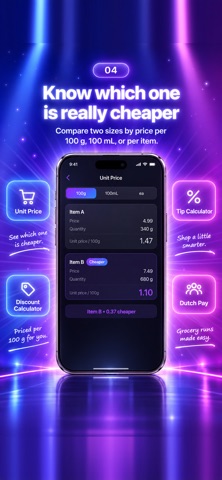
• Unit price — compares two products per 100g, 100mL or item
• Stock averaging — new average price and gain/loss
• Ovulation — fertile window and next period (nothing is saved)
• Scan and sum — reads numbers from a photo and adds them up, on device
• Unit conversion, time zones (50+ cities, DST handled) and date calculator
• Open tools from Siri, Spotlight and the Shortcuts app
■ Quotes and invoices
• Rows sharing a tax rate are grouped into a subtotal (2 rows free)
• Rounding applies once per rate subtotal, so the total always agrees
• One-page PDF — quote, invoice or receipt with date, issuer, recipient and registration number (preview free, export with Pro)
■ Tools by country (Settings > Region)
Your country of residence is separate from your display language and decides which tools appear.
• VAT and GST — 9 countries (China, Germany, Spain, France, Italy, Netherlands, Belgium, Austria, Singapore), two-way net/gross
• Stock sale tax — Korea, Japan and China. Enter the sale and cost to see the tax and what you keep
• Japan — consumption tax, simplified taxation, invoice transition relief, the 20% special rule, resale profit, simple inventory, and six payroll tools including take-home pay, social insurance by prefecture and the furusato nozei limit
• China — social insurance and housing fund, take-home pay, and year-end bonus tax comparison
• Korea — net salary, the four major insurances, severance pay, VAT, compound interest and annual leave
• Each tool explains how it calculates and what it leaves out
※ Results are for reference. For actual filing and payment, please consult a tax professional or your national tax authority.
■ About Pro
• The calculator stays free — arithmetic, scientific functions, memory, history and themes
• Tools, country calculators, the formula book, the workbook and photo math open with one purchase (not a subscription). The workbook lets you try 3 problems per topic for free
• No ads, even in the free version
※ If you downloaded this app before Pro was introduced, your Apple ID keeps every feature free
■ Built to be easy to use
• Thousands separators as you type (100000 → 100,000)
• Dark and light mode, seven accent colors
• Works on iPhone, iPad and Mac, with hardware keyboard support
• 9 languages, following your system or switched manually in the app
■ Private by design
• Every calculation happens on your device — nothing is sent anywhere
• No network requests, no tracking, no ads, no permission dialogs
• Everything works offline
A simple look and solid functions, for the small calculations you do every day.