

Allergy Translate
Allergy Translate is made and published by Chris Korhonen. AppBrain is an independent app data site and isn't affiliated with Chris Korhonen. The app name, icon, screenshots and description belong to Chris Korhonen and are shown as published on the App Store.
AppBrain's verdict
Established- Rating on App Store
- 4.20
- 5 ratings
- Last updated
- May 26, 2026
It doesn't have enough ratings yet to judge what users think.
Rankings
App Store top chartsApp Store Rankings for Allergy Translate
Competitors
Similar apps and more from Chris KorhonenAlternatives to Allergy Translate







More from Chris Korhonen


Releases
Updates seen on the App Store- Version
- 3.3
- Launched
- April 2018
No changelog data
User feedback
Ratings and reviews on the App StoreComments on Allergy Translate for iOS
We don't have enough comments to show example comments. Please check back later.
Technology
Found in the app by AppBrain- Price
- $4.99
- App size
- 34.9 MB
- Content rating
- Everyone
Technologies used by Allergy Translate
About the app and developer
About Allergy Translate
Allergy Translate is a health & fitness app developed by Chris Korhonen.
User Ratings
Allergy Translate is rated 4.20 out of 5 stars. The rating is based on 5 ratings.
App Information
Allergy Translate costs $4.99. The app size is 34.94 MB. The latest version available is 3.3. The last update was on May 26, 2026.
Technical Requirements
The app has a content rating of Everyone. The app has been available on the App Store since April 2018.
Developer information for Chris Korhonen
Address:
Store listing
By Chris Korhonen, from the App Store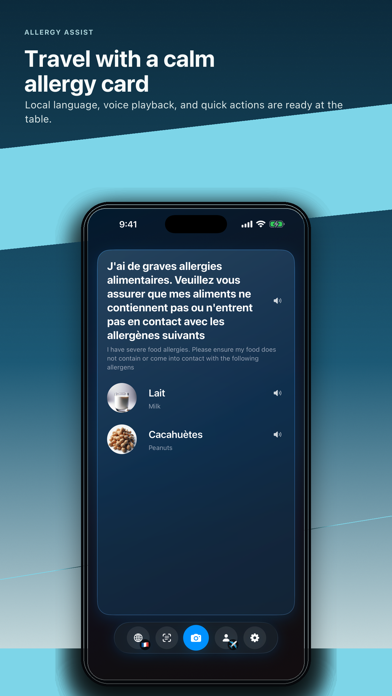



Description by Chris Korhonen Written by the developer, not by AppBrain. Click to read.
Create clear allergy cards for different profiles, translate them into supported languages, and use voice playback when staff need to hear the phrase aloud.
Newer tools help you plan before ordering:
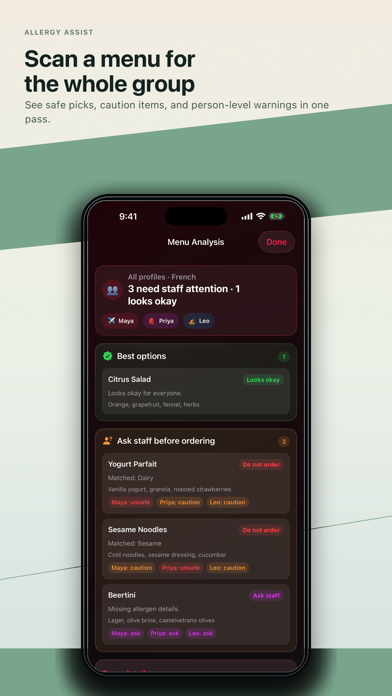
• Scan a menu photo for likely allergen risks
• Check one menu against multiple profiles at once
• See person-by-person caution badges and a safe-for-everyone shortlist
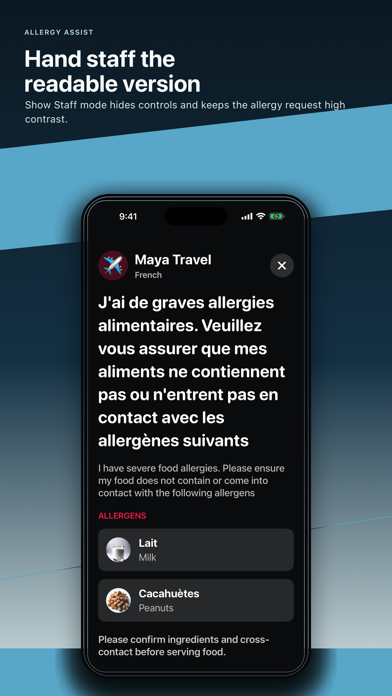
• Show a high-contrast staff mode for easier reading
• Share a child profile card for school, camps, parties, and relatives
• Keep emergency help nearby with calm, deliberate prompts
Menu scans review visible menu text only. Always confirm ingredients and cross-contact with staff before ordering.