

ALPDF - PDF Converter & Editor
ALPDF - PDF Converter & Editor is made and published by ESTsoft corp. AppBrain is an independent app data site and isn't affiliated with ESTsoft corp. The app name, icon, screenshots and description belong to ESTsoft corp. and are shown as published on the App Store.
AppBrain's verdict
- Rating on App Store
- 4.71
- 7 ratings
- Last updated
- October 12, 2026
- Size
- 372.0 MB
It doesn't have enough ratings yet to judge what users think.
User feedback
Ratings and reviews on the App StoreComments on ALPDF - PDF Converter & Editor for iOS
We don't have enough comments to show example comments. Please check back later.
Store listing
By ESTsoft corp., from the App Store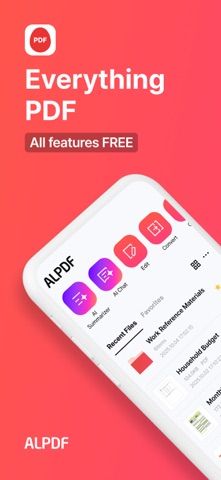


Description by ESTsoft corp. Written by the developer, not by AppBrain. Click to read.
Get free PDF tools for editing, conversion, scanning, AI summaries, and more.
· Essential PDF tools: View, edit, convert, scan, compress, split, merge, sign, lock, and organize documents
· AI & cloud features: Summarize and chat with PDFs using AI, and access files through OneDrive
· Apple device support: iPhone, iPad, and compatible Mac devices
-
● Key Features
[PDF Editing - View, Edit, Merge, and Split]
Use ALPDF as a free PDF editor on iPhone or iPad.
· PDF viewer: Quickly open and read PDF files on iPhone and iPad
· Edit PDFs: Edit text and add notes, annotations, callouts, lines, links, stamps, underlines, and multimedia
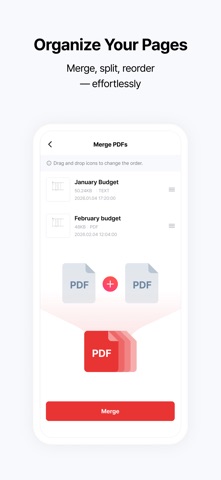
· Merge PDFs: Combine multiple documents into a single PDF
· Split PDFs: Separate, delete, or extract selected pages into individual PDF files
· Create PDFs: Create new documents with custom page size, color, and page count
· Rotate pages: Rotate PDF pages to your preferred orientation
· Compress PDFs: Reduce large PDF file sizes for easier sharing
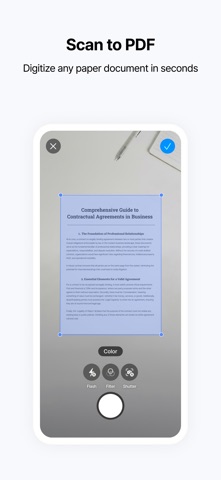
· Scan documents: Use your iPhone or iPad camera to scan paper documents and save them as PDF or image files
· Add page numbers: Customize the position, size, and font of page numbers
[PDF Conversion - Word, Excel, PPT, Images, and More]
Use the free PDF converter for PDFs, Office documents, and images.
· PDF to JPG, Word, PPT, Excel, and TXT
· JPG and PNG to PDF
· Word, PPT, and Excel to PDF
· Convert photos into PDF documents
· HWP viewing and HWP to PDF conversion supported
[AI PDF - Summary and Chat]
Understand long reports, research papers, and foreign-language documents faster with AI.
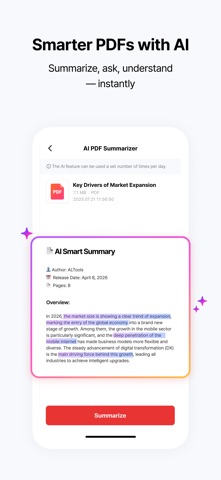
· AI PDF Summary: Get the key points from long PDF documents
· AI PDF Chat: Ask questions and get answers based on the content of your document
※ Subscribe to an ALTools AI plan on the official ALTools website for higher AI usage limits.
[Cloud Integration - OneDrive]
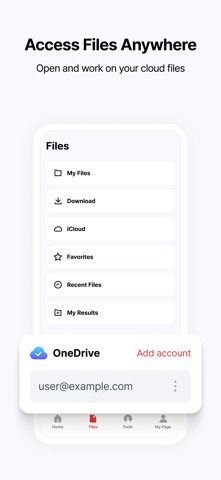
Connect your OneDrive account to access and edit documents stored in the cloud.
· Open and edit OneDrive documents directly in ALPDF
· Connect two or more OneDrive accounts at the same time
[PDF Security - Lock, Watermark, and eSign]
Keep important documents protected and organized.
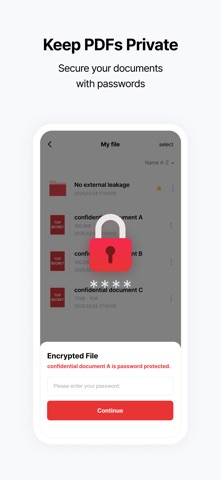
· Password protection: Add or remove passwords from PDF files
· Watermark: Add text or images to help protect document ownership
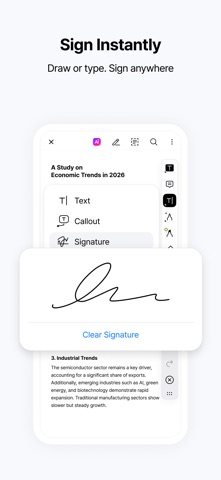
· eSign: Add your signature to PDF documents for convenient electronic signing
· Organize pages: Reorder, delete, or add PDF pages
-
● Recommended for
Professionals who need to edit documents on the go
→ Review and edit contracts, reports, and other PDF files directly on iPhone or iPad
Anyone looking for a free PDF app for everyday document tasks
→ View, edit, convert, scan, compress, merge, split, and sign PDFs in one place
Anyone who needs to scan paper documents
→ Use your iPhone or iPad camera to scan documents and save them as PDFs
Students working with research papers and study materials
→ Summarize PDFs with AI, add annotations, and convert documents for easier study
Anyone managing forms, tax documents, or important files
→ Merge, split, compress, password-protect, and eSign documents in one place
Anyone who needs to convert between PDF and other file formats
→ Convert PDFs to Word, Excel, PPT, JPG, and TXT, or create PDFs from Office files and images
Anyone who works across Apple devices
→ View and manage PDF documents on iPhone and iPad, with availability on compatible Mac devices
-
[App Permissions]
Optional Permissions
· Camera: Add photos while editing PDFs
· Microphone: Add voice notes to PDFs
· Tracking: Provide personalized ads and offers
※ You can use the app without granting optional permissions, but features that require them may be limited until permission is granted.
-
[Customer Support]
Email: altools@estsoft.com
Terms of Use: https://www.apple.com/legal/internet-services/itunes/dev/stdeula/
Safety and technology
Found in the app by AppBrain- Price
- Free
- App size
- 372.0 MB
- Content rating
- Everyone
Technologies used by ALPDF - PDF Converter & Editor
Releases
Updates seen on the App Store- Version
- 2.13.0
- Launched
- March 2025
No changelog data
Alternatives
Similar apps and more from ESTsoft corp.Alternatives to ALPDF - PDF Converter & Editor


More from ESTsoft corp.





Also available on Google Play

Rankings
App Store top chartsApp Store Rankings for ALPDF - PDF Converter & Editor
About the app and developer
About ALPDF - PDF Converter & Editor
ALPDF - PDF Converter & Editor is a productivity app developed by ESTsoft corp.
User Ratings
ALPDF - PDF Converter & Editor is rated 4.71 out of 5 stars. The rating is based on 7 ratings.
App Information
ALPDF - PDF Converter & Editor is freely available from the App Store. The app size is 371.99 MB. The latest version available is 2.13.0. The last update was on October 12, 2026.
Technical Requirements
The app has a content rating of Everyone. The app has been available on the App Store since March 2025.
Developer information for ESTsoft corp.
Address:
Frequently asked questions about ALPDF - PDF Converter & Editor
Is ALPDF - PDF Converter & Editor free?
Yes. ALPDF - PDF Converter & Editor is free on the App Store.
Is ALPDF - PDF Converter & Editor still available?
Yes. ALPDF - PDF Converter & Editor is on the App Store, and the last update we saw was on October 12, 2026.
How large is ALPDF - PDF Converter & Editor?
ALPDF - PDF Converter & Editor is 371.99 MB.
Is ALPDF - PDF Converter & Editor suitable for children?
App Store rates the content of ALPDF - PDF Converter & Editor as suitable for everyone.
How do people rate ALPDF - PDF Converter & Editor?
ALPDF - PDF Converter & Editor scores 4.71 out of 5 stars, from 7 ratings on the App Store.
Who made ALPDF - PDF Converter & Editor?
ALPDF - PDF Converter & Editor was developed by ESTsoft corp. It is listed in the productivity category on the App Store.
What are the best alternatives to ALPDF - PDF Converter & Editor?
People looking at ALPDF - PDF Converter & Editor also look at these productivity apps: Hancom Docs, Goover: Your AI Research Agent, Tiro - AI Meeting Notes, Certpia, 깔끔 한글뷰어 - hwp, hwpx, 한글파일 뷰어.