

Alterframe: Blur Video Eraser
Alterframe: Blur Video Eraser is made and published by Trove Technologies LLC. AppBrain is an independent app data site and isn't affiliated with Trove Technologies LLC. The app name, icon, screenshots and description belong to Trove Technologies LLC and are shown as published on the App Store.
AppBrain's verdict
- Last updated
- August 1, 2026
- Size
- 8.16 MB
User feedback
Ratings and reviews on the App StoreComments on Alterframe: Blur Video Eraser for iOS
We don't have enough comments to show example comments. Please check back later.
Store listing
By Trove Technologies LLC, from the App Store
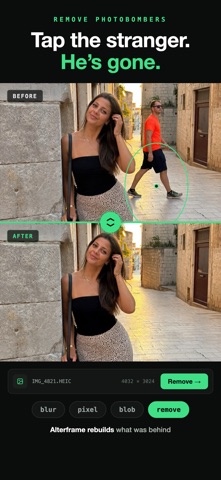

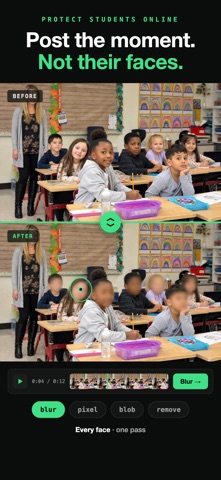

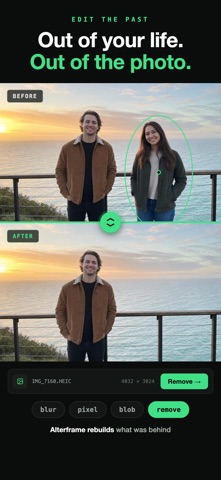


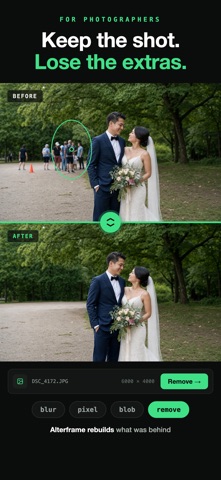

Description by Trove Technologies LLC Written by the developer, not by AppBrain. Click to read.
No timelines, no keyframes, no masks. You tap the thing once; Alterframe does the rest.
WHAT IT DOES
• Remove people and objects — the background is rebuilt so it reads as if they were never there
• Blur or pixelate faces, license plates, phone screens, documents
• Edit still photos too — tap or brush to select, then save a clean PNG. Your first 3 photo edits are free; any credit pack unlocks unlimited photo editing
• Track up to 4 objects per video or photo, each with its own effect and strength
• Handles motion, turns, and re-entries — add one extra tap if the subject leaves the frame and comes back
• Original ⇄ edited comparison with a shared playhead
• Save the finished MP4 or PNG to Photos, original audio kept
HOW IT WORKS
1. Pick a video (MP4, MOV — up to 60 minutes) or a photo
2. Tap the person or object. An outline appears with a live preview of the effect
3. Press render and save the result
NO ACCOUNT NEEDED
Start editing the moment the app opens — no sign-up, no email. Your first 3 photo edits are free, and any credit pack unlocks unlimited photo editing for good — photos never spend credits. Video starts with 3 render credits; before your first pack those renders cover clips up to 10 seconds, and a pack lifts the limit at 1 credit per started minute. Credits follow your Apple ID across devices and reinstalls.
PRIVATE BY DESIGN
Your videos and photos are processed privately and stay yours. Deleting an edit deletes the files. There is no feed, no sharing, no watermark.
Questions? https://alterframe.app/faq
Safety and technology
Found in the app by AppBrain- Price
- Free
- App size
- 8.16 MB
- Content rating
- Everyone
Technologies used by Alterframe: Blur Video Eraser
Releases
Updates seen on the App Store- Version
- 1.0.2
- Launched
- July 2026
No changelog data
Alternatives
Similar apps and more from Trove Technologies LLCAlternatives to Alterframe: Blur Video Eraser


Rankings
App Store top chartsApp Store Rankings for Alterframe: Blur Video Eraser
About the app and developer
About Alterframe: Blur Video Eraser
Alterframe: Blur Video Eraser is a photo & video app developed by Trove Technologies LLC.
User Ratings
The app has no ratings yet.
App Information
Alterframe: Blur Video Eraser is freely available from the App Store. The app size is 8.16 MB. The latest version available is 1.0.2. The last update was on August 1, 2026.
Technical Requirements
The app has a content rating of Everyone. The app has been available on the App Store since July 2026.
Developer information for Trove Technologies LLC
Address:
Frequently asked questions about Alterframe: Blur Video Eraser
Is Alterframe: Blur Video Eraser free?
Yes. Alterframe: Blur Video Eraser is free on the App Store.
Is Alterframe: Blur Video Eraser still available?
Yes. Alterframe: Blur Video Eraser is on the App Store, and the last update we saw was on August 1, 2026.
How large is Alterframe: Blur Video Eraser?
Alterframe: Blur Video Eraser is 8.16 MB.
Is Alterframe: Blur Video Eraser suitable for children?
App Store rates the content of Alterframe: Blur Video Eraser as suitable for everyone.
Who made Alterframe: Blur Video Eraser?
Alterframe: Blur Video Eraser was developed by Trove Technologies LLC. It is listed in the photo & video category on the App Store.
What are the best alternatives to Alterframe: Blur Video Eraser?
People looking at Alterframe: Blur Video Eraser also look at these photo & video apps: CleanFrame: Object Remover, QuietCut: Silence Remover, Anonpix: AI Blur Faces & Text, Imagic: AI Object Remover, BlurClip - Blur Video.