

Altitude explorer
Altitude explorer is made and published by Stefano Rampazzo. AppBrain is an independent app data site and isn't affiliated with Stefano Rampazzo. The app name, icon, screenshots and description belong to Stefano Rampazzo and are shown as published on the App Store.
AppBrain's verdict
- Last updated
- June 12, 2026
Rankings
App Store top chartsApp Store Rankings for Altitude explorer
Competitors
Similar apps and more from Stefano RampazzoMore from Stefano Rampazzo


Releases
Updates seen on the App Store- Version
- 1.0
- Launched
- June 2026
No changelog data
User feedback
Ratings and reviews on the App StoreComments on Altitude explorer for iOS
We don't have enough comments to show example comments. Please check back later.
Technology
Found in the app by AppBrain- Price
- $3.99
- App size
- 8.11 MB
- Content rating
- Everyone
Technologies used by Altitude explorer
About the app and developer
About Altitude explorer
Altitude explorer is a reference app developed by Stefano Rampazzo.
User Ratings
The app has no ratings yet.
App Information
Altitude explorer costs $3.99. The app size is 8.11 MB. The latest version available is 1.0. The last update was on June 12, 2026.
Technical Requirements
The app has a content rating of Everyone. The app has been available on the App Store since June 2026.
Developer information for Stefano Rampazzo
Address:
Store listing
By Stefano Rampazzo, from the App Store




Description by Stefano Rampazzo Written by the developer, not by AppBrain. Click to read.
Explore the terrain beneath your routes with precise elevation data powered by the Copernicus DEM GLO-90 — a global Digital Elevation Model derived from TanDEM-X radar imagery, operated by DLR and Airbus Defence and Space under the European Union's Copernicus Programme.
Global coverage of all land areas (approximately 90S to 84N latitude, 180W to 180E longitude).
What you can do
• Point query — tap anywhere on the map to get the exact elevation at that location
• Line profile — place two markers and instantly generate a cross-section of the terrain between them
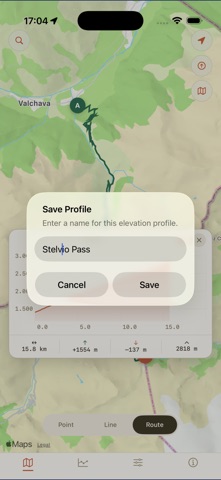
• Road profile — follow a real driving or walking route and see how elevation changes along the way
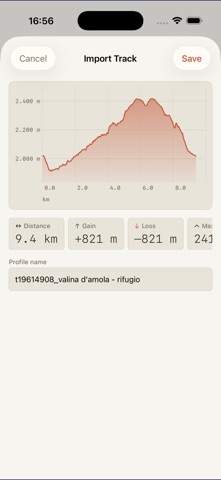
• Track import — load GPX, KML, KMZ, or GeoJSON files and visualise the elevation of your own tracks
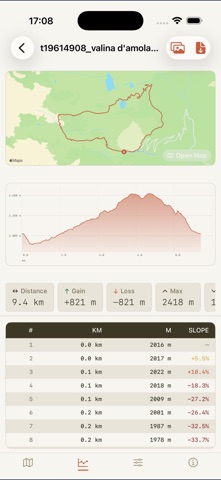
• Interactive chart — drag a scrubber along the profile chart to read elevation and distance at any point
• Saved profiles — store your profiles in a personal library and revisit them anytime
• PDF export — export any profile as a PDF with map snapshot, chart, stats and full data table
Data & accuracy
The dataset is hosted on proprietary servers for fast, direct access across all supported regions. Accuracy varies with terrain complexity — dense vegetation, steep slopes, and urban areas may introduce artefacts. Full attribution and the Copernicus Data Policy are available directly within the app under Settings → About.
Customisation
Choose your units (km/miles, m/ft), map style, interpolation algorithm, chart colour and line weight. Available in English, Italian, French, German and Spanish.