

Altitude-Meter is made and published by 文智 洪. AppBrain is an independent app data site and isn't affiliated with 文智 洪. The app name, icon, screenshots and description belong to 文智 洪 and are shown as published on the App Store.
AppBrain's verdict
- Last updated
- September 23, 2026
- Size
- 12.1 MB
User feedback
Ratings and reviews on the App StoreComments on Altitude-Meter for iOS
We don't have enough comments to show example comments. Please check back later.
Store listing
By 文智 洪, from the App Store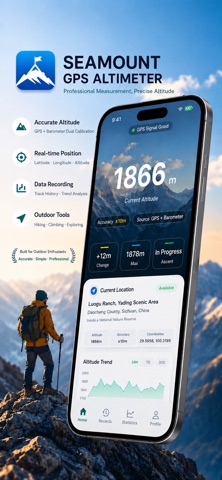
Description by 文智 洪 Written by the developer, not by AppBrain. Click to read.
【Core Features】
Precise Real-Time Altitude Monitoring – Integrates GPS + barometer dual-source positioning to display current altitude, accuracy range (e.g., ±30m), and data source in real time. Provides more reliable data in mountainous or urban environments. Supports dimensions such as "change amount," "maximum value," and "climbing status" for dynamic elevation insights.
In-Depth Data Statistics & Analysis – Built-in "Altitude Dashboard" allows one‑tap viewing of key metrics including total ascent/descent, minimum altitude, and valid sample count. Automatically generates altitude trend curves to quantify journey fluctuations, offering scientific reference for mountaineering and hiking.
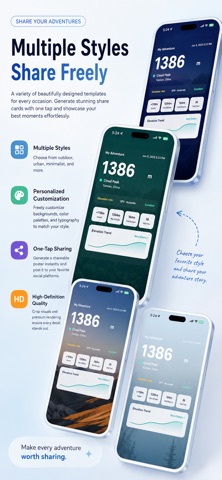
Personalized Share Posters – Preset multiple style templates such as "Mountain Classic," "City Minimalist," "Morning Ridge Mist," and "Night Contour Lines." Automatically integrates altitude, time, and track data to generate beautiful posters, making it easy to share your outdoor achievements on social platforms.
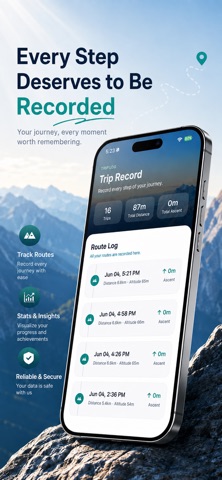
Comprehensive Historical Record Management – Stores peak altitude, ascent/descent data, and route logs for each journey along a timeline. Supports retrospective queries and data export, ensuring every exploration leaves a trace.
【Use Cases】
Ideal for mountaineering enthusiasts tracking summit heights, hikers planning route undulations, and outdoor adventurers recording geographic coordinates. Whether conquering peaks or strolling through the city, it serves as your personal "altitude butler."
【Product Highlights】
Dual‑sensor fusion algorithm delivers stable altitude output even in weak‑signal environments.
Visualized statistics + trend graphs make complex data easy to understand.
Abundant poster templates allow personalized style customization.
Lightweight interaction design with four clearly structured modules (Home, Records, Statistics, Profile) for zero learning curve.
Safety and technology
Found in the app by AppBrain- Price
- Free
- App size
- 12.1 MB
- Content rating
- Everyone
Technologies used by Altitude-Meter
Releases
Updates seen on the App Store- Version
- 1.2
- Launched
- June 2026
No changelog data
Alternatives
Similar apps and more from 文智 洪Alternatives to Altitude-Meter


More from 文智 洪


Rankings
App Store top chartsApp Store Rankings for Altitude-Meter
About the app and developer
About Altitude-Meter
Altitude-Meter is a reference app developed by 文智 洪.
User Ratings
The app has no ratings yet.
App Information
Altitude-Meter is freely available from the App Store. The app size is 12.08 MB. The latest version available is 1.2. The last update was on September 23, 2026.
Technical Requirements
The app has a content rating of Everyone. The app has been available on the App Store since June 2026.
Developer information for 文智 洪
Address:
Frequently asked questions about Altitude-Meter
Is Altitude-Meter free?
Yes. Altitude-Meter is free on the App Store.
Is Altitude-Meter still available?
Yes. Altitude-Meter is on the App Store, and the last update we saw was on September 23, 2026.
How large is Altitude-Meter?
Altitude-Meter is 12.08 MB.
Is Altitude-Meter suitable for children?
App Store rates the content of Altitude-Meter as suitable for everyone.
Who made Altitude-Meter?
Altitude-Meter was developed by 文智 洪. It is listed in the reference category on the App Store.
What are the best alternatives to Altitude-Meter?
People looking at Altitude-Meter also look at these reference apps: SchoolApp by Waresoft, Factopia: Know More Daily!, 전기기능사-기출문제,음성듣기, 해설강의, 오답노트, 가스기능사-기출문제,오답노트,해설풀이, Typing Trainer.