

Amaze - AI Image Generator
Amaze - AI Image Generator is made and published by Swiftware Solutions GmbH. AppBrain is an independent app data site and isn't affiliated with Swiftware Solutions GmbH. The app name, icon, screenshots and description belong to Swiftware Solutions GmbH and are shown as published on the App Store.
AppBrain's verdict
- Last updated
- November 12, 2024
Rankings
App Store top chartsApp Store Rankings for Amaze - AI Image Generator
Competitors
Similar apps and more from Swiftware Solutions GmbHAlternatives to Amaze - AI Image Generator





Releases
Updates seen on the App Store- Version
- 2.0
- Launched
- January 2023
No changelog data
User feedback
Ratings and reviews on the App StoreComments on Amaze - AI Image Generator for iOS
We don't have enough comments to show example comments. Please check back later.
Technology
Found in the app by AppBrain- Price
- Free
- App size
- 33.5 MB
- Content rating
- Everyone
Technologies used by Amaze - AI Image Generator
About the app and developer
About Amaze - AI Image Generator
Amaze - AI Image Generator is a graphics & design app developed by Swiftware Solutions GmbH.
User Ratings
The app has no ratings yet.
App Information
Amaze - AI Image Generator is freely available from the App Store. The app size is 33.54 MB. The latest version available is 2.0. The last update was on November 12, 2024.
Technical Requirements
The app has a content rating of Everyone. The app has been available on the App Store since January 2023.
Developer information for Swiftware Solutions GmbH
Address:
Frequently asked questions about Amaze - AI Image Generator
Is Amaze - AI Image Generator free?
Yes. Amaze - AI Image Generator is free on the App Store.
Is Amaze - AI Image Generator still available?
Yes. Amaze - AI Image Generator is on the App Store, and the last update we saw was on November 12, 2024.
How large is Amaze - AI Image Generator?
Amaze - AI Image Generator is 33.54 MB.
Is Amaze - AI Image Generator suitable for children?
App Store rates the content of Amaze - AI Image Generator as suitable for everyone.
Who made Amaze - AI Image Generator?
Amaze - AI Image Generator was developed by Swiftware Solutions GmbH. It is listed in the graphics & design category on the App Store.
What are the best alternatives to Amaze - AI Image Generator?
People looking at Amaze - AI Image Generator also look at these graphics & design apps: Aify - AI Art Generator, ArtScribe - AI Art Generator, Draw Dream - AI Art Generator, Pogie: AI Image Generator, AI Photo Maker - Art Generator.
Store listing
By Swiftware Solutions GmbH, from the App Store
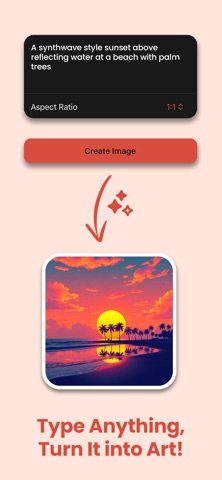



Description by Swiftware Solutions GmbH Written by the developer, not by AppBrain. Click to read.
Discover the Magic of AI-Powered Art:
- Create photos and art: Simply type what’s on your mind and watch the AI turn your words into stunning visuals. Endless creativity awaits! (In-app subscription required)
- Image variations in a snap: Transform any image into a unique, one-of-a-kind masterpiece with our image variation feature. (In-app subscription required)
- Upscale with clarity: Say goodbye to blurry images! Enjoy crisp, high-definition images with our powerful upscaling tools. (In-app subscription required)
- Remove backgrounds seamlessly: Just one tap to remove the background from any photo, perfect for that professional touch. (In-app subscription required)
Why Amaze?
- Superior Models: Create, edit, and enhance images with top-notch AI technology designed to make your visuals shine.
- Easy-to-Use: Whether you’re a social media star or a casual creator, Amaze makes it easy to elevate your images. No tech skills required!
Create, inspire, and share your art – all with Amaze. The possibilities are endless!
IN-APP PURCHASES
Amaze is free to download with a in-app subscription option. Subscribe to unlock exclusive content and features. Subscription automatically renews unless canceled at least 24 hours before the end of the current period. Payment will be charged to your iTunes account at confirmation of purchase. You can manage and cancel your subscriptions by going to your account settings on the App Store after purchase. More information: https://www.apple.com/legal/internet-services/itunes/dev/stdeula/