

AngioAID 3D is made and published by Cardiology Apps. AppBrain is an independent app data site and isn't affiliated with Cardiology Apps. The app name, icon, screenshots and description belong to Cardiology Apps and are shown as published on the App Store.
AppBrain's verdict
- Rating on App Store
- 4.00
- 1 ratings
- Last updated
- April 29, 2026
It doesn't have enough ratings yet to judge what users think.
Rankings
App Store top chartsApp Store Rankings for AngioAID 3D
Competitors
Similar apps and more from Cardiology AppsAlternatives to AngioAID 3D

 SCAI Point-of-Care App





More from Cardiology Apps


Also available on Google Play

Releases
Updates seen on the App Store- Version
- 1.0.1
- Launched
- January 2024
No changelog data
User feedback
Ratings and reviews on the App StoreComments on AngioAID 3D for iOS
We don't have enough comments to show example comments. Please check back later.
Technology
Found in the app by AppBrain- Price
- Free
- App size
- 91.8 MB
- Content rating
- High
Technologies used by AngioAID 3D
About the app and developer
About AngioAID 3D
AngioAID 3D is a medical app developed by Cardiology Apps.
What is the rating of AngioAID 3D?
AngioAID 3D is rated 4.00 out of 5 stars, based on one rating ratings.
Is AngioAID 3D free?
AngioAID 3D is free. The app size is 91.80 MB. The latest version available is 1.0.1. The last update was on April 29, 2026.
What are the requirements for AngioAID 3D?
The app has a content rating of High Maturity. The app has been available on the App Store since January 2024.
Developer information for Cardiology Apps
Address:
Store listing
By Cardiology Apps, from the App Store


Description by Cardiology Apps Written by the developer, not by AppBrain. Click to read.
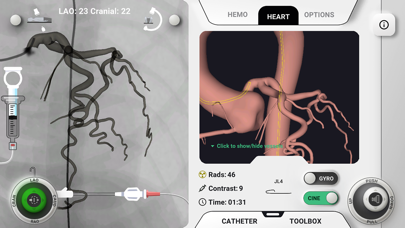
Within a 3D live simulation, you begin by advancing a diagnostic guidewire into the aortic root. Then, advance one of many diagnostic catheter options to either the right of left coronary ostium. Through pushing and pulling, as well as rotation of the catheter, try to achieve a truly co-axial engagement of the coronary ostium with the catheter. Meanwhile monitor the hemodynamic tab which simulated damping from over-engagement or roofing of the catheter tip. Line up the view with the target view, zoom to fill the screen with he coronaries, and rotate the C-Arm LAO/RAO and Cranial/Caudal until you're where you think you need to be. Finally, inject dye and take a cine to compare with the one we actually did in the cath lab for this set of coronaries.
In addition to the diagnostic simulation, "Review Mode" allows you to play with angles and panning while always being able to see the vessels with no dye injection needed. Also a collection of key topics have been included within the review mode such as key angiographic angles depending on what you're aiming to see clearly, vessel segmentation conventions, and more coronary anatomy and angiography pearls.
We highly recommend you view the tutorial video that is available when you first open the application or from the settings page to understand all of the available functions.
The first launch has a normal set of coronary arteries but please stay tuned while we create more sets of coronaries such as anomalous coronaries and bypass grafts.