

AnySketch Neo AR Trace Drawing
AnySketch Neo AR Trace Drawing is made and published by Sung Jin Park. AppBrain is an independent app data site and isn't affiliated with Sung Jin Park. The app name, icon, screenshots and description belong to Sung Jin Park and are shown as published on the App Store.
AppBrain's verdict
- Rating on App Store
- 4.75
- 8 ratings
- Last updated
- September 1, 2026
It doesn't have enough ratings yet to judge what users think.
Rankings
App Store top chartsApp Store Rankings for AnySketch Neo AR Trace Drawing
Competitors
Similar apps and more from Sung Jin ParkAlso available on Google Play

Releases
Updates seen on the App Store- Version
- 4.0.6
- Launched
- February 2026
No changelog data
User feedback
Ratings and reviews on the App StoreComments on AnySketch Neo AR Trace Drawing for iOS
We don't have enough comments to show example comments. Please check back later.
Technology
Found in the app by AppBrain- Price
- Free
- App size
- 178.1 MB
- Content rating
- Everyone
Technologies used by AnySketch Neo AR Trace Drawing
About the app and developer
About AnySketch Neo AR Trace Drawing
AnySketch Neo AR Trace Drawing is a graphics & design app developed by Sung Jin Park.
What is the rating of AnySketch Neo AR Trace Drawing?
AnySketch Neo AR Trace Drawing is rated 4.75 out of 5 stars, based on 8 ratings.
Is AnySketch Neo AR Trace Drawing free?
AnySketch Neo AR Trace Drawing is free. The app size is 178.11 MB. The latest version available is 4.0.6. The last update was on September 1, 2026.
What are the requirements for AnySketch Neo AR Trace Drawing?
The app has a content rating of Everyone. The app has been available on the App Store since February 2026.
Developer information for Sung Jin Park
Address:
Frequently asked questions about AnySketch Neo AR Trace Drawing
Is AnySketch Neo AR Trace Drawing free?
Yes. AnySketch Neo AR Trace Drawing is free on the App Store.
Is AnySketch Neo AR Trace Drawing still available?
Yes. AnySketch Neo AR Trace Drawing is on the App Store, and the last update we saw was on September 1, 2026.
How large is AnySketch Neo AR Trace Drawing?
AnySketch Neo AR Trace Drawing is 178.11 MB.
Is AnySketch Neo AR Trace Drawing suitable for children?
App Store rates the content of AnySketch Neo AR Trace Drawing as suitable for everyone.
How do people rate AnySketch Neo AR Trace Drawing?
AnySketch Neo AR Trace Drawing scores 4.75 out of 5 stars, from 8 ratings on the App Store.
Who made AnySketch Neo AR Trace Drawing?
AnySketch Neo AR Trace Drawing was developed by Sung Jin Park. It is listed in the graphics & design category on the App Store.
Store listing
By Sung Jin Park, from the App Store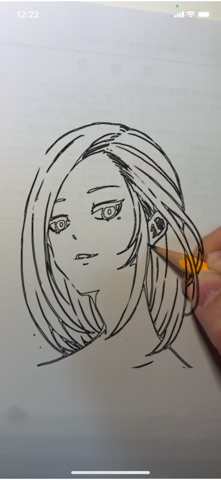

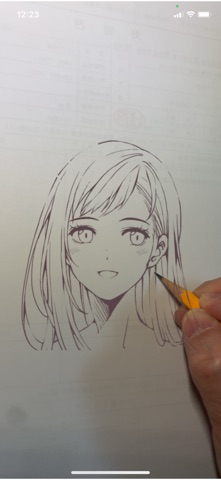
Description by Sung Jin Park Written by the developer, not by AppBrain. Click to read.
100% Free & No Ads
If You Can Capture It, You Can Sketch It
Can't draw? No problem. With AnySketch Neo, anyone can become an artist. Transform everything you see into a stunning sketch directly with your own hands. Trace any image through your camera with AR, turn your photos into anime-style art with AI, and share your creations with artists all over the world.
Key Features :
- AR Trace Drawing : Seamlessly overlay reference images onto your camera view for perfect proportions.
- Screen Lock & Refined Control : Pin your sketch in place so it never slips under your hand, and adjust transparency, outline thickness, and extraction quality in real-time.
- Capture & Create : Take a photo of your surroundings or import from your gallery to start sketching instantly.
- AI Anime Style Transform : Transform your photos into beautiful anime-style line art. Choose from 5 unique styles (Anime, Romance, Caricature, Cute, Ink Pen).
- Original Library : Access 228 professional official sketches — characters, animals, flowers, and more, growing with every update.
- Smart Search : Instantly find the exact sketch you want, both in the curated library and the Network Gallery.
- Network Gallery : Share your artwork with artists worldwide, discover creative stencils, and build a meaningful creative connection.
- Social Creative Loop : Trace designs by other artists in the community, and watch your own creations inspire new interpretations under "Traced by Others."
- Low-Light Support : Toggle your device's LED torch directly from the AR tracing screen to keep creating in any lighting condition.
- Personalize : Customize your drawing space with a redesigned home screen and 38 beautiful wallpapers.
Privacy-First & 100% Free :
No hidden costs, no in-app purchases, and zero ads. Our mission is to keep art accessible to everyone.
Core features work entirely offline. The optional Network Gallery uses anonymous authentication—no email or personal information is required.
Content Safety :
All community-shared content is actively moderated to maintain a safe and respectful creative environment.
Users must agree to clear guidelines before participating and can easily report inappropriate content or block users directly from the gallery.
AI Feature Disclosure :
The 'AI Anime Style Transform' is entirely optional and requires explicit consent.
It uses a secure third-party service (OpenAI API). Transmitted images are processed and returned; they are not retained or used for training purposes in accordance with OpenAI's API Data Usage Policy.
Usage limits apply to ensure fair access. The results are intended as reference stencils for hand-drawing—the creative process remains yours.
Our Story :
AnySketch Neo is the official, modernized evolution of the original AnySketch, first released in 2013. Re-engineered from the ground up for the modern iOS ecosystem, we leverage advanced AR technology to provide an intuitive platform for every creator.
Experience the perfect harmony of technology and traditional art. AnySketch Neo helps you bridge the gap between imagination and reality.