

APLink Pro is made and published by APLink Pte. Ltd. AppBrain is an independent app data site and isn't affiliated with APLink Pte. Ltd. The app name, icon, screenshots and description belong to APLink Pte. Ltd. and are shown as published on the App Store.
AppBrain's verdict
- Rating on App Store
- 5.00
- 1 ratings
- Last updated
- October 15, 2026
- Size
- 148.2 MB
It doesn't have enough ratings yet to judge what users think.
User feedback
Ratings and reviews on the App StoreComments on APLink Pro for iOS
We don't have enough comments to show example comments. Please check back later.
Store listing
By APLink Pte. Ltd., from the App Store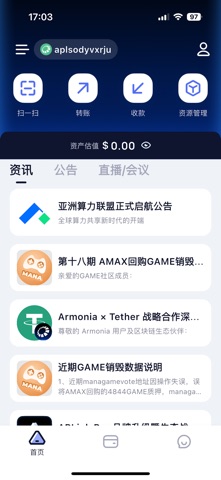


Description by APLink Pte. Ltd. Written by the developer, not by AppBrain. Click to read.
Our philosophy is to return to the essence of wallet, to help you organize and summarize each digital currency,
which will make your assets clearer, easier to use, and more secure.
What is decentralized wallet?
Centralized wallet: The user does not hold the private key of the wallet, and the private key is kept by a third party or service provider. Decentralized Wallet: The user holds the private key of the wallet, and the third party or service provider does not know the private key of the user.
APLink is a decentralized wallet that allows users to generate their private keys and store them locally. The wallet does not store any private keys and mnemonic information of users, which is safe and private.
What is multi-currency wallet?
Single currency wallet: A blockchain wallet that only serves a single blockchain digital asset. Wallets that typically support only a single blockchain backbone platform are also called mainchain wallets. Multi-currency wallets: Support multiple blockchain digital assets in a single wallet. A multi-blockchain digital asset can be either a blockchain backbone and tokens set around the backbone protocol, or different digital assets on multiple blockchain backchains. APLink is a multi-currency wallet, which supports multi-currency and multi-chain.
What if I forget my payment password?
If you forget the password at the time of creation or import, you can uninstall and reinstall the private key. Since our APP does not save any of your private key passwords, you can import the private key again and set a new payment password.
How to Create a Wallet?
1. Download APLink, click [Create Wallet], set your wallet name and password, decentralize the wallet. Do not store your password to keep it safe;
2. Record the mnemonic. The private mnemonic key is your asset, and the helpful word is your possession of the asset.
3. The wallet has been created, supporting multi-currency and multi-chain, convenient and safe.
Safety and technology
Found in the app by AppBrain- Price
- Free
- App size
- 148.2 MB
- Content rating
- Everyone
Technologies used by APLink Pro
Releases
Updates seen on the App Store- Version
- 3.2.0
- Launched
- July 2022
No changelog data
Alternatives
Similar apps and more from APLink Pte. Ltd.Alternatives to APLink Pro


Also available on Google Play

Rankings
App Store top chartsApp Store Rankings for APLink Pro
About the app and developer
About APLink Pro
APLink Pro is an utilities app developed by APLink Pte. Ltd.
User Ratings
APLink Pro is rated 5.00 out of 5 stars. The rating is based on one rating ratings.
App Information
APLink Pro is freely available from the App Store. The app size is 148.20 MB. The latest version available is 3.2.0. The last update was on October 15, 2026.
Technical Requirements
The app has a content rating of Everyone. The app has been available on the App Store since July 2022.
Developer information for APLink Pte. Ltd.
Address: