

ApolloOne - Photo Video Viewer
ApolloOne - Photo Video Viewer is made and published by Anogeissus Limited. AppBrain is an independent app data site and isn't affiliated with Anogeissus Limited. The app name, icon, screenshots and description belong to Anogeissus Limited and are shown as published on the App Store.
AppBrain's verdict
- Last updated
- October 8, 2026
- Size
- 36.3 MB
User feedback
Ratings and reviews on the App StoreComments on ApolloOne - Photo Video Viewer for iOS
We don't have enough comments to show example comments. Please check back later.
Store listing
By Anogeissus Limited, from the App Store




Description by Anogeissus Limited Written by the developer, not by AppBrain. Click to read.
ApolloOne Version 5
Built for photographers, ApolloOne is an image viewer and digital asset manager with fast, intuitive tools and no database imports. Version 5 adds tabs, Stacks, Focus Score, AI Rating, AI Keywords and more. The biggest new features form the new Max Edition, free to try for 14 days. Standard and Pro licenses keep everything they have.
NEW IN VERSION 5
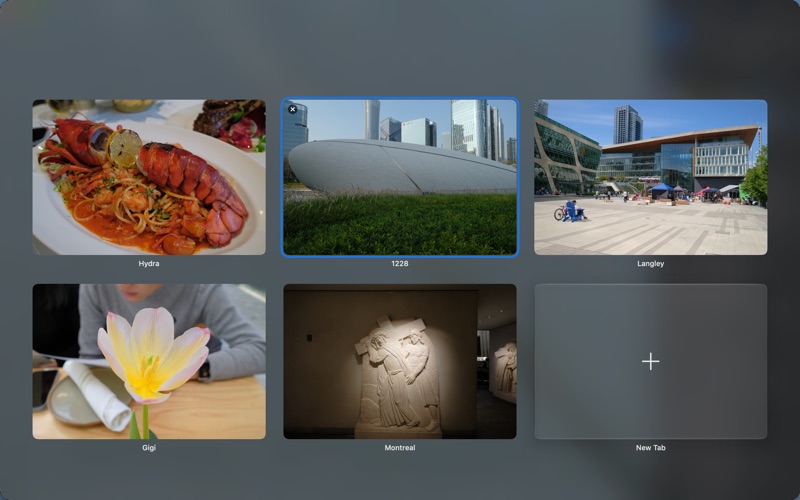
• Liquid Glass Mode³: An immersive image view with a tab overview (macOS 26 or later).
• Tabs and Multiple Windows¹: Browse several folders at once, each tab with its own selection, filters and sort order.
• Focus Score³: Grades every image from 1 to 100 on how sharply the camera focused, at the camera’s own AF points and on detected faces. Filter by the result.
• Stacks³: Group a burst, a bracket or a panorama sequence into one pile in the Contact Sheet, with a key photo on top.
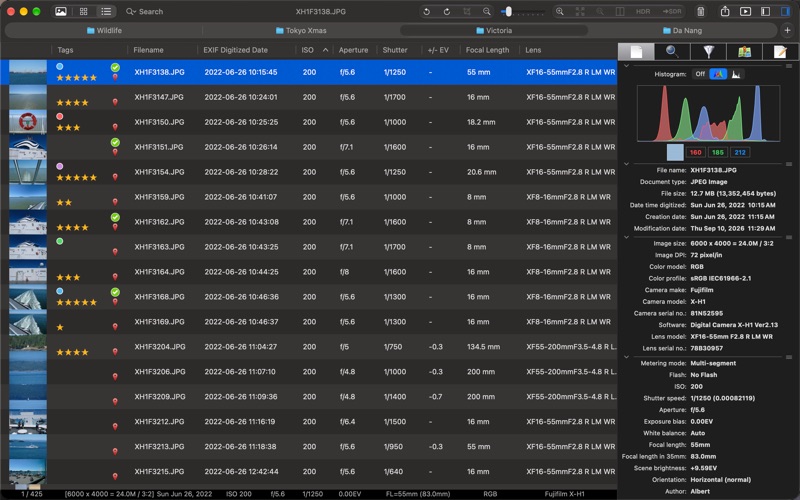
• List View¹: The Contact Sheet as a sortable table, with columns for EXIF date, ISO, aperture, shutter, focal length, lens and tags.
• Hierarchical Keywords³: A keyword tree with synonyms and categories, written to the fields Lightroom and Photo Mechanic read.
• Code Replacements³: Short codes and variables expand into full text in metadata fields and rename rules. Photo Mechanic files work as they are.
• AI Rating³,⁴: Apple Private Cloud Compute rates your photos from 1 to 5 stars, combined with their Focus Score, and picks the key photo of each stack.
• AI Keywords³,⁴: Apple Private Cloud Compute proposes the subject, species, place and keywords of each photo, for you to review and apply.
• ML Processing³,⁴: Apple’s machine learning RAW decoder with ML noise reduction, for supported cameras.
• Faster Imports²: Memory card import up to 2× faster, with an optional backup copy in the same run.
• AppleScript Automation³: Read and write image metadata from scripts, on the whole selection at once.
• Customizable Status Bar³, Hide Menu Items²: Pick the fields at the bottom of the window, and hide the functions you never use.
HDR
• World’s First High-Speed HDR RAW Viewer²: Decode full sensor dynamic range on XDR/EDR displays.
• HDR Slideshow², SDR Proof Mode², HDR histogram and overexposure visualizer².
• HDR Export²: JPEG XL, AVIF, JPEG and HEIC with gain maps, compatible with iPhone, Mac and Photoshop. OpenEXR viewing and export for all users.
• Automatic Lens Correction²: Corrects distortion, vignetting and chromatic aberration from the camera’s embedded lens profile.
SPEED⁵
• Shows 26Mpix HEIF at 55 images/sec, Fujifilm RAW at 13 images/sec on 5K displays.
• 64-bit precision, 10-bit Liquid Retina support.
• RawBridge™²: Developed with Gentlemen Coders, LLC, connects proprietary RAW formats (Nikon HE/HE*, Fujifilm) to Apple’s RAW Decoder.
• InstaBake™²: Bake your Quick Edits instantly into JPEG by AirDrop or drag-and-drop, HDR included.
ALSO INCLUDED
• Quick Edits²: Non-destructive, real-time image adjustments, synced with Camera RawX.
• Interface: HUD display, Split View with synced zoom and scroll, Bird’s Eye View, customizable toolbar, folder grouping.
• Culling: Pick (Lightroom-compatible), rate and tag with shortcuts or from the toolbar.
• Import from ApolloOne GO²: Copy only the RAW files you picked on your iPhone or iPad.
• Metadata Tools: Search, edit and tag EXIF/IPTC/XMP data.
• Batch Processing: Rename, resize, convert and export, in sRGB, Display P3 or Adobe RGB.
• Unique Features¹: Show AF points, filter by GPS, measure distances between photos.
• Video: Frame-by-frame playback, SRT subtitles, GIFs.
• Available in 11 languages.
System Requirements:
• macOS 14 (Sonoma) or later.
Notes:
¹ Needs Standard Edition subscription or license.
² Needs Pro Edition subscription or license.
³ Needs Max Edition subscription or license.
⁴ Requires macOS 27 or later.
⁵ Tested on Mac Studio M1 Ultra, 64GB RAM, 48-core GPU, 5K display, macOS 27, SSD via Thunderbolt 4.
Wildlife photos in the screenshots courtesy of Shane Dias.
Safety and technology
Found in the app by AppBrain- Price
- Free
- App size
- 36.3 MB
- Content rating
- Everyone
Technologies used by ApolloOne - Photo Video Viewer
Releases
Updates seen on the App Store- Version
- 5.0.1
- Launched
- October 2015
No changelog data
Alternatives
Similar apps and more from Anogeissus LimitedMore from Anogeissus Limited


Rankings
App Store top chartsApp Store Rankings for ApolloOne - Photo Video Viewer
About the app and developer
About ApolloOne - Photo Video Viewer
ApolloOne - Photo Video Viewer is a photo & video app developed by Anogeissus Limited.
User Ratings
The app has no ratings yet.
App Information
ApolloOne - Photo Video Viewer is freely available from the App Store. The app size is 36.27 MB. The latest version available is 5.0.1. The last update was on October 8, 2026.
Technical Requirements
The app has a content rating of Everyone. The app has been available on the App Store since October 2015.
Developer information for Anogeissus Limited
Address:
Frequently asked questions about ApolloOne - Photo Video Viewer
Is ApolloOne - Photo Video Viewer free?
Yes. ApolloOne - Photo Video Viewer is free on the App Store.
Is ApolloOne - Photo Video Viewer still available?
Yes. ApolloOne - Photo Video Viewer is on the App Store, and the last update we saw was on October 8, 2026.
How large is ApolloOne - Photo Video Viewer?
ApolloOne - Photo Video Viewer is 36.27 MB.
Is ApolloOne - Photo Video Viewer suitable for children?
App Store rates the content of ApolloOne - Photo Video Viewer as suitable for everyone.
Who made ApolloOne - Photo Video Viewer?
ApolloOne - Photo Video Viewer was developed by Anogeissus Limited. It is listed in the photo & video category on the App Store.