It doesn't have enough ratings yet to judge what users think.
App Volume: a volume per app is made and published by
CHIH YU LIN.
AppBrain is an independent app data site and isn't affiliated with CHIH YU LIN.
The app name, icon, screenshots and description belong to CHIH YU LIN and are shown as
published on the App Store.
About App Volume: a volume per app
App Volume: a volume per app is an utilities app developed by CHIH YU LIN.
What is the rating of App Volume: a volume per app?
App Volume: a volume per app is rated 3.50 out of 5 stars, based on 6 ratings.
Is App Volume: a volume per app free?
App Volume: a volume per app is free. The app size is 34.14 MB. The latest version available is 1.3.4. The last update was on October 8, 2026.
What are the requirements for App Volume: a volume per app?
The app has a content rating of Everyone. The app has been available on the App Store since May 2026.
Description by CHIH YU LIN(from the App Store)
App Volume — the per-app volume control iPhone & iPad have been missing.
Going from a quiet podcast to TikTok? No more eardrum panic. Each app gets its own volume — and now a second one just for Bluetooth headphones. Stop mashing the side button every time you switch apps. App Volume uses Apple's official Shortcuts engine — no jailbreak, no warranty risk, no advertising tracking.
— WHY IT EXISTS —
iOS has ONE global media volume: whatever you played last sets the level for whatever you open next. Spotify-to-TikTok startles everyone on the bus, and your ears want different levels on headphones than on the speaker. Apple never built per-app volume — so we did, the official way, on Apple's own Shortcuts engine.
— HOW IT WORKS —
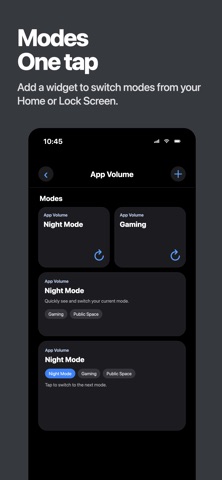
1. Create a mode and add your apps with their target volumes (TikTok 30%, Podcast 70%, Netflix 80%). 2. The in-app guide walks you through installing our pre-built template in Apple Shortcuts once. Whenever you add another app later, add it to the list of apps that trigger your existing Personal Automation. 3. Follow the in-app animation to set up one Personal Automation — switching apps auto-applies the right volume. 4. Add the widget to Lock Screen, Home Screen, or Control Center — tap to switch the whole mode in one go.
— NEW: HEADPHONE VOLUMES —
Turn on "Separate headphone volume" for any app to give it a second, headphone-only level. Bluetooth helper automations handle the switch when they run; wired headphones aren't supported.
— USE CASES —
• A volume per app — Podcast 70%, music 60%, video 80%. Set once; switching apps auto-applies. • Ears vs room — TikTok at 25% on AirPods, 60% on the speaker.
— FEATURES —
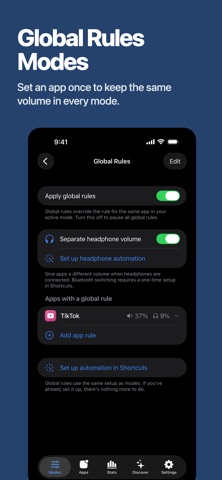
• Per-app volume targets — an independent volume for any app • Headphone volumes — a second per-app volume that applies while Bluetooth headphones are connected • Modes — bundle rules into named modes, swap the whole set instantly • Global rules — pin an app's volume across every mode; great for games that should always open muted • Ready-made modes — browse Discover, install Bedtime or Silent Game Ads in one tap • Share your setup — send any mode as a picture + link a friend can import • Widgets everywhere — Lock Screen, Home Screen, Control Center (iOS 18+): see the active mode, tap to switch • Switch notifications — silent banner by default, sound + haptic, or off • iCloud backup — modes backed up to your iCloud
— GOOD TO KNOW —
Honest limits, no surprises: • One volume at a time: App Volume sets the system volume the moment you open or switch to an app. iOS can't mix two apps playing at once — a video during a Discord call shares one level, and no App Store app can change that. • It shines with apps you actively open and switch between. Audio already playing in the background keeps its level until you return to that app. • Headphones: Bluetooth helpers apply the headphone level when they run; speaker volume may take a few seconds to return after disconnecting. Wired headphones aren't supported because Shortcuts only provides automation triggers for Bluetooth connections and disconnections.
— PRIVACY FIRST —
• No ad tracking or data sales. We collect basic analytics and crash reports. Feedback you choose to send reaches us with its text, optional email, app/build and iOS versions, device model, and locale. • No microphone, no location, no contacts • Troubleshooting guide • Privacy Policy in Settings → Privacy
— SUPPORT —
Use the in-app feedback button to reach us directly — we read every message.
Built for iPhone and iPad. From a one-person studio. Transparent development.
Terms of Use (EULA) : https://www.apple.com/legal/internet-services/itunes/dev/stdeula/
Each subscription will automatically renew 3 days before the expiration date for
the same time period. Subscriptions can be cancelled at any time before the renewal.