

AppBlock Screen Time Control
AppBlock Screen Time Control is made and published by Saif Ur Rehman. AppBrain is an independent app data site and isn't affiliated with Saif Ur Rehman. The app name, icon, screenshots and description belong to Saif Ur Rehman and are shown as published on the App Store.
AppBrain's verdict
- Last updated
- November 2, 2026
- Size
- 46.4 MB
User feedback
Ratings and reviews on the App StoreComments on AppBlock Screen Time Control for iOS
We don't have enough comments to show example comments. Please check back later.
Store listing
By Saif Ur Rehman, from the App Store


Description by Saif Ur Rehman Written by the developer, not by AppBrain. Click to read.
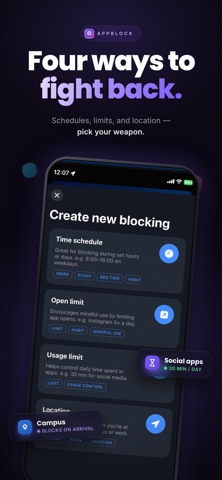
Pick the apps that pull you in, like social media, Reels, short videos or games, then choose how to block them. AppBlock uses Apple's Screen Time system, so a blocked app shows a shield screen when you try to open it.
WAYS TO BLOCK
• Quick Block: start a focus session in one tap. A countdown shows how long is left.
• Schedules: block apps during work, study, dinner or bedtime. Pick the days and the times.
• Daily limits: set how long you can use an app each day. When the time is up, the app is blocked.
• Open limits: allow only a few opens a day. The blocked screen shows how many you have left.
• Location blocking: block apps when you are at school, the library or the office, or when you are away from a place you choose.
SEE YOUR SCREEN TIME
Guess your daily screen time, then see the real number. Insights show your screen time and your most used apps each day for free. Weekly and monthly views come with Premium.
MADE FOR REAL LIFE
• Stop doomscrolling at night
• Study or work without your phone pulling you away, with an app blocker that stays on
• Keep dinner and family time phone free
• Switch off work apps when you get home
PRIVACY
The apps you pick stay private. Apple's Screen Time system keeps your list hidden from us, and your schedules and limits are stored on your device.
11 LANGUAGES
English, Spanish, Portuguese (Brazil and Portugal), German, French, Italian, Dutch, Japanese, Korean and Simplified Chinese.
HOW IT WORKS
1. Allow Screen Time access once
2. Pick the apps that distract you
3. Start Quick Block, or set a schedule, a limit or a place
4. Get your time back
FREE AND PREMIUM
AppBlock is free to start. The free plan includes 4 hour Quick Block sessions, schedules on one day, a few usage, open and location rules, and daily Insights.
Premium adds more rules, longer usage limits, schedules on several days, 24 hour Quick Block sessions, and weekly and monthly Insights.
Try Premium free for 7 days, then choose monthly or yearly.
SUBSCRIPTION DETAILS
• Premium is an auto-renewing subscription, billed monthly or yearly
• Payment is charged to your Apple Account at confirmation of purchase
• The subscription renews automatically unless you turn it off at least 24 hours before the end of the current period
• Your account is charged for renewal within 24 hours before the end of the current period
• Manage or cancel in your Apple Account settings
• Any unused part of a free trial is lost when you buy a subscription
Privacy Policy: https://o9tech.com/appblocker/privacypolicy.html
Terms of Use: https://www.apple.com/legal/internet-services/itunes/dev/stdeula/
Support: support@o9tech.com
Safety and technology
Found in the app by AppBrain- Price
- Free
- App size
- 46.4 MB
- Content rating
- Everyone
Technologies used by AppBlock Screen Time Control
Releases
Updates seen on the App Store- Version
- 1.0.4
- Launched
- June 2026
No changelog data
Alternatives
Similar apps and more from Saif Ur RehmanAlternatives to AppBlock Screen Time Control


More from Saif Ur Rehman


Rankings
App Store top chartsApp Store Rankings for AppBlock Screen Time Control
About the app and developer
About AppBlock Screen Time Control
AppBlock Screen Time Control is a productivity app developed by Saif Ur Rehman.
What is the rating of AppBlock Screen Time Control?
AppBlock Screen Time Control has no ratings yet.
Is AppBlock Screen Time Control free?
AppBlock Screen Time Control is free. The app size is 46.39 MB. The latest version available is 1.0.4. The last update was on November 2, 2026.
What are the requirements for AppBlock Screen Time Control?
The app has a content rating of Everyone. The app has been available on the App Store since June 2026.
Developer information for Saif Ur Rehman
Address: