

AppCage: Lock Apps & Focus
AppCage: Lock Apps & Focus is made and published by liang zhenying. AppBrain is an independent app data site and isn't affiliated with liang zhenying. The app name, icon, screenshots and description belong to liang zhenying and are shown as published on the App Store.
AppBrain's verdict
- Last updated
- October 16, 2026
Rankings
App Store top chartsApp Store Rankings for AppCage: Lock Apps & Focus
Competitors
Similar apps and more from liang zhenyingMore from liang zhenying


Releases
Updates seen on the App Store- Version
- 1.0.0
- Launched
- October 2026
No changelog data
User feedback
Ratings and reviews on the App StoreComments on AppCage: Lock Apps & Focus for iOS
We don't have enough comments to show example comments. Please check back later.
Technology
Found in the app by AppBrain- Price
- Free
- App size
- 4.17 MB
- Content rating
- Everyone
Technologies used by AppCage: Lock Apps & Focus
About the app and developer
About AppCage: Lock Apps & Focus
AppCage: Lock Apps & Focus is an utilities app developed by liang zhenying.
User Ratings
The app has no ratings yet.
App Information
AppCage: Lock Apps & Focus is freely available from the App Store. The app size is 4.17 MB. The latest version available is 1.0.0. The last update was on October 16, 2026.
Technical Requirements
The app has a content rating of Everyone. The app has been available on the App Store since October 2026.
Developer information for liang zhenying
Address:
Store listing
By liang zhenying, from the App Store


Description by liang zhenying Written by the developer, not by AppBrain. Click to read.
Ten minutes, you told yourself. Two hours later you look up. Every attempt to cut back on your own ends the same way: the moment you reach for your phone, it's already in your hand. AppCage doesn't ask you to resist — it makes the apps you named unavailable, and iOS enforces it.
【HOW IT WORKS】
· Grant Screen Time access once, then pick the apps or categories to limit with the system picker
· Lock them: the app stays on the Home Screen and asks for verification when you open it
· The blocking is done by iOS. AppCage never touches the app's process, and it can't be bypassed from inside the app you're trying to avoid
【FOUR WAYS TO DECIDE WHEN IT'S ON】
· Always on — limited all day; verify, then use it for a while
· Scheduled — shielding switches itself on for the window you set (study hours, bedtime, work)
· Free time — usable during the window, shielded the rest of the day (lunch breaks and other exceptions)
· By date — only on the days you pick: exam week, a trip, any stretch that needs it
【NEED IT RIGHT NOW? TAKE TEMPORARY ACCESS】
· Verify and it opens for 15 minutes, then shielding returns on its own
· As often as you like, every time — you verify each time
· Rather stop early? Tap one button and it's shielded again
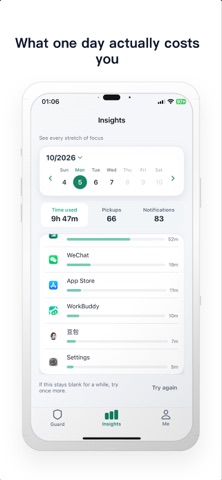
【SEE WHAT ONE DAY ACTUALLY COSTS】
· Screen time, pickups and notifications for any day, plus a per-app breakdown
· About the last month, day by day — the numbers stay on your phone
【AND WHEN IT OPENS?】
· Open a limited app and iOS shows the block screen. That's it — no second chance, no "just this once" unless you ask for it yourself
【BOUNDARIES FOR A SHARED OR A CHILD'S DEVICE】
· Block app installs and deletions, App Store payments and in-app purchases
· Lock account changes, date & time, Game Center friends and multiplayer
· Restrict apps by age rating, and block explicit content
【PRIVACY FIRST】
· No servers, no sign-up, nothing uploaded
· No ads, no third-party analytics SDKs, no cross-app tracking
· Your passcode and recovery code live only in this device's Keychain
· Usage figures come from iOS and never leave your device
【WHAT'S FREE】
Scheduled plans, free time, by-date rules, temporary access, insights, the App Library-level system limits (block installs, purchases, account changes, multiplayer games, explicit content) and the stealth calculator entry — all available to everyone. The free version limits how many apps, categories and websites you can limit in total (1). Pro removes that limit.
Important: limits are enforced by iOS through Screen Time authorization. Turning that authorization off in Settings → Screen Time lifts every limit at once, and anyone who knows your passcode — or your Face ID — can grant temporary access. AppCage helps you keep your own rules; it is not tamper-proof control over another person's device. The developer is not liable for limits that fail because of device failure, system settings or permission changes.
Download AppCage and hand the rules over to something that never gets tired.
Terms of Use: https://lancewin.github.io/appcage/terms_en.html
Privacy Policy: https://lancewin.github.io/appcage/privacy_en.html