

AppHush is made and published by Moutaz Baaj. AppBrain is an independent app data site and isn't affiliated with Moutaz Baaj. The app name, icon, screenshots and description belong to Moutaz Baaj and are shown as published on the App Store.
AppBrain's verdict
- Last updated
- October 8, 2026
Rankings
App Store top chartsApp Store Rankings for AppHush
Competitors
Similar apps and more from Moutaz BaajAlternatives to AppHush


More from Moutaz Baaj


Releases
Updates seen on the App Store- Version
- 2.1
- Launched
- October 2026
No changelog data
User feedback
Ratings and reviews on the App StoreComments on AppHush for iOS
We don't have enough comments to show example comments. Please check back later.
Technology
Found in the app by AppBrain- Price
- Free
- App size
- 11.6 MB
- Content rating
- Everyone
Technologies used by AppHush
About the app and developer
About AppHush
AppHush is an utilities app developed by Moutaz Baaj.
What is the rating of AppHush?
AppHush has no ratings yet.
Is AppHush free?
AppHush is free. The app size is 11.65 MB. The latest version available is 2.1. The last update was on October 8, 2026.
What are the requirements for AppHush?
The app has a content rating of Everyone. The app has been available on the App Store since October 2026.
Developer information for Moutaz Baaj
Address:
Frequently asked questions about AppHush
Is AppHush free?
Yes. AppHush is free on the App Store.
Is AppHush still available?
Yes. AppHush is on the App Store, and the last update we saw was on October 8, 2026.
How large is AppHush?
AppHush is 11.65 MB.
Is AppHush suitable for children?
App Store rates the content of AppHush as suitable for everyone.
Who made AppHush?
AppHush was developed by Moutaz Baaj. It is listed in the utilities category on the App Store.
What are the best alternatives to AppHush?
People looking at AppHush also look at these utilities apps: diBlue, Mars Hydro, Inateck Office, Mars Legacy, Certo AntiSpy.
Store listing
By Moutaz Baaj, from the App Store




Description by Moutaz Baaj Written by the developer, not by AppBrain. Click to read.
Pause distracting apps, set recurring usage limits, build automatic routines, and block websites—all in one place, with dedicated Home, Focus, Usage Limits, Schedule, and Websites tabs.
With AppHush, you can:
- Block selected apps immediately for a chosen amount of time.
- Choose whether a focus session can be cancelled early. Turn off Allow Early Unlock to commit until the timer ends, with Emergency Unlock still available.
- Set recurring usage limits: choose how long you can use an app and how long it should be blocked afterward.
- Create custom app-blocking lists for studying, working, sleeping, workouts, and more.
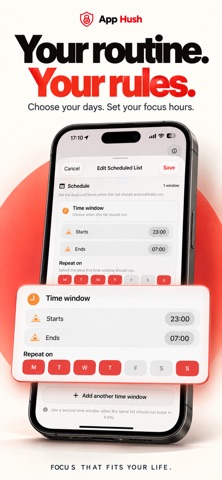
- Schedule lists by weekday, with multiple time windows and overnight schedules.
- Enable or disable saved schedules without recreating them.
- Block websites by choosing from those available in Apple’s Screen Time picker or entering an address manually.
- See active focus countdowns, usage-limit counts, enabled schedules, and website rules on your Home dashboard.
- Check which scheduled list is coming up next.
- View today’s Screen Time and detailed usage insights on your iPhone.
- See how much protection capacity is used and how much remains available.
- Check blocked apps, remaining block time, usage-limit rules, schedules, and blocked websites on your paired Apple Watch.
- Customize app names used for Apple Watch and notifications when needed.
- Receive notifications when focus blocks end, plus app news and update announcements, subject to your iOS notification settings.
- Protect access to AppHush with Face ID, Touch ID, or device passcode.
- Use Emergency Unlock to clear active restrictions. Saved schedules remain but are turned off.
- Delete AppHush’s saved rules and preferences to start fresh. This does not delete Apple’s Screen Time history or device backups.
- Enjoy an interface that adapts to light and dark appearance.
No account or login is required.
AppHush uses Apple Screen Time technologies to apply restrictions to the apps and websites you select. Screen Time permission is required for protection features, and the Apple Watch companion requires a paired iPhone.
Take back control of your time, one intentional choice at a time.