

AppTidy - App Manager
AppTidy - App Manager is made and published by joon-ho kil. AppBrain is an independent app data site and isn't affiliated with joon-ho kil. The app name, icon, screenshots and description belong to joon-ho kil and are shown as published on the App Store.
AppBrain's verdict
- Last updated
- May 23, 2026
Rankings
App Store top chartsApp Store Rankings for AppTidy - App Manager
Competitors
Similar apps and more from joon-ho kilMore from joon-ho kil


Releases
Updates seen on the App Store- Version
- 1.0
- Launched
- May 2026
No changelog data
User feedback
Ratings and reviews on the App StoreComments on AppTidy - App Manager for iOS
We don't have enough comments to show example comments. Please check back later.
Technology
Found in the app by AppBrain- Price
- Free
- App size
- 3.61 MB
- Content rating
- Everyone
Technologies used by AppTidy - App Manager
About the app and developer
About AppTidy - App Manager
AppTidy - App Manager is an utilities app developed by joon-ho kil.
User Ratings
The app has no ratings yet.
App Information
AppTidy - App Manager is freely available from the App Store. The app size is 3.61 MB. The latest version available is 1.0. The last update was on May 23, 2026.
Technical Requirements
The app has a content rating of Everyone. The app has been available on the App Store since May 2026.
Developer information for joon-ho kil
Address:
Store listing
By joon-ho kil, from the App Store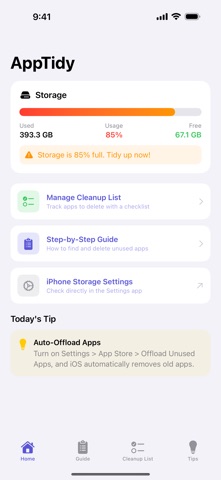


Description by joon-ho kil Written by the developer, not by AppBrain. Click to read.
【 Key Features 】
Storage Overview
Check your iPhone storage usage in real time. See used and free space at a glance.
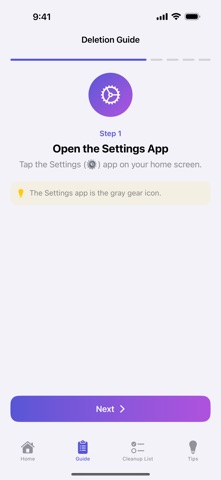
Step-by-Step Deletion Guide
A 5-step guide to finding and deleting unused apps. Anyone can follow along, even first-timers.
Cleanup Checklist
Manage your list of apps to delete. Add apps, check them off when done, and track your progress.
Monthly Cleanup Reminder
Get a reminder every 1st of the month at 10 AM so you never forget to clean up.
Home & Lock Screen Widgets
Add widgets to check your storage status directly from your home or lock screen.
Storage Tips
8 practical tips including offloading, clearing cache, and optimizing photos.
【 Who It's For 】
• People who frequently see "Storage Almost Full"
• Anyone unsure which apps to delete
• Those who want to regularly maintain their phone