

AquaTick Water Tracker
AquaTick Water Tracker is made and published by Byunghak Ko. AppBrain is an independent app data site and isn't affiliated with Byunghak Ko. The app name, icon, screenshots and description belong to Byunghak Ko and are shown as published on the App Store.
AppBrain's verdict
- Last updated
- October 10, 2026
Rankings
App Store top chartsApp Store Rankings for AquaTick Water Tracker
Competitors
Similar apps and more from Byunghak KoMore from Byunghak Ko

Releases
Updates seen on the App Store- Version
- 1.3.3
- Launched
- May 2026
No changelog data
User feedback
Ratings and reviews on the App StoreComments on AquaTick Water Tracker for iOS
We don't have enough comments to show example comments. Please check back later.
Technology
Found in the app by AppBrain- Price
- Free
- App size
- 153.9 MB
- Content rating
- Everyone
Technologies used by AquaTick Water Tracker
About the app and developer
About AquaTick Water Tracker
AquaTick Water Tracker is a health & fitness app developed by Byunghak Ko.
What is the rating of AquaTick Water Tracker?
AquaTick Water Tracker has no ratings yet.
Is AquaTick Water Tracker free?
AquaTick Water Tracker is free. The app size is 153.86 MB. The latest version available is 1.3.3. The last update was on October 10, 2026.
What are the requirements for AquaTick Water Tracker?
The app has a content rating of Everyone. The app has been available on the App Store since May 2026.
Developer information for Byunghak Ko
Address:
Store listing
By Byunghak Ko, from the App Store


Description by Byunghak Ko Written by the developer, not by AppBrain. Click to read.
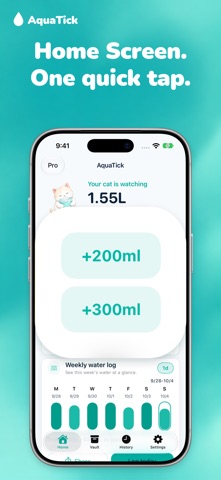
Log water from Home Screen widgets, Lock Screen widgets, or Apple Watch—often without opening the app. See today's total, daily goal, remaining amount, and progress on iPhone, Live Activity, and Dynamic Island, and let the cat's expressions gently nudge you when you fall behind.
Key features
- One-tap quick add for common amounts and your favorite cups
- Cup Vault to save and find your cups, with 3 or 6 cups on Home Quick Add
- Custom amounts and undo for recent accidental entries
- History tab with monthly calendar and selected-day progress
- 7-day average, goal-hit days, and streak flow
- Home Screen and Lock Screen widgets for progress and quick logging
- Live Activities and Dynamic Island keep hydration visible
- Apple Watch app and complications for wrist-side logging
- Optional reminder notifications and Apple Health sync
AquaTick works without an account. Log in mL or US fl oz, see your daily progress, and undo recent accidental entries. Apple Health and reminders are optional. Keep recording from your iPhone, widgets, or Apple Watch.
Terms of Use (EULA): https://sparkish-xyz.github.io/aquatick/en/terms/
Privacy Policy: https://sparkish-xyz.github.io/aquatick/privacy/