

AR Block Cubes
AR Block Cubes is made and published by UniCom Technology. AppBrain is an independent app data site and isn't affiliated with UniCom Technology. The app name, icon, screenshots and description belong to UniCom Technology and are shown as published on the App Store.
AppBrain's verdict
- Rating on App Store
- 4.00
- 9 ratings
- Last updated
- March 14, 2025
It doesn't have enough ratings yet to judge what users think.
Rankings
App Store top chartsApp Store Rankings for AR Block Cubes
Competitors
Similar apps and more from UniCom TechnologyAlternatives to AR Block Cubes





More from UniCom Technology


Releases
Updates seen on the App Store- Version
- 1.3
- Launched
- November 2021
No changelog data
User feedback
Ratings and reviews on the App StoreComments on AR Block Cubes for iOS
We don't have enough comments to show example comments. Please check back later.
Technology
Found in the app by AppBrain- Price
- Free
- App size
- 13.0 MB
- Content rating
- Everyone
Technologies used by AR Block Cubes
About the app and developer
About AR Block Cubes
AR Block Cubes is an entertainment app developed by UniCom Technology.
User Ratings
AR Block Cubes is rated 4.00 out of 5 stars. The rating is based on 9 ratings.
App Information
AR Block Cubes is freely available from the App Store. The app size is 12.99 MB. The latest version available is 1.3. The last update was on March 14, 2025.
Technical Requirements
The app has a content rating of Everyone. The app has been available on the App Store since November 2021.
Developer information for UniCom Technology
Address:
Store listing
By UniCom Technology, from the App Store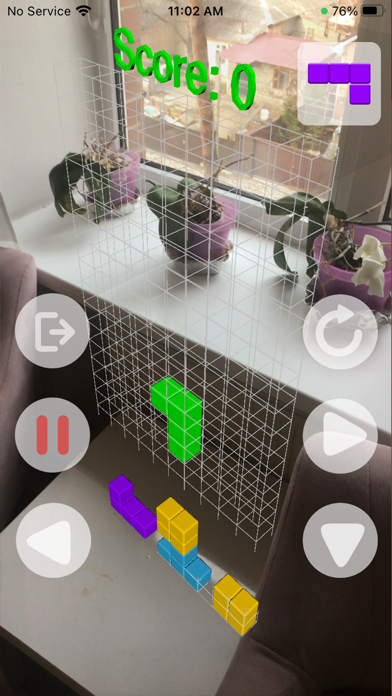

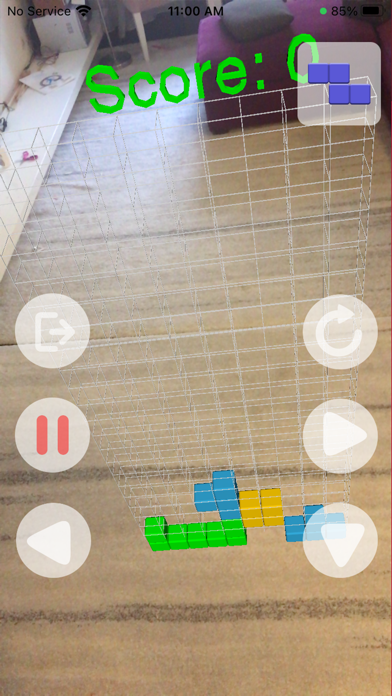


Description by UniCom Technology Written by the developer, not by AppBrain. Click to read.
AR Block Puzzle is a real classic, no time limit and totally free elimination game.
Play AR Block Puzzle - Board Games everyday, eliminate blocks with your family, enjoy the pure family time, this classic board game fits for all ages and skill levels!
How to play:
• Just hold your camera to the surface where game would launch
• Select the detected surface and locate the pointer where game will be launched
• After that game should appear on the
• Use control buttons to move shapes
• Increase score by manipulating shapes, with the aim of creating a horizontal line of eleven units without gaps
• Try to improve your score