



AppBrain's verdict
- Last updated
- April 30, 2026
- Size
- 11.0 MB
User feedback
Ratings and reviews on the App StoreComments on AR Draw Sketch & Trace for iOS
We don't have enough comments to show example comments. Please check back later.
Store listing
By Adnan Amin, from the App StoreDescription by Adnan Amin Written by the developer, not by AppBrain. Click to read.
Whether you're a complete beginner or a seasoned artist, our live AR overlay makes drawing feel effortless, fun, and satisfying from your very first stroke.
HOW IT WORKS
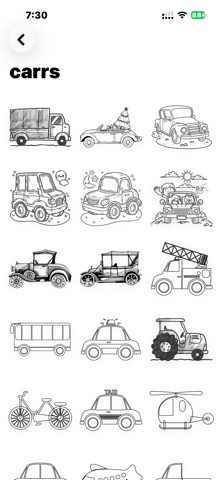
1. Browse and pick any character from our image library
2. Point your camera at your paper or sketchbook
3. The character appears as a live overlay on your screen
4. Trace the outline directly onto paper beneath your phone
5. Lift your phone — your drawing is done!
No projectors. No special equipment. Just your phone and a pencil.
KEY FEATURES
Live AR Camera Overlay
See character images projected in real time through your camera. Resize, reposition, and adjust opacity to match your paper perfectly before you start tracing.
Curated Character Library
Browse a growing collection of characters loaded fresh from our online library. New content is added regularly so you always have something new to draw.
Beginner Friendly
Never drawn before? No problem. The AR overlay removes the hardest part of drawing — getting proportions right. Just follow the lines and build your confidence stroke by stroke.
Clean, Distraction-Free Interface
Everything is designed to get out of your way so you can focus on drawing. No cluttered menus, no steep learning curve.
Works on Any Surface
Paper, sketchbooks, canvas, cardboard — if you can draw on it, AR Draw works on it.
WHO IS THIS FOR?
- Kids learning to draw for the first time
- Hobbyists who want to sketch characters with accuracy
- Artists who use tracing as a warm-up or reference tool
- Anyone who wants to draw but doesn't know where to start
START DRAWING TODAY
Download AR Draw Sketch & Trace and pick up a pencil. Your first great drawing is one overlay away.
Safety and technology
Found in the app by AppBrain- Price
- Free
- App size
- 11.0 MB
- Content rating
- Everyone
Technologies used by AR Draw Sketch & Trace
Releases
Updates seen on the App Store- Version
- 1.2
- Launched
- April 2026
No changelog data
Alternatives
Similar apps and more from Adnan AminAlternatives to AR Draw Sketch & Trace


Rankings
App Store top chartsApp Store Rankings for AR Draw Sketch & Trace
About the app and developer
About AR Draw Sketch & Trace
AR Draw Sketch & Trace is an education app developed by Adnan Amin.
User Ratings
The app has no ratings yet.
App Information
AR Draw Sketch & Trace is freely available from the App Store. The app size is 11.01 MB. The latest version available is 1.2. The last update was on April 30, 2026.
Technical Requirements
The app has a content rating of Everyone. The app has been available on the App Store since April 2026.
AR Draw Sketch & Trace is made and published by Adnan Amin. AppBrain is an independent app data site and isn't affiliated with Adnan Amin. The app name, icon, screenshots and description belong to Adnan Amin and are shown as published on the App Store.
Developer information for Adnan Amin
Address:
Frequently asked questions about AR Draw Sketch & Trace
Is AR Draw Sketch & Trace free?
Yes. AR Draw Sketch & Trace is free on the App Store.
Is AR Draw Sketch & Trace still available?
Yes. AR Draw Sketch & Trace is on the App Store, and the last update we saw was on April 30, 2026.
How large is AR Draw Sketch & Trace?
AR Draw Sketch & Trace is 11.01 MB.
Is AR Draw Sketch & Trace suitable for children?
App Store rates the content of AR Draw Sketch & Trace as suitable for everyone.
Who made AR Draw Sketch & Trace?
AR Draw Sketch & Trace was developed by Adnan Amin. It is listed in the education category on the App Store.
What are the best alternatives to AR Draw Sketch & Trace?
People looking at AR Draw Sketch & Trace also look at these education apps: Athanify: Prayer Times & Focus, Plant Identifier & Care Guide:, Akshar Vidya Mandir, Parrot Paper, Plant ID: Leaf & Garden Care.