

AR Drawing Projector: Trace
AR Drawing Projector: Trace is made and published by omur olgunay. AppBrain is an independent app data site and isn't affiliated with omur olgunay. The app name, icon, screenshots and description belong to omur olgunay and are shown as published on the App Store.
AppBrain's verdict
- Last updated
- September 3, 2026
- Size
- 30.0 MB
User feedback
Ratings and reviews on the App StoreComments on AR Drawing Projector: Trace for iOS
We don't have enough comments to show example comments. Please check back later.
Store listing
By omur olgunay, from the App Store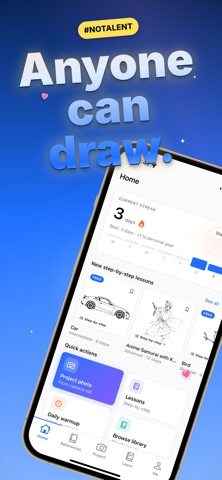


Description by omur olgunay Written by the developer, not by AppBrain. Click to read.
No drawing skills? No problem. Point your camera, line up the picture, and trace what you see on your paper. Then keep going with guided lessons that take you from "I can't draw" to finished art. Whether you want to learn how to draw, trace a photo, or sketch your favorite characters, this AR drawing projector meets you at your level.
WHY AR DRAWING PROJECTOR
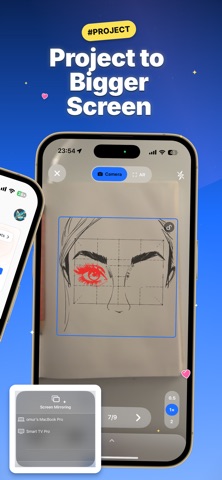
• PROJECT ONTO PAPER OR A BIGGER SCREEN Most AR drawing apps only project through your phone. AR Drawing Projector also casts your reference to an external screen, so you can trace murals, posters, canvases,ze. Draw big or small, on paper, wood, walls, or any surface.
• LEARN TO DRAW, STEP BY STEP — Follow guided, beginner-fried real skills instead of just tracing once. Learn how to drawpeople, animals, cartoons, and more with easy step-by-step tutorials. Perfect for kids, students, and adults returning to art.
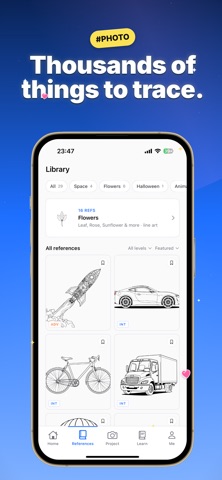
• THOUSANDS OF IMAGES TO TRACE — A huge built-in drawing library: animals, anime, cartoons, characters, flowers, cars, dinosaurs, and more. New images
are added regularly, so you never run out of things to draw,
• TRACE ANY PHOTO — Import your own photo, convert it to a c, and trace it on paper. Great for portraits, pets, logos,tattoos, and custom art. Turn any picture into a drawing you can trace by hand.
• SKETCH AND OUTLINE MODES — Switch between outline and sketch styles to match your skill level. Adjust opacity, zoom, and lock the image so your
reference stays perfectly in place while you draw.
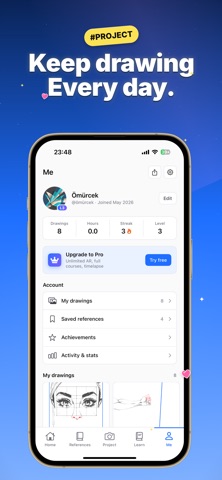
• DAILY STREAKS & ACHIEVEMENTS — Turn drawing into a daily h unlock achievements, and watch your art skills grow a littleevery day.
• EASY, KID-FRIENDLY CONTROLS — A clean, simple interface that anyone can use. No sign-up needed to start, no complicated tools, just pick an image and draw.
• AVAILABLE IN 12 LANGUAGES — Learn to draw and create in yo
HOW IT WORKS
1. Pick an image from the library, import your own photo, or choose a drawing lesson.
2. Project it onto your paper through the camera, or cast it
3. Keep your phone steady, trace the lines, then color and finish your drawing.
4. Keep your daily streak going and level up your art skills
PERFECT FOR
• Total beginners who think they "can't draw"
• Kids and students learning to sketch and trace
• Parents looking for a creative, screen-smart activity
• Artists tracing references, murals, and large-format work
• Anyone who wants a simple daily creative habit
• Hobbyists, doodlers, and anyone who loves to draw and colo
TRACE, SKETCH, AND LEARN ON ANY SURFACE
AR Drawing Projector is more than a tracing app. It is a complete drawing companion that helps you trace images, learn how to draw step by step, and build lasting art skills. Use it to trace on paper through yll for a mural, or cast to a big screen for large artwork.From quick doodles to detailed portraits, from cartoon characters to realistic sketches, you decide what to draw and how big to draw it.
Download AR Drawing Projector and start drawing today. Trace, sketch, learn, and create on any surface, at any size.
Questions or feedback? We read every message, so reach out anytime and we will help.
Terms of Use (EULA): https://www.apple.com/legal/internet-services/itunes/dev/stdeula/
Privacy Policy: https://omurolgunay.com/ar-projector-pp.html
Safety and technology
Found in the app by AppBrain- Price
- Free
- App size
- 30.0 MB
- Content rating
- Everyone
Technologies used by AR Drawing Projector: Trace
Releases
Updates seen on the App Store- Version
- 1.3
- Launched
- June 2026
No changelog data
Alternatives
Similar apps and more from omur olgunayMore from omur olgunay


Rankings
App Store top chartsApp Store Rankings for AR Drawing Projector: Trace
About the app and developer
About AR Drawing Projector: Trace
AR Drawing Projector: Trace is a graphics & design app developed by omur olgunay.
User Ratings
The app has no ratings yet.
App Information
AR Drawing Projector: Trace is freely available from the App Store. The app size is 29.95 MB. The latest version available is 1.3. The last update was on September 3, 2026.
Technical Requirements
The app has a content rating of Everyone. The app has been available on the App Store since June 2026.
Developer information for omur olgunay
Address: