

AR Needle Guide
AR Needle Guide is made and published by Kazufumi Suzuki. AppBrain is an independent app data site and isn't affiliated with Kazufumi Suzuki. The app name, icon, screenshots and description belong to Kazufumi Suzuki and are shown as published on the App Store.
AppBrain's verdict
- Last updated
- March 14, 2024
Rankings
App Store top chartsApp Store Rankings for AR Needle Guide
Competitors
Similar apps and more from Kazufumi SuzukiAlternatives to AR Needle Guide


More from Kazufumi Suzuki



Releases
Updates seen on the App Store- Version
- 3.6
- Launched
- April 2021
No changelog data
User feedback
Ratings and reviews on the App StoreComments on AR Needle Guide for iOS
We don't have enough comments to show example comments. Please check back later.
Technology
Found in the app by AppBrain- Price
- Free
- App size
- 89.4 MB
- Content rating
- High
Technologies used by AR Needle Guide
About the app and developer
About AR Needle Guide
AR Needle Guide is a medical app developed by Kazufumi Suzuki.
User Ratings
The app has no ratings yet.
App Information
AR Needle Guide is freely available from the App Store. The app size is 89.43 MB. The latest version available is 3.6. The last update was on March 14, 2024.
Technical Requirements
The app has a content rating of High Maturity. The app has been available on the App Store since April 2021.
Developer information for Kazufumi Suzuki
Address:
Frequently asked questions about AR Needle Guide
Is AR Needle Guide free?
Yes. AR Needle Guide is free on the App Store.
Is AR Needle Guide still available?
Yes. AR Needle Guide is on the App Store, and the last update we saw was on March 14, 2024.
How large is AR Needle Guide?
AR Needle Guide is 89.43 MB.
Is AR Needle Guide suitable for children?
App Store gives AR Needle Guide a high maturity rating. It is meant for adults.
Who made AR Needle Guide?
AR Needle Guide was developed by Kazufumi Suzuki. It is listed in the medical category on the App Store.
What are the best alternatives to AR Needle Guide?
People looking at AR Needle Guide also look at these medical apps: ALDS, Devices : Intervention devices, iBronch, Inside Vascular Interventions, Cystic Fibrosis.
Store listing
By Kazufumi Suzuki, from the App Store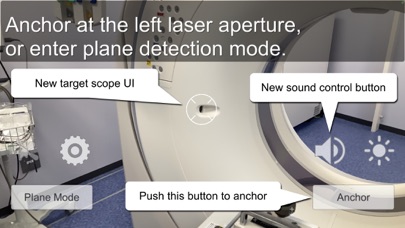

Description by Kazufumi Suzuki Written by the developer, not by AppBrain. Click to read.
An AR coordinate system is presented based on the position of laser apertures, allowing the virtual protractor to be displayed at the desired coordinates. In addition, the inclination angle of the puncture needle recognized by the iPhone camera is measured in a non-contact manner and displayed in real time.
§ User Manual
1. Setting coordinate system
Scan the feature points around the CT scanner with your iPhone or iPad to stable spatial anchor.
"Anchor" at the left laser aperture of CT. Set laser aperture in the center target scope of the screen and press "Anchor" button to set spatial anchor. Then, anchor at the right laser aperture.
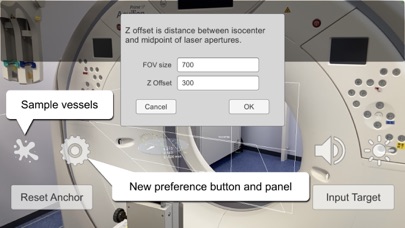
Default Z-offset of scan plane is 300mm headward from the midpoint of the two laser apertures. The coordinate origin is set at the left upper corner of CT field of view (FOV). Size of FOV and Z-offset can be configured with preferences button ("Gear" button).
When the coordinate system deviates from the actual space, press "Reset Anchor" button to reconfigure the coordinate system.
2. Determination of puncture position
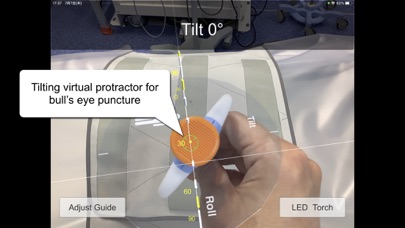
A virtual protractor is initially displayed at 1m caudal to the scanning isocenter (z -1000mm).
The virtual protractor can be moved in the CT scan plane (XY-plane) with one finger, and along to the Z-axis direction with two fingers.
Alternatively, coordinates can be entered directly with "Input Target" button.
When the CT gantry is tilted to perform a procedure, the angle of the virtual protractor can be also tilted with three fingers. The Z coordinate of the center of the tilted plane including the center of the virtual protractor is displayed, which can be used to determine the scaning position.
Pinch in and out with two fingers to change the size of the virtual protractor.
3. Puncture needle tracking
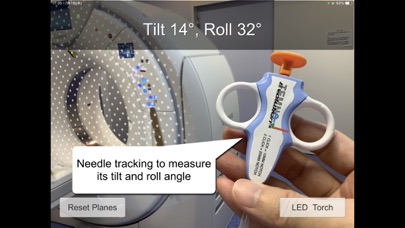
For some specific puncture needles, the tilt and roll angles are displayed as they are recognized from the camera.
Tilting was defined according to the tilting of the CT gantry so that rolling would match the angle measured in the CT images.
The following biopsy needles are currently supported.
• TEMNO Evolution (Merit Medical)
• STARCUT (TSK Laboratory, back side only)
• BARD MISSION (BD)
• Quick-Core (Cook Medical)
• “KAKENHI” sticker (purple color)
Turn on LED torch of iPhone to improve the accuracy of needle tracking.