It doesn't have enough ratings yet to judge what users think.
AR Sketch: Drawing & Paint is made and published by
TECHFLINES JOINT STOCK COMPANY.
AppBrain is an independent app data site and isn't affiliated with TECHFLINES JOINT STOCK COMPANY.
The app name, icon, screenshots and description belong to TECHFLINES JOINT STOCK COMPANY and are shown as
published on the App Store.
About AR Sketch: Drawing & Paint
AR Sketch: Drawing & Paint is a graphics & design app developed by TECHFLINES JOINT STOCK COMPANY.
User Ratings
AR Sketch: Drawing & Paint is rated 4.34 out of 5 stars. The rating is based on 53 ratings.
App Information
AR Sketch: Drawing & Paint is freely available from the App Store. The app size is 139.74 MB. The latest version available is 3.0. The last update was on June 5, 2026.
Technical Requirements
The app has a content rating of Everyone. The app has been available on the App Store since April 2024.
Description by TECHFLINES JOINT STOCK COMPANY(from the App Store)
AR Sketch: Drawing & Paint
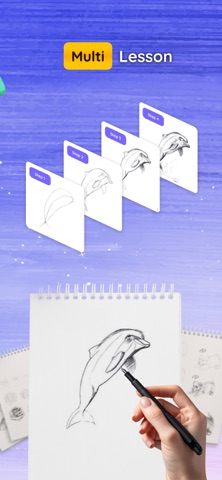
Explore drawing, sketching, and painting with augmented reality. AR Sketch: Drawing & Paint helps you use your device camera to display reference images on paper, making it easier to practice drawing, create sketches, and develop artwork from photos and templates.
Whether you're interested in drawing as a hobby, learning sketching techniques, or creating artistic projects, the app provides a collection of tools for tracing, sketching, and painting.
AR Drawing & Tracing
Use augmented reality to display images as drawing references while working on paper.
Features include:
• AR image overlay
• Adjustable transparency
• Image positioning tools
• Drawing reference support
• Paper tracing assistance
Sketch from Photos
Import photos from your gallery and turn them into sketch references.
• Photo-to-sketch conversion
• Outline generation
• Personal photo tracing
• Custom drawing references
Drawing Templates
Browse a collection of templates across different categories.
Categories include:
• Animals
• Nature
• Food
• Anime
• Characters
• Objects
• Landscapes
• Decorative Art
and more.
Painting & Coloring
Add colors and details to your drawings after tracing and sketching.
• Coloring tools
• Creative artwork projects
• Drawing refinement options
• Personal art creation
Time-Lapse Recording
Record your drawing process and save videos of your artwork development.
• Drawing session recording
• Time-lapse videos
• Progress tracking
• Creative project documentation
Save & Organize Artwork
Keep your drawings organized in one place.
• Save completed artwork
• Access drawing history
• Manage personal projects
• Store reference images
How to Use Place your device on a stable stand or surface. Select a template or import a photo. Position the image using AR view. Trace the outlines on paper. Add details, shading, and colors. Save your artwork. Features AR drawing tools Image tracing support Sketch creation Photo-to-sketch conversion Drawing templates Painting tools Time-lapse recording Artwork management Adjustable transparency Gallery support Suitable For Drawing practice Sketch projects Art activities Students Hobby artists Creative learning Illustration practice
Create sketches, trace images, explore drawing techniques, and develop artwork with AR Sketch: Drawing & Paint.
Please note that terms and conditions, as well as our privacy policy, apply. Terms of Use: https://sites.google.com/view/haoios-term Privacy Policy: https://sites.google.com/view/haoios-privacy Contact us: haoios.dev@gmail.com
Each subscription will automatically renew 3 days before the expiration date for
the same time period. Subscriptions can be cancelled at any time before the renewal.