AR Tracing - Sketch Trace Draw
AR Tracing - Sketch Trace Draw is made and published by Darshan Mavani. AppBrain is an independent app data site and isn't affiliated with Darshan Mavani. The app name, icon, screenshots and description belong to Darshan Mavani and are shown as published on the App Store.
AppBrain's verdict
- Rating on App Store
- 4.50
- 10 ratings
- Last updated
- March 30, 2026
It doesn't have enough ratings yet to judge what users think.
Rankings
App Store top chartsApp Store Rankings for AR Tracing - Sketch Trace Draw
Competitors
Similar apps and more from Darshan MavaniMore from Darshan Mavani
Releases
Updates seen on the App Store- Version
- 1.1
- Launched
- December 2025
No changelog data
User feedback
Ratings and reviews on the App StoreComments on AR Tracing - Sketch Trace Draw for iOS
We don't have enough comments to show example comments. Please check back later.
Technology
Found in the app by AppBrain- Price
- Free
- App size
- 91.5 MB
- Content rating
- Everyone
Technologies used by AR Tracing - Sketch Trace Draw
About the app and developer
About AR Tracing - Sketch Trace Draw
AR Tracing - Sketch Trace Draw is a graphics & design app developed by Darshan Mavani.
What is the rating of AR Tracing - Sketch Trace Draw?
AR Tracing - Sketch Trace Draw is rated 4.50 out of 5 stars, based on 10 ratings.
Is AR Tracing - Sketch Trace Draw free?
AR Tracing - Sketch Trace Draw is free. The app size is 91.46 MB. The latest version available is 1.1. The last update was on March 30, 2026.
What are the requirements for AR Tracing - Sketch Trace Draw?
The app has a content rating of Everyone. The app has been available on the App Store since December 2025.
Developer information for Darshan Mavani
Address:
Frequently asked questions about AR Tracing - Sketch Trace Draw
Is AR Tracing - Sketch Trace Draw free?
Yes. AR Tracing - Sketch Trace Draw is free on the App Store.
Is AR Tracing - Sketch Trace Draw still available?
Yes. AR Tracing - Sketch Trace Draw is on the App Store, and the last update we saw was on March 30, 2026.
How large is AR Tracing - Sketch Trace Draw?
AR Tracing - Sketch Trace Draw is 91.46 MB.
Is AR Tracing - Sketch Trace Draw suitable for children?
App Store rates the content of AR Tracing - Sketch Trace Draw as suitable for everyone.
How do people rate AR Tracing - Sketch Trace Draw?
AR Tracing - Sketch Trace Draw scores 4.50 out of 5 stars, from 10 ratings on the App Store.
Who made AR Tracing - Sketch Trace Draw?
AR Tracing - Sketch Trace Draw was developed by Darshan Mavani. It is listed in the graphics & design category on the App Store.
Store listing
By Darshan Mavani, from the App StoreDescription by Darshan Mavani Written by the developer, not by AppBrain. Click to read.
With advanced AR technology, you can place a virtual image on real paper and draw by trace with accuracy. From portraits to cartoons, from objects to handwritten text drawing, everything becomes easy to sketch and paint.
Key Features:
AR Tracing – Trace Any Image
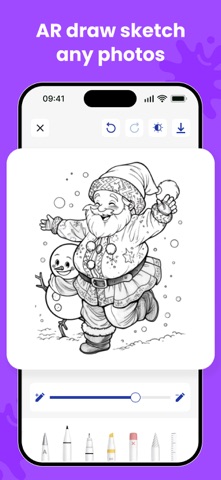
Use the AR Tracing camera to place an image on your paper and draw trace outlines with perfect alignment. Great for Paper Sketch, portraits, tattoos, and school art.
Learn to Draw – Step-by-Step
Follow structured drawing lessons designed to help beginners improve quickly. The How to Draw mode simplifies complex images so anyone can learn.
Sketch Trace & Sketch Draw Tools
Master tracing with tools like:
- Sketch Trace
- Trace Draw
- Sketch Draw
- How Draw guides
Perfect for creating smooth sketches with pencils, markers, or pens.
Import & Trace Any Photo
Upload photos from your gallery and convert them into outlines for image to pen edit and trace image drawing styles.
Drawing With Pen or Pencil
The app works with any medium—drawing with pen, pencil, marker, or brush. Just place your phone above your paper and start tracing.
Sketching & Painting
Enhance your creativity with built-in sketch & paint tools, helping you turn simple outlines into beautiful artwork.
Adjustable Controls
- Resize, rotate, or flip images
- Change transparency for better visibility
- Lock the image for stable tracing
Save & Share
Save your draw sketch results or share them on Instagram, Facebook, or with friends.
Why You’ll Love AR Tracing – Sketch Trace Draw
- Makes drawing simple with Easy Draw tools
- Best app to Learn Draw and improve sketching skills
- Ideal for beginners, kids, students & artists
- Helps you practice everyday Drawing, portraits & cartoons
- Brings real-time AR technology for perfect tracing
- Works for tattoo design drafts, custom art, and calligraphy
How to Use
1. Place your phone above your paper
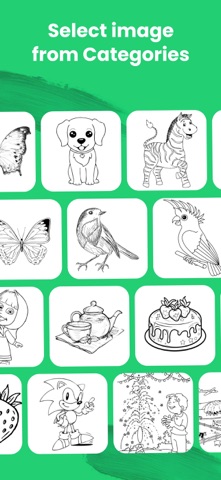
2. Select a picture or import your own
3. Adjust size and transparency
4. Start tracing with ease
5. Finish your paper sketch and share your art
Create Your Best Art Today
Whether you want to learn to draw, improve your drawing sketch skills, or make professional-level art with draw trace techniques, this app gives you everything in one place.
Use the free Video Browser to watch videos directly from the internet. It provides a smooth, fast, and seamless experience while browsing and viewing your favorite content.
Privacy Policy: https://darshanmavaniapps.blogspot.com/2025/12/privacy-policy-for-ar-drawing-sketch.html
Terms of use: https://darshanmavaniapps.blogspot.com/2025/12/terms-and-conditions-for-ar-drawing.html
Download AR Tracing – Sketch Trace Draw and start drawing like a pro!