

Arbiter - Local AI Chat
Arbiter - Local AI Chat is made and published by Jordan Stone. AppBrain is an independent app data site and isn't affiliated with Jordan Stone. The app name, icon, screenshots and description belong to Jordan Stone and are shown as published on the App Store.
AppBrain's verdict
- Rating on App Store
- 4.94
- 16 ratings
- Last updated
- September 14, 2026
It doesn't have enough ratings yet to judge what users think.
Rankings
App Store top chartsApp Store Rankings for Arbiter - Local AI Chat
Competitors
Similar apps and more from Jordan StoneAlternatives to Arbiter - Local AI Chat


Releases
Updates seen on the App Store- Version
- 0.2.09
- Launched
- October 2025
No changelog data
User feedback
Ratings and reviews on the App StoreComments on Arbiter - Local AI Chat for iOS
We don't have enough comments to show example comments. Please check back later.
Technology
Found in the app by AppBrain- Price
- Free
- App size
- 40.4 MB
- Content rating
- Everyone
Technologies used by Arbiter - Local AI Chat
About the app and developer
About Arbiter - Local AI Chat
Arbiter - Local AI Chat is a productivity app developed by Jordan Stone.
User Ratings
Arbiter - Local AI Chat is rated 4.94 out of 5 stars. The rating is based on 16 ratings.
App Information
Arbiter - Local AI Chat is freely available from the App Store. The app size is 40.45 MB. The latest version available is 0.2.09. The last update was on September 14, 2026.
Technical Requirements
The app has a content rating of Everyone. The app has been available on the App Store since October 2025.
Developer information for Jordan Stone
Address:
Store listing
By Jordan Stone, from the App Store




Description by Jordan Stone Written by the developer, not by AppBrain. Click to read.
Key Features:
- On-Device AI: Download and run models locally on your iPhone
- Apple Intelligence Support: Use Apple’s on-device Foundation Model on supported devices without downloading another model
- Local Image Generation: Create images directly on your device with Stable Diffusion
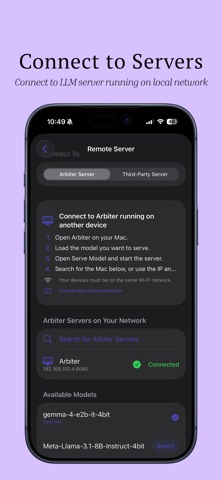
- Local Network Models: Connect to more powerful models running on your PC or Mac through tools like LM Studio, Ollama, or Arbiter for Mac
- Visual AI Support: Upload images or take photos in-app to use with MLX-powered visual models
- Document & File Uploads: Summarize files and extract key insights
- Expanded File Support: Work with DOCX, RTF, HTML, Markdown, CSV, JSON, code, PDF, and text files
- Bring Your Own Model: Search Hugging Face, download compatible models, or import supported GGUF files and MLX folders already on your device
- MCP Tools: Connect to compatible MCP servers, review tool arguments, and run tools when needed
- Optional Web Search: Access up-to-date information when needed, while keeping your core experience private and local
- Smart Chat Suggestions: Context-aware suggestions tailored to your selected model and role
- Personalization: Customize system prompts and model settings for a more tailored experience
- Advanced Model Controls: Adjust context size, maximum response length, temperature, Top-P, and Top-K
- Local Model Benchmarking: Measure model quality, speed, response time, and memory use directly on your device
- Privacy by Design: Your conversations and data never leave your device unless you choose to enable web search or connect to a local network model
- Model Flexibility: Choose from multiple open-source AI models to balance speed, accuracy, and memory use
- Improved Reliability: Smarter context handling and enhanced error management for a more stable experience
- No Hidden Costs: Avoid expensive cloud fees with local and local-network processing
Whether you want to brainstorm, code, proofread text, analyze images, summarize files, search the web, or experiment with the latest open-source AI, Arbiter makes advanced AI models accessible while keeping your data in your hands.
Device Requirements: For smooth on-device performance, Arbiter is recommended for iPhone 13 Pro or later, or devices with at least 6GB RAM. Older devices may experience memory issues or crashes.