It doesn't have enough ratings yet to judge what users think.
Archivist Browser is made and published by
Robert Lothian.
AppBrain is an independent app data site and isn't affiliated with Robert Lothian.
The app name, icon, screenshots and description belong to Robert Lothian and are shown as
published on the App Store.
About Archivist Browser
Archivist Browser is an utilities app developed by Robert Lothian.
What is the rating of Archivist Browser?
Archivist Browser is rated 4.89 out of 5 stars, based on 56 ratings.
Is Archivist Browser free?
Archivist Browser is free. The app size is 78.93 MB. The latest version available is 1.4.0. The last update was on September 17, 2026.
What are the requirements for Archivist Browser?
The app has a content rating of High Maturity. The app has been available on the App Store since January 2026.
Description by Robert Lothian(from the App Store)
Archivist Browser: Your Portal to Digital History
Archivist Browser is the ultimate media player, transforming your device into a comprehensive portal for streaming content directly from the Internet Archive's vast collections. Built specifically for researchers and enthusiasts of historical media, our app provides the fastest, most reliable way to stream millions of films, audiobooks, music and digital texts.
Stop struggling with browser playback. Download Archivist Browser and experience the past, optimised for seamless, modern streaming.
What the Critics Say
"A really cool piece of software... I've never seen anything like this before... Highly recommend." — WILL SMITH, BRAD AND WILL MADE A TECH POD
"A great idea for a very niche utility – my favourite kind these days." — FEDERICO VITICCI, MACSTORIES
As featured in Cory Doctorow's Pluralistic blog.
Enhanced Media Playback & Visuals
Experience history in high definition with a UI designed for modern enthusiasts.
Custom Themes: Personalise your experience with the new Alt Indigo Theme, a variation specifically for Dark Mode enthusiasts.
Universal TV Casting: Watch films and video on your big screen! Archivist Browser supports AirPlay (on iOS) for instant, seamless video streaming to any compatible TV or streaming device.
High-Res Image Viewer: Enjoy smoother navigation and better rendering when viewing high-resolution assets.
Improved Subtitles: Expanded support for subtitles across more titles and languages.
Optimised Audio: Enjoy full background audio support and media controls right from your lock screen, perfect for listening to historical audiobooks or music collections.
Polished UI: Refined thumbnail badges offer better clarity and a more professional look.
Discovery & Integration
Navigate the Archive’s millions of items with ease.
Topic Chips: Quickly filter and find what you want with Topic Chips now appearing on Collections.
Uploader Profiles: Explore more from your favourite contributors by clicking an uploader’s name to see their full gallery.
Internet Archive (IA) Integration: Seamlessly import your lists directly from your IA account for a seamless transition.
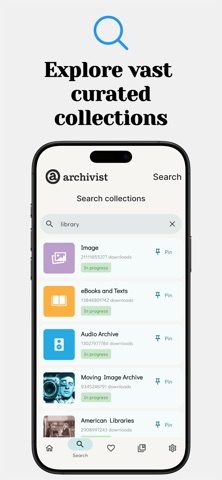
Fast Content Discovery: Easily find media by title, keyword or creator, or access curated "Popular Queries" to jump straight into trending collections.
File & Folder Management
Organise and share your research effortlessly.
Folder Sharing: Share your favourite folders with other users via URL or QR code.
Smart Store Linking: If a recipient doesn’t have the app installed, shared links will automatically direct them to the store page.
On-the-Fly Renaming: Keep your library organised by renaming your folders instantly.
Text File Clean Up: Use a dedicated button to instantly tidy up messy OCR text files.
Rapid Text Access: Cached text fetching retrieves PDFs and documents rapidly (note: cache is purged on app closure).
Privacy & Reliability
We prioritise your privacy: No user accounts, no mandatory login and absolutely no personal details are stored. Experience the Archive with total peace of mind.
Each subscription will automatically renew 3 days before the expiration date for
the same time period. Subscriptions can be cancelled at any time before the renewal.