




AppBrain's verdict
- Rating on App Store
- 5.00
- 2 ratings
- Last updated
- September 8, 2026
- Size
- 3.35 MB
It doesn't have enough ratings yet to judge what users think.
User feedback
Ratings and reviews on the App StoreComments on Ares Intel: Password Generator for iOS
We don't have enough comments to show example comments. Please check back later.
Store listing
By Craig Anthony Perkins, from the App StoreDescription by Craig Anthony Perkins Written by the developer, not by AppBrain. Click to read.
That is a statement about how the app is built, not a promise about how it behaves. There is no networking code in it, and it asks iOS for no network permission. Turn on Airplane Mode and every feature still works, because none of them ever needed a connection.
HONEST STRENGTH RATINGS
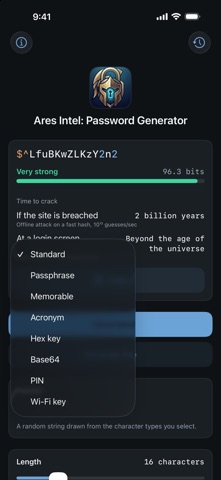
Most generators judge a password by looking at the finished text, counting its length and noting which character types appear. That method flatters the result badly. It can report several hundred bits for a passphrase genuinely worth eighty.
Ares Intel measures the process instead: the real size of the space each password was drawn from. The number on screen is the number an attacker actually faces.
When two options combine to make the exact figure impossible to compute, the app shows a conservative lower bound rather than inventing a precise looking one.
Crack times are shown for two attackers, not one. A stolen database cracked offline at a trillion guesses a second, and a login screen that limits attempts to a hundred a second. The same password is often strong against one and useless against the other, and a single figure hides that. Both assumptions are printed on screen so you can judge them rather than take them on faith.
EIGHT FORMATS
Standard gives you random characters from the types you choose. Passphrase draws words from the 7,776 word EFF list, long to look at but genuinely easy to type and to recall. Memorable combines two words, three digits and a symbol, the easiest to remember and rated Weak because that is the truth.
Acronym is new. The app writes you a sentence and the password is its initials, so you carry the sentence and type the letters. You can add two to four digits of your own and a symbol for sites that demand them.
PIN is digits only, for door codes and device locks. Hex Key produces uppercase hexadecimal for API keys and seed material. Base64 suits tokens and configuration files. Wi-Fi Key is new too, and gives you the full 63 characters a WPA network will accept, set once on the router and forgotten.
PRECISE CONTROL
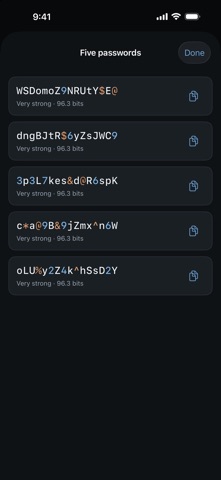
Set length anywhere from 8 to 50 characters, or 4 to 12 words. Choose from six character classes including extended symbols and brackets. Exclude the look alike glyphs O, l, 0 and 1. Forbid repeated neighboring characters. Require at least one character from every type you selected. Switch on pronounceable output for passwords you have to read aloud, or write a custom pattern to build one position by position. Generate five at once when you are provisioning several accounts.
Randomness comes from the system cryptographic generator, sampled by rejection so that every character is equally likely, with no shortcuts that quietly bias the result.
BUILT FOR SAFE HANDLING
Copied passwords clear from the clipboard after 60 seconds, with a visible countdown on the button. They are marked local only, so they never travel to your other devices. The screen is covered when you switch apps, keeping passwords out of the app switcher snapshot. Session history lives in memory alone and is discarded the moment you leave.
Letters, digits and symbols are tinted differently so you can tell l from 1 at a glance. Dynamic Type is supported throughout, and VoiceOver reads passwords character by character rather than trying to pronounce them.
NOTHING IS SAVED
No password is ever written to disk. None reaches a file, a keychain entry, iCloud, or a log. There is no vault and no account to create. Delete the app and nothing of it remains.
No ads. No in-app purchases. No subscriptions. No analytics. No third party code of any kind. Free, and staying that way.
Safety and technology
Found in the app by AppBrain- Price
- Free
- App size
- 3.35 MB
- Content rating
- Everyone
Technologies used by Ares Intel: Password Generator
Releases
Updates seen on the App Store- Version
- 1.1.0
- Launched
- August 2026
No changelog data
Alternatives
Similar apps and more from Craig Anthony PerkinsAlternatives to Ares Intel: Password Generator


More from Craig Anthony Perkins


Rankings
App Store top chartsApp Store Rankings for Ares Intel: Password Generator
About the app and developer
About Ares Intel: Password Generator
Ares Intel: Password Generator is an utilities app developed by Craig Anthony Perkins.
What is the rating of Ares Intel: Password Generator?
Ares Intel: Password Generator is rated 5.00 out of 5 stars, based on 2 ratings.
Is Ares Intel: Password Generator free?
Ares Intel: Password Generator is free. The app size is 3.35 MB. The latest version available is 1.1.0. The last update was on September 8, 2026.
What are the requirements for Ares Intel: Password Generator?
The app has a content rating of Everyone. The app has been available on the App Store since August 2026.
Ares Intel: Password Generator is made and published by Craig Anthony Perkins. AppBrain is an independent app data site and isn't affiliated with Craig Anthony Perkins. The app name, icon, screenshots and description belong to Craig Anthony Perkins and are shown as published on the App Store.
Developer information for Craig Anthony Perkins
Address: