

ARES Touch: DWG Viewer & CAD
ARES Touch: DWG Viewer & CAD is made and published by Graebert GmbH. AppBrain is an independent app data site and isn't affiliated with Graebert GmbH. The app name, icon, screenshots and description belong to Graebert GmbH and are shown as published on the App Store.
AppBrain's verdict
EstablishedLoved by users- Rating on App Store
- 4.73
- 157 ratings
- Last updated
- October 7, 2026
Users love it: 4.7 stars from 157 ratings.
Rankings
App Store top chartsApp Store Rankings for ARES Touch: DWG Viewer & CAD
Competitors
Similar apps and more from Graebert GmbHAlternatives to ARES Touch: DWG Viewer & CAD





More from Graebert GmbH

Releases
Updates seen on the App Store- Version
- 26.0.0
- Launched
- December 2016
No changelog data
User feedback
Ratings and reviews on the App StoreComments on ARES Touch: DWG Viewer & CAD for iOS
We don't have enough comments to show example comments. Please check back later.
Technology
Found in the app by AppBrain- Price
- Free
- App size
- 260.8 MB
- Content rating
- Everyone
Technologies used by ARES Touch: DWG Viewer & CAD
About the app and developer
About ARES Touch: DWG Viewer & CAD
ARES Touch: DWG Viewer & CAD is a productivity app developed by Graebert GmbH.
User Ratings
ARES Touch: DWG Viewer & CAD is rated 4.73 out of 5 stars. The rating is based on 160 ratings.
App Information
ARES Touch: DWG Viewer & CAD is freely available from the App Store. The app size is 260.82 MB. The latest version available is 26.0.0. The last update was on October 7, 2026.
Technical Requirements
The app has a content rating of Everyone. The app has been available on the App Store since December 2016.
Developer information for Graebert GmbH
Address:
Frequently asked questions about ARES Touch: DWG Viewer & CAD
Is ARES Touch: DWG Viewer & CAD free?
Yes. ARES Touch: DWG Viewer & CAD is free on the App Store.
Is ARES Touch: DWG Viewer & CAD still available?
Yes. ARES Touch: DWG Viewer & CAD is on the App Store, and the last update we saw was on October 7, 2026.
How large is ARES Touch: DWG Viewer & CAD?
ARES Touch: DWG Viewer & CAD is 260.82 MB.
Is ARES Touch: DWG Viewer & CAD suitable for children?
App Store rates the content of ARES Touch: DWG Viewer & CAD as suitable for everyone.
How do people rate ARES Touch: DWG Viewer & CAD?
ARES Touch: DWG Viewer & CAD scores 4.73 out of 5 stars, from 157 ratings on the App Store.
Who made ARES Touch: DWG Viewer & CAD?
ARES Touch: DWG Viewer & CAD was developed by Graebert GmbH. It is listed in the productivity category on the App Store.
What are the best alternatives to ARES Touch: DWG Viewer & CAD?
People looking at ARES Touch: DWG Viewer & CAD also look at these productivity apps: DWG View - CAD Viewer & Editor, ZWCAD Mobile - Mobile CAD, DWG FastView-CAD Viewer&Editor, CAD HD, iPocket Draw Lite.
Store listing
By Graebert GmbH, from the App Store



Description by Graebert GmbH Written by the developer, not by AppBrain. Click to read.
### ABOUT ARES TOUCH ###
ARES Touch is a full CAD solution for professionals. It is the ideal companion to read, create, annotate or modify DWG drawings on your iPhone or iPad. Non-subscribers get access to viewing, sharing and dimensioning tools for FREE while subscribers get hundreds of additional tools to create or modify drawings.
TRY THE FULL EXPERIENCE FOR FREE: If you subscribe via In-App purchase you can cancel within 14 days and will not be charged.
### FREE FEATURES ###
=== The following features can be used for free: ===
- FREEDOM: Unlimited number of mobile devices for the same user
- CONTROL: Files can be synchronized with Dropbox, Box, iCloud or Google Drive, OR saved locally on the device.
- POWER: No size limitation to read, save or share 2D and 3D drawings in DWG
- UNIVERSAL: Save in DWG or export to JPEG
- Model space and layouts: switch as required
- Layers palette + advanced layer tools
- High precision tools: Selection, Snap, Loupe, Tracking, Coordinates Input (Polar/Cartesian, Relative/Absolute)
- Simple annotation: Add text, dimensions, leaders, tolerances, revision clouds
ARES Touch is available in English, Japanese and German. More languages are coming.
### PREMIUM FEATURES ###
=== Hundreds of additional features are available for subscribers: ===
- Drawing features: lines, polylines, circles, arcs, ellipses, splines, points, hatches…
- Editing features: Split, weld, trim, extend, align, offset, fillet, chamfer…
- Quick Modify: combine copy, move, rotate and scale actions with the same selection
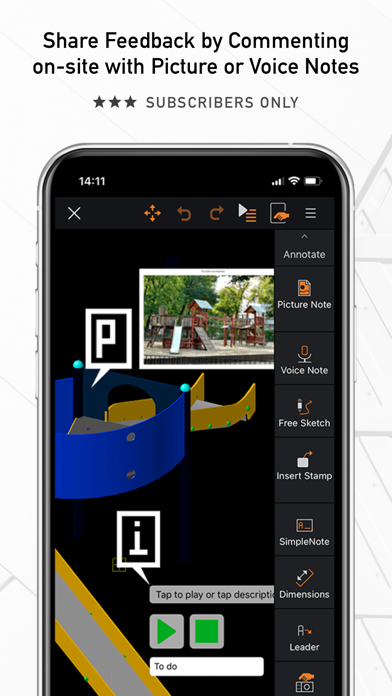
- Picture Note: Annotate drawings with pictures and comments
- Voice Note: Insert a comment by recording your voice
- Blocks: insertion and creation
### THE ARES TOUCH SUBSCRIPTION ###
=== Get the full experience of ARES Touch ===
The features of the Free Simple Mode are great for viewing and simple annotation but you will need a valid subscription to access the premium features listed above.
To get the Premium features of ARES Touch, we invite you to buy a monthly renewable subscription from iTunes via In-App purchase, directly inside ARES Touch. If you purchased another Graebert software such as ARES Commander, and your subscription includes ARES Touch, you can simply use the same Graebert Account credentials (the one you use for other Graebert products) to log in inside ARES Touch, and this will unlock the Premium features for you.
If you subscribe via iTunes:
Payment will be charged to your iTunes Account at confirmation of purchase. Subscription automatically renews on a monthly basis unless auto-renew is turned off at least 24 hours before the end of the current period. The account will be charged for renewal within 24 hours prior to the end of the current period at the rate of the offered plan. Auto-renewal subscriptions can be managed straightforwardly via the Account Settings on the device after purchase.
Customer portal: https://customer-portal.graebert.com/
Privacy Policy: https://www.graebert.com/company/privacypolicy
Terms of Use: https://www.graebert.com/arestouch/termsofuse
### ARES TOUCH FOR DEVELOPERS ###
=== First of its kind CAD platform for mobile apps ===
The C++ and Lisp API of ARES Touch offers an easy way for developers willing to reuse code initially created for the desktop. Developers willing to market a vertical application powered by ARES Touch can contact Graebert to discuss an OEM version.