

Ari Companion is made and published by Realwear Inc. AppBrain is an independent app data site and isn't affiliated with Realwear Inc. The app name, icon, screenshots and description belong to Realwear Inc. and are shown as published on the App Store.
AppBrain's verdict
- Last updated
- September 22, 2026
Rankings
App Store top chartsApp Store Rankings for Ari Companion
Competitors
Similar apps and more from Realwear Inc.Alternatives to Ari Companion



More from Realwear Inc.

Releases
Updates seen on the App Store- Version
- 2.1
- Launched
- July 2025
No changelog data
User feedback
Ratings and reviews on the App StoreComments on Ari Companion for iOS
We don't have enough comments to show example comments. Please check back later.
Technology
Found in the app by AppBrain- Price
- Free
- App size
- 37.8 MB
- Content rating
- Everyone
Technologies used by Ari Companion
About the app and developer
About Ari Companion
Ari Companion is an utilities app developed by Realwear Inc.
What is the rating of Ari Companion?
Ari Companion has no ratings yet.
Is Ari Companion free?
Ari Companion is free. The app size is 37.78 MB. The latest version available is 2.1. The last update was on September 22, 2026.
What are the requirements for Ari Companion?
The app has a content rating of Everyone. The app has been available on the App Store since July 2025.
Developer information for Realwear Inc.
Address:
Store listing
By Realwear Inc., from the App Store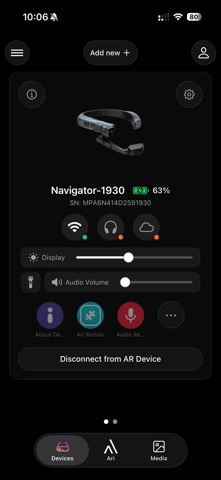





Description by Realwear Inc. Written by the developer, not by AppBrain. Click to read.
Connect over Bluetooth, then run the headset from a screen you can actually type on.
DEVICE CONTROL
Check the battery at a glance. Adjust display brightness and volume, switch the torch on and off, and see which apps are running on the headset. Pair more than one device and switch between them in a tap.
NETWORK SETUP
Get the headset onto Wi-Fi without typing on the device itself. Pick a network and enter the password from your phone, join a hidden or enterprise network, or share your phone connection as a hotspot when there is no network to join.
BLUETOOTH AUDIO
Pair Bluetooth headsets with the glasses and see what is already connected, so voice and audio work in loud places.
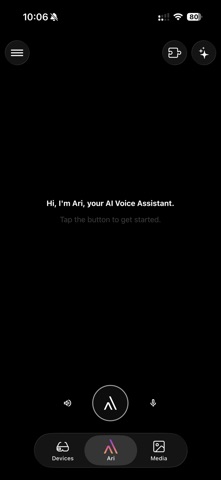
ARI, YOUR AI ASSISTANT
Ask Ari for help with messages, contacts, email and everyday tasks. Every conversation is kept, so you can scroll back through your history in the sidebar or search it for something you asked before.
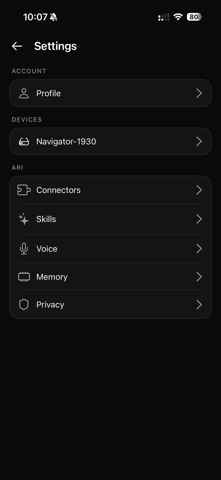
TUNE HOW ARI WORKS
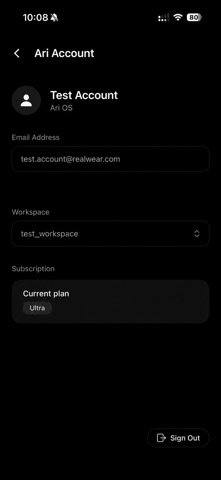
Ari has its own settings. Choose which services it can reach under Connectors, turn individual Skills on and off, set up Voice, decide what it keeps under Memory, and manage what you share under Privacy. Ari and its settings need an Ari account.
MEDIA
Browse the photos and videos in your library from your phone. Filter to just photos or just videos, open any of them full screen, and play videos right in the app. Save the ones you want to your phone and remove the ones you do not.
DEVICE INFORMATION
Look up the serial number, operating system version and firmware before you contact support, and keep an eye on connection status.
SUPPORTED DEVICES
Realwear Arc 3, Realwear Navigator 500, Realwear Navigator 520 and Realwear Navigator Z1.
SIGNING IN
You can use Ari Companion without an account. Pairing, Wi-Fi setup, Bluetooth audio and device controls all work signed out. Signing in with your work account adds Ari, the AI assistant and some other features.