

Art Staging & Mockup - FrameQ
Art Staging & Mockup - FrameQ is made and published by Kamalaben Modi. AppBrain is an independent app data site and isn't affiliated with Kamalaben Modi. The app name, icon, screenshots and description belong to Kamalaben Modi and are shown as published on the App Store.
AppBrain's verdict
New- Rating on App Store
- 1.00
- 1 ratings
- Last updated
- August 4, 2026
Art Staging & Mockup - FrameQ came out 85 days ago. It doesn't have enough ratings yet to judge what users think.
Rankings
App Store top chartsApp Store Rankings for Art Staging & Mockup - FrameQ
Competitors
Similar apps and more from Kamalaben ModiAlternatives to Art Staging & Mockup - FrameQ


More from Kamalaben Modi


Releases
Updates seen on the App Store- Version
- 1.0
- Launched
- August 2026
No changelog data
User feedback
Ratings and reviews on the App StoreComments on Art Staging & Mockup - FrameQ for iOS
We don't have enough comments to show example comments. Please check back later.
Technology
Found in the app by AppBrain- Price
- Free
- App size
- 77.3 MB
- Content rating
- Medium
Technologies used by Art Staging & Mockup - FrameQ
About the app and developer
About Art Staging & Mockup - FrameQ
Art Staging & Mockup - FrameQ is a photo & video app developed by Kamalaben Modi.
User Ratings
Art Staging & Mockup - FrameQ is rated 1.00 out of 5 stars. The rating is based on one rating ratings.
App Information
Art Staging & Mockup - FrameQ is freely available from the App Store. The app size is 77.35 MB. The latest version available is 1.0. The last update was on August 4, 2026.
Technical Requirements
The app has a content rating of Medium Maturity. The app has been available on the App Store since August 2026.
Developer information for Kamalaben Modi
Address:
Frequently asked questions about Art Staging & Mockup - FrameQ
Is Art Staging & Mockup - FrameQ free?
Yes. Art Staging & Mockup - FrameQ is free on the App Store.
Is Art Staging & Mockup - FrameQ still available?
Yes. Art Staging & Mockup - FrameQ is on the App Store, and the last update we saw was on August 4, 2026.
How large is Art Staging & Mockup - FrameQ?
Art Staging & Mockup - FrameQ is 77.35 MB.
Is Art Staging & Mockup - FrameQ suitable for children?
App Store gives Art Staging & Mockup - FrameQ a medium maturity rating, so it is not meant for young children.
How do people rate Art Staging & Mockup - FrameQ?
Art Staging & Mockup - FrameQ has one rating of 1.00 stars on the App Store.
Who made Art Staging & Mockup - FrameQ?
Art Staging & Mockup - FrameQ was developed by Kamalaben Modi. It is listed in the photo & video category on the App Store.
What are the best alternatives to Art Staging & Mockup - FrameQ?
People looking at Art Staging & Mockup - FrameQ also look at these photo & video apps: ArtMock - Mockup Creator, WallStage: Visualize Your Art, Cast to TV for Chromecast, ArtStage - Display Your Art, WallPictureApp: Visualize it.
Store listing
By Kamalaben Modi, from the App Store



Description by Kamalaben Modi Written by the developer, not by AppBrain. Click to read.
FrameQ is the wall art visualizer built for painters, photographers, printmakers, and illustrators. Snap a photo of your piece, drop it into a beautifully lit room, and walk away with a mockup that looks like a real gallery shot — ready for your shop, your feed, or your next client pitch.
No props. No photo shoots. No expensive staging. Just your artwork, a room, and a few taps.
STAGE YOUR ART IN SECONDS
Import a photo from your library or shoot one right in the app. FrameQ places it on the wall of a photorealistic interior, sized true to the dimensions you enter — so what buyers see is what they'll get.
144 HAND-PICKED ROOMS
Choose from 144 real interior scenes across 12 categories — living rooms, studios, bedrooms, offices, minimalist spaces, and more. Find the setting that makes your work sing, then swap rooms anytime with a single tap.
FRAME IT YOUR WAY
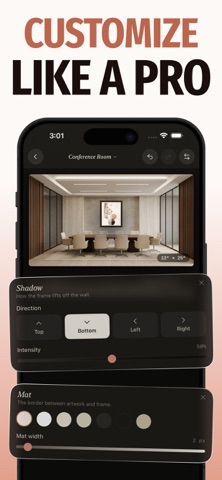
Fine-tune every detail until it's perfect: pick a frame style, add a mat, adjust the shadow and lighting, and apply subtle filters. Drag to reposition, pinch to resize. Every change updates live on the wall.
EXPORT FOR ANYWHERE
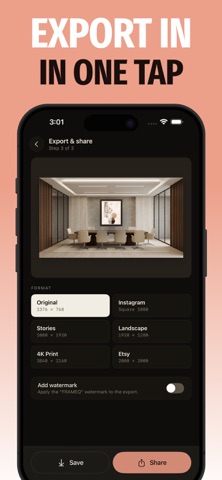
One mockup, every format. Export in the exact sizes you need for Instagram posts and Stories, Etsy listings, landscape banners, or high-resolution 4K prints. Add an optional watermark, then save to Photos or share directly.
SAVE AND COME BACK
Build a library of your staged pieces. Every project saves with its exact framing, room, and edits — reopen and refine whenever inspiration strikes.
DESIGNED LIKE A GALLERY
A warm, editorial interface that stays out of the way and lets your work take center stage.
WHY ARTISTS USE FRAMEQ
• Sell more with mockups that look professionally photographed
• Save hundreds on staging, framing, and product photography
• Show collectors and clients exactly how a piece will look in a space
• Build a consistent, scroll-stopping presence on social and marketplaces
FRAMEQ PRO
Unlock the full studio with a FrameQ Pro subscription. Upgrade anytime from within the app.
Your art deserves to be seen at its best. Download FrameQ and start staging today.
Questions or feedback? Reach us at kamalabenmodi.apps@gmail.com
Privacy Policy: https://frameq.blogspot.com/p/privacy-policy.html
Terms & Condition: https://frameq.blogspot.com/p/terms-condition.html