


AppBrain's verdict
- Last updated
- October 11, 2026
- Size
- 3.00 MB
User feedback
Ratings and reviews on the App StoreComments on ArtAlign Mojestic for iOS
We don't have enough comments to show example comments. Please check back later.
Store listing
By Axel Gustafsson, from the App StoreDescription by Axel Gustafsson Written by the developer, not by AppBrain. Click to read.
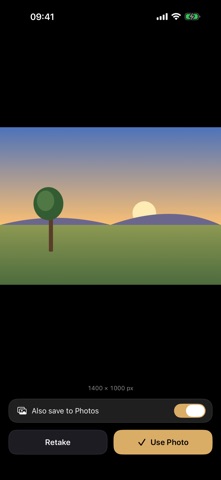
Start from any photo in your library — or take your reference right in the app with the built-in camera: a still life, the view from your easel, a model. Study references for details like hands or a colour sketch sit alongside the main one.
Snap a photo of your work in progress, and ArtAlign automatically warps and aligns it to your reference — correcting the angle, distance, and perspective of a handheld shot so the two line up pixel-for-pixel. From there, every comparison tool works on both images at once, in the exact same coordinate space.
SEE WHAT'S ACTUALLY WRONG
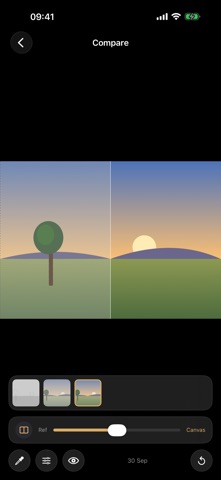
• Fade between your reference and your canvas to catch proportion and drawing errors instantly
• Split-screen wipe, or a rapid blink comparison, for a second way to spot what the fade blend can miss
• Synchronized zoom — pinch into a detail on one image and the other follows, perfectly registered
PAINT WITH A TRAINED EYE
• Grid overlay (3×3, with diagonals, or fine 6×6) for classic grid-method transfer and composition checks
• Value study modes — grayscale, 4-value posterize, and 2-value notan — to judge light and shadow without color getting in the way
• Mirror flip, the classic fresh-eyes trick for catching drawing errors
• Paint Match: tap any spot to see your reference color and your canvas color side by side, with a plain-language read on the difference ("your canvas reads warmer here") — and save the mixes you want to remember to a running palette board
MOUNT IT AND PAINT
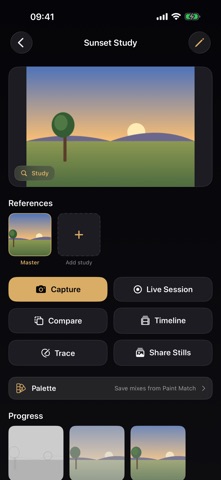
Set the phone on a tripod facing your easel and start a Live Session. ArtAlign watches your canvas, automatically discarding the frames where you're standing in the way, and keeps only the moments where something actually changed — so a four-hour painting session becomes a few dozen meaningful frames, not thousands of near-duplicates. Reference and grid stay visible the whole time, right on the capture screen.
Working on an iPad? Pair it with your capture phone and study your reference — and your latest progress — right at the easel, hands free.
WATCH IT COME TOGETHER
Every session lands on one timeline, grouped by month for paintings that take weeks or months. Play back the whole evolution inside the app, or export a time-lapse video — with a title-safe aspect ratio for Reels and TikTok, a reveal finale that wipes your reference across the finished piece, and optional date stamps and a signature watermark.
Your projects sync across your own devices through your private iCloud — nothing is uploaded anywhere else.
ArtAlign is built for painters working from photos: portrait and landscape painters, plein air artists finishing indoors, students doing master copies, and anyone who wants an honest, side-by-side record of how a painting actually got made.
Safety and technology
Found in the app by AppBrain- Price
- Free
- App size
- 3.00 MB
- Content rating
- Everyone
Technologies used by ArtAlign Mojestic
Releases
Updates seen on the App Store- Version
- 3.1
- Launched
- October 2026
No changelog data
Alternatives
Similar apps and more from Axel GustafssonMore from Axel Gustafsson

Rankings
App Store top chartsApp Store Rankings for ArtAlign Mojestic
About the app and developer
About ArtAlign Mojestic
ArtAlign Mojestic is a graphics & design app developed by Axel Gustafsson.
User Ratings
The app has no ratings yet.
App Information
ArtAlign Mojestic is freely available from the App Store. The app size is 3.00 MB. The latest version available is 3.1. The last update was on October 11, 2026.
Technical Requirements
The app has a content rating of Everyone. The app has been available on the App Store since October 2026.
ArtAlign Mojestic is made and published by Axel Gustafsson. AppBrain is an independent app data site and isn't affiliated with Axel Gustafsson. The app name, icon, screenshots and description belong to Axel Gustafsson and are shown as published on the App Store.
Developer information for Axel Gustafsson
Address:
Frequently asked questions about ArtAlign Mojestic
Is ArtAlign Mojestic free?
Yes. ArtAlign Mojestic is free on the App Store.
Is ArtAlign Mojestic still available?
Yes. ArtAlign Mojestic is on the App Store, and the last update we saw was on October 11, 2026.
How large is ArtAlign Mojestic?
ArtAlign Mojestic is 3.00 MB.
Is ArtAlign Mojestic suitable for children?
App Store rates the content of ArtAlign Mojestic as suitable for everyone.
Who made ArtAlign Mojestic?
ArtAlign Mojestic was developed by Axel Gustafsson. It is listed in the graphics & design category on the App Store.