

Artisans 3D Acoustics
Artisans 3D Acoustics is made and published by Artisans 3D EOOD. AppBrain is an independent app data site and isn't affiliated with Artisans 3D EOOD. The app name, icon, screenshots and description belong to Artisans 3D EOOD and are shown as published on the App Store.
AppBrain's verdict
- Last updated
- December 16, 2025
- Size
- 12.7 MB
User feedback
Ratings and reviews on the App StoreComments on Artisans 3D Acoustics for iOS
We don't have enough comments to show example comments. Please check back later.
Store listing
By Artisans 3D EOOD, from the App Store
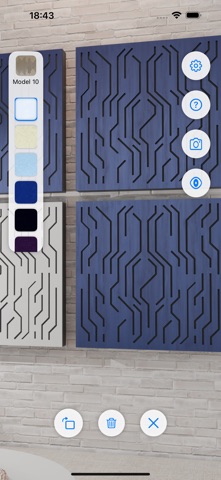
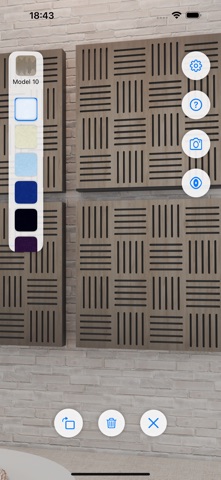
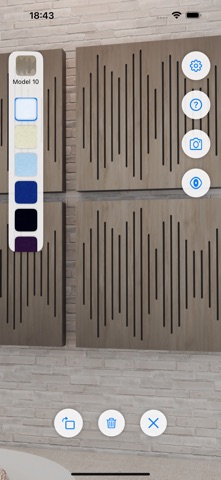

Description by Artisans 3D EOOD Written by the developer, not by AppBrain. Click to read.
Visualize premium acoustic panels in your space – instantly.
With Artisans 3D Acoustics, you can preview our handcrafted sound panels in your home, office, studio, or podcast setup using AR.
Each panel combines high-performance acoustic foam with a Baltic birch wooden diffuser, stained and sealed with durable polyurethane - engineered for both form and function.
Key Features:
- Place life-sized panels on your walls using augmented reality
- Preview multiple finishes and styles
- Capture and share screenshots of your setup
- Designed to complement Tricoustix panel listings
- Whether you're designing a home studio or upgrading your workspace, see exactly how our panels will look before you buy.
How to Use Artisans 3D Acoustics
1. Launch the App & Scan Your Space
Move your device around to scan the floor and walls. Once blue (floor) and green (wall) anchor planes appear, you're ready to place panels.
2. Select & Place Panels
Tap the panel preview in the top left to choose a model. Then tap anywhere on a detected green wall plane to place it.
When a panel is selected:
- Tap the rotate icon to rotate it 90° clockwise.
- Use the colour picker below the panel selector to change its colour.
- Tap the trash icon to delete the panel.
- Tap the X icon to deselect it.
3. Toggle Anchor Visibility
Tap the eye icon to show or hide the green and blue anchor planes.
4. Capture a Screenshot (Optional)
Take a screenshot to save and share your room layout with panels in place.
Trouble Detecting Walls?
If the app isn't detecting your walls properly, it may be due to smooth, plain surfaces that lack texture or depth.
To improve AR tracking, place a few sticky notes or paper markers on the wall. This helps your device detect surface geometry more accurately.
Safety and technology
Found in the app by AppBrain- Price
- Free
- App size
- 12.7 MB
- Content rating
- Everyone
Technologies used by Artisans 3D Acoustics
Releases
Updates seen on the App Store- Version
- 3.0
- Launched
- June 2025
No changelog data
Alternatives
Similar apps and more from Artisans 3D EOODMore from Artisans 3D EOOD


Rankings
App Store top chartsApp Store Rankings for Artisans 3D Acoustics
About the app and developer
About Artisans 3D Acoustics
Artisans 3D Acoustics is a lifestyle app developed by Artisans 3D EOOD.
User Ratings
The app has no ratings yet.
App Information
Artisans 3D Acoustics is freely available from the App Store. The app size is 12.67 MB. The latest version available is 3.0. The last update was on December 16, 2025.
Technical Requirements
The app has a content rating of Everyone. The app has been available on the App Store since June 2025.
Developer information for Artisans 3D EOOD
Address:
Frequently asked questions about Artisans 3D Acoustics
Is Artisans 3D Acoustics free?
Yes. Artisans 3D Acoustics is free on the App Store.
Is Artisans 3D Acoustics still available?
Yes. Artisans 3D Acoustics is on the App Store, and the last update we saw was on December 16, 2025.
How large is Artisans 3D Acoustics?
Artisans 3D Acoustics is 12.67 MB.
Is Artisans 3D Acoustics suitable for children?
App Store rates the content of Artisans 3D Acoustics as suitable for everyone.
Who made Artisans 3D Acoustics?
Artisans 3D Acoustics was developed by Artisans 3D EOOD. It is listed in the lifestyle category on the App Store.