Download Android Apps and Games
AppBrain
  • Apps
  • Apps being viewed right now Trending apps today Most popular apps All-time most downloaded apps Top rated apps
  • Intelligence ▾
    Intelligence overview → Track any Android app or your whole market
    Track & analyze
    Keyword Tracker & OptimizerTrack & improve Play rankings App Performance ReportOne-off PDF for any app StatisticsFree Android & Play market stats
    Promote your app
    Featured Apps App Links
  • Intelligence
  • Pricing
  • Dashboard
  • Sign up
  • Log in
Last updated on: 2026-06-26
App Store Apps > Games > Arcade Games > ArtLoop: How to Draw Together
ArtLoop: How to Draw Together icon

ArtLoop: How to Draw Together

1.9.18
Anhelina Denezhko
4.70
14,075 reviews
Free

ArtLoop: How to Draw Together Screenshot 1 of 8
ArtLoop: How to Draw Together Screenshot 2 of 8
ArtLoop: How to Draw Together Screenshot 3 of 8
ArtLoop: How to Draw Together Screenshot 4 of 8
ArtLoop: How to Draw Together Screenshot 5 of 8
ArtLoop: How to Draw Together Screenshot 6 of 8
ArtLoop: How to Draw Together Screenshot 7 of 8
ArtLoop: How to Draw Together Screenshot 8 of 8
Download from the App Store Android version

About ArtLoop: How to Draw Together

ArtLoop: How to Draw Together is an overall app developed by Anhelina Denezhko.

How many times has ArtLoop: How to Draw Together been downloaded?

What is the rating of ArtLoop: How to Draw Together?

ArtLoop: How to Draw Together is rated 4.70 out of 5 stars, based on 14 thousand ratings.

Is ArtLoop: How to Draw Together free?

ArtLoop: How to Draw Together is free to download. The APK download size is 260.05 MB. The latest version available is 1.9.18. The last update was on June 22, 2026.

What are the requirements for ArtLoop: How to Draw Together?

The app has a content rating of Low Maturity. The app has been available on Google Play November 2024.

Description
Unlock Your Artistic Potential with Our Drawing App!

Discover ArtLoop – a playful drawing game where learning to draw happens through fun, challenges and experiments, not boring lessons. From calm step-by-step tutorials to fast multiplayer battles, ArtLoop turns your screen into a creative playground for any skill level.

Draw in Different Styles:

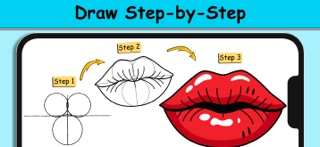
Follow clear, step-by-step tutorials to draw characters, objects, food, animals and more.

Explore a wide variety of styles: from simple doodles and cute cartoons to more detailed illustrations.

Practice at your own pace – repeat drawings, try new colors and build your own gallery of finished artworks.

Pixel Art & Neon Glow:

Pixel Art Mode – create retro-style pictures pixel by pixel, like a tiny digital mosaic.

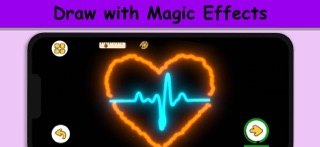
Neon & Glow Drawings – draw with bright glowing lines on a dark canvas.

Experiment with different looks and turn simple sketches into bold, stylized art.

Dynamic Drawing Modes:

Use dynamic brushes with animated strokes that wobble, pulse and move, making your lines feel alive.

Combine classic drawing with playful effects so every sketch feels fresh and satisfying.

Draw Rush – Speed & Precision:

In Draw Rush, you copy simple shapes and lines as quickly and accurately as you can.

Race against the timer, focus on precision and try to beat your own score in short, intense rounds.

Great for quick drawing challenges when you only have a few minutes.

Art Battle:

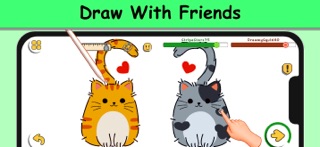
Join Art Battle and compete in drawing challenges with friends!

It’s all about fun, creativity and friendly competition – not about being “perfect”.

Fun Challenges, Not Stressful Lessons:

No strict rules, no pressure – just a safe space to experiment and enjoy drawing.

No prior art skills needed: simple guidance helps you start, and varied modes keep you motivated.

User-Friendly Interface:

Enjoy a clean, intuitive interface that keeps the focus on your drawing, not on menus.

The drawing pad is comfortable for both finger and stylus, so you can relax and focus on your lines, colors and ideas.

Paint Offline

Keep drawing even when you’re offline.

Most tutorials and practice modes work without an internet connection, so you can sketch on a trip, in a café or anywhere else.

For Anyone Who Loves to Draw (or Wants to Start)

Whether you’re:

a beginner taking your first steps in digital drawing,

a casual doodler who wants fun challenges, or

a more experienced artist looking for new styles and modes to play with,

ArtLoop gives you a playful way to practice, experiment and grow your skills over time.

Jump into ArtLoop today and turn everyday doodles into a fun drawing habit!

Privacy Policy: https://artloop.netlify.app/privacy-policy
Terms of Use (EULA): https://artloop.netlify.app/terms-of-use
Show more Show less

More data about ArtLoop: How to Draw Together

Price Free to download
Rating 4.70 based on 14 thousand ratings
Ranking Highly ranked
Version 1.9.18
App download size 260.0 MB
Maturity Low Maturity

More from Anhelina Denezhko

ArtLoop AR: Step By Step icon ArtLoop AR: Step By Step
Anhelina Denezhko
0.0
Free

Changelog of ArtLoop: How to Draw Together

No changelog data

Developer information for Anhelina Denezhko

Anhelina Denezhko

Address:

Share ArtLoop: How to Draw Together

Comments on ArtLoop: How to Draw Together for iOS

We don't have enough comments to show example comments. Please check back later.

App Store Rankings for ArtLoop: How to Draw Together

Top rankings

Rank Country Category List
40 Saudi Arabia Board Games Top Free
63 Poland Board Games Top Free
76 Russia Board Games Top Free
95 Mexico Board Games Top Free

Ranking history in Saudi Arabia

AppBrain offers valuable information about your app and those of your competitors. Join AppBrain for free and claim this app to view more ranking data, view history etc.
I'm the developer of this app

Technologies used by ArtLoop: How to Draw Together

Top new apps Apps other people are watching Today's trending apps Popular Overall Apps on sale
More hot apps 🔥

Back to top
AppBrain Intelligence premium content

Subscribe now to get full and unlimited access to AppBrain Intelligence. You'll have access to:

  • App Intelligence dashboard (performance timeline, competitor comparison, country rankings, insight cards)
  • Detailed ranking data per app
  • Full timeline per developer
  • Device market shares data per country
1 Month

$75/mo
(billed every month)

SAVE 0%
Subscribe
3 Months

$65/mo
($195 billed every 3 months)

SAVE 13%
Subscribe
1 Year

$57.50/mo
($690 billed every year)

SAVE 23%
Subscribe
Each subscription will automatically renew 3 days before the expiration date for the same time period. Subscriptions can be cancelled at any time before the renewal.

AppBrain is a directory focused on discovering great apps and games. We give statistics, rankings and search options that Google Play and the App Store don't have. All trademarks are owned by their respective owners. AppBrain doesn't offer APKs or binaries, and always lets users install the official version from Google Play or the App Store.

More apps

  • Top Android apps being viewed
  • Crystal TV+
  • myJSW Android App
  • View String Art Maker Pro

Android Statistics

  • Android statistics
  • Google Play Developer stats
  • Trending Android Apps
  • Top popular Apps
  • Buy the best Android phone

About AppBrain

  • Contact
  • Privacy
  • Documentation
  • DMCA takedowns
  • Articles
  • Blog
  • Free webpage for your Android app
© 2010-2026 - AppBrain