Download Android Apps and Games
AppBrain
  • Apps
  • Apps being viewed right now Trending apps today Most popular apps All-time most downloaded apps Top rated apps
  • Intelligence ▾
    Intelligence overview → Track any Android app or your whole market
    Track & analyze
    Keyword Tracker & OptimizerTrack & improve Play rankings App Performance ReportOne-off PDF for any app StatisticsFree Android & Play market stats
    Promote your app
    Featured Apps App Links
  • Intelligence
  • Pricing
  • Dashboard
  • Sign up
  • Log in
Last updated on: 2026-08-19
App Store Apps > Graphics & Design > ArtSync: AR Drawing Projector
ArtSync: AR Drawing Projector icon

ArtSync: AR Drawing Projector

2.0
Radun Cicen
2.00
2 reviews
Free

ArtSync: AR Drawing Projector Screenshot 1 of 6
ArtSync: AR Drawing Projector Screenshot 2 of 6
ArtSync: AR Drawing Projector Screenshot 3 of 6
ArtSync: AR Drawing Projector Screenshot 4 of 6
ArtSync: AR Drawing Projector Screenshot 5 of 6
ArtSync: AR Drawing Projector Screenshot 6 of 6
2.00 · 2 reviews
Download from the App Store

About ArtSync: AR Drawing Projector

ArtSync: AR Drawing Projector is an overall app developed by Radun Cicen.

Download Statistics

User Ratings

ArtSync: AR Drawing Projector is rated 2.00 out of 5 stars. The rating is based on 2 ratings.

App Information

ArtSync: AR Drawing Projector is FREE to download. The APK download size is 179.97 MB. The latest version available is 2.0. The last update was on August 9, 2026.

Technical Requirements

The app has a content rating of Everyone. The app has been available on Google Play November 2023.

Description
Turn any photo into a guide you can trace on paper, canvas, or a wall.

ArtSync brings your reference image and real drawing surface together. Import an image, choose the setup that fits your project, align it precisely, and create at your own pace—whether you are practicing a sketch, painting on canvas, preparing a stencil, lettering a sign, or planning a mural.

FIVE WAYS TO TRACE

• AR Style
Lock your reference to a real drawing surface and keep it aligned as you move your device.

• Normal Style
Follow your reference over the live camera view for a fast, familiar tracing setup.

• Quick Anchor
Pin your artwork to a surface with minimal setup and start tracing sooner.

• Light Table
Place paper over your device’s screen and trace the illuminated reference beneath it.

• Remote Canvas
Pair two devices for larger canvases and walls or just for ease of viewing experience. Use one as a fixed camera host and the other to view the live feed, position your reference, and control your tools while you work.

TOOLS THAT KEEP YOU IN FLOW

• Import and trace your own photos and artwork
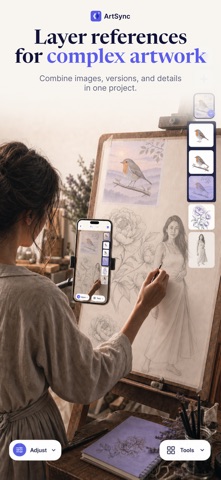
• Build compositions with multiple layers and sublayers
• Move, scale, rotate, and fine-tune references with precision
• Adjust opacity and align artwork using an interactive grid
• Use Strobe Comparison to alternate your reference on and off, making it easy to compare your progress without stopping
• Undo and redo changes without interrupting your process
• Record high-quality video at 30 or 60 FPS, or capture your process as a timelapse
• Adjust recording quality, speed, and timelapse settings to fit your workflow
• Save, organize, favorite, and reopen your projects
• Follow clear onboarding and tutorials whenever you need guidance

MADE FOR YOUR NEXT IDEA

Use ArtSync to learn and practice drawing, improve proportions, trace portraits, paint on canvas, create murals, prepare stencils, or transfer lettering and logos.

Capture the process as a satisfying high-quality video or timelapse, then save it or share it on social media.

Choose your reference. Find your setup. Start creating.

Begin creating with ArtSync for free. When you’re ready to go further, ArtSync Pro unlocks advanced tracing modes and the complete creative toolkit.
Show more Show less

More data about ArtSync: AR Drawing Projector

Price Free to download
Rating 2.00 based on 2 ratings
Ranking Not ranked
Version 2.0
App download size 180.0 MB
Suitable for Everyone

Changelog of ArtSync: AR Drawing Projector

No changelog data

Developer information for Radun Cicen

Radun Cicen

Address:

Share ArtSync: AR Drawing Projector

Comments on ArtSync: AR Drawing Projector for iOS

We don't have enough comments to show example comments. Please check back later.

App Store Rankings for ArtSync: AR Drawing Projector

This app is not ranked

Technologies used by ArtSync: AR Drawing Projector

Today's trending apps Top new apps Popular Overall Apps other people are watching Apps on sale
More hot apps 🔥

Back to top
AppBrain Intelligence premium content

Subscribe now to get full and unlimited access to AppBrain Intelligence. You'll have access to:

  • App Intelligence dashboard (performance timeline, competitor comparison, country rankings, insight cards)
  • Detailed ranking data per app
  • Full timeline per developer
  • Device market shares data per country
  • Unlimited keyword tracking
1 Month

$75/mo
(billed every month)

SAVE 0%
Subscribe
3 Months

$65/mo
($195 billed every 3 months)

SAVE 13%
Subscribe
1 Year

$57.50/mo
($690 billed every year)

SAVE 23%
Subscribe
Each subscription will automatically renew 3 days before the expiration date for the same time period. Subscriptions can be cancelled at any time before the renewal.

AppBrain is a directory focused on discovering great apps and games. We give statistics, rankings and search options that Google Play and the App Store don't have. All trademarks are owned by their respective owners. AppBrain doesn't offer APKs or binaries, and always lets users install the official version from Google Play or the App Store.

More apps

  • Top Android apps being viewed
  • sPlayer
  • View AirCrack
  • View Age of Legends: Origin

Android Statistics

  • Android statistics
  • Google Play Developer stats
  • Trending Android Apps
  • Top popular Apps
  • Buy the best Android phone

About AppBrain

  • Contact
  • Privacy
  • Documentation
  • DMCA takedowns
  • Articles
  • Blog
  • Android App Marketing: Learn how to better market your Android app
© 2010-2026 - AppBrain